Vicigeek guides for learning VICIdial
Browse+
VICIdial for beginners
Learn VICIdial.One screen at a time.
Start with the Admin and Agent screens. Follow a complete practice example with clear steps, actual screenshots and a check at the end of each lesson.
Follow the beginner pathExplore by topic
All guidesEvery guide in one place123 guidesVICIdial & agentsVICIdial agents, campaigns and calling lists31 guidesPhone system (Asterisk)The phone system underneath VICIdial9 guidesCarriers & SIPPhone carriers and the SIP connection they use17 guidesRunning your systemLooking after your server safely44 guidesReports & resultsUnderstanding calls, activity and results7 guidesAutomate tasksConnecting VICIdial to other tools safely15 guides
New to VICIdial?
Start with one practice campaign.
- Learn what the agent, phone, campaign and list each do.
- Set up the example in your prepared practice lab.
- Make an internal test call and find its saved result.
Start learning here
Guides for
every step
123 guides
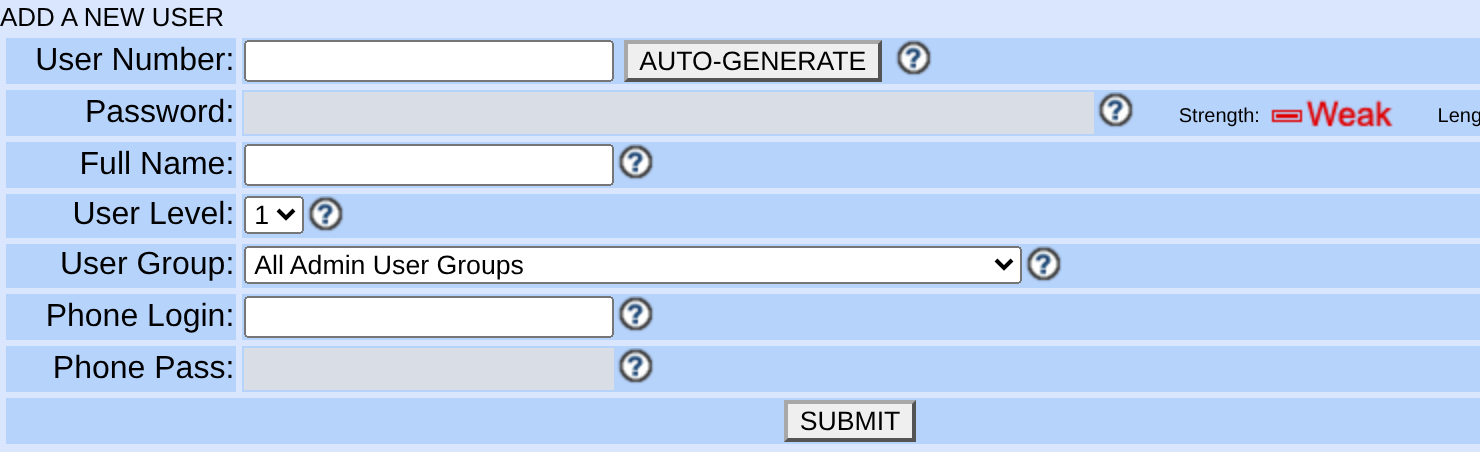
Pick a guide and learn at your pace.58Running your systemAppliance installation pathViciBox 12 installation: from bare metal to first dialBoot the correct ViciBox 12 ISO, complete the Phase 1 base operating system install and root wizard, run Phase 2 with vicibox-express (or vicibox-install for a cluster), confirm Asterisk and the web stack actually came up, then change the default 6666 password before the box is reachable from the internet.34Running your systemFirst loginYour first VICIdial login: find the Admin URL, Agent URL and default passwordA guided first login for a fresh VICIdial install: the documented fresh-install admin login, the separate Admin and Agent addresses and logins, a tour of the Users, User Groups, Campaigns, Lists, Scripts, Phones, Carriers, and Reports menus, the phone-versus-user distinction that confuses every newcomer, and how to change the default password safely.35Carriers & SIPCarrier setupConnect your first SIP carrier so calls can leave the serverGather the right facts from your provider, create one database-managed carrier in Admin, verify PJSIP registration, and place one test call, all without hand-editing a single Asterisk file.36VICIdial & agentsCampaign setupCreate your first VICIdial campaign, list, user group and agentBuild the five records a working VICIdial campaign needs, in the order that actually works: a user group, an agent login, a phone (station) record, a list, and the campaign that switches everything on, safely inactive until your first manual test call.37VICIdial & agentsBeginner pathLoad leads into VICIdial from a CSV fileA safe, source-verified walkthrough of getting contacts into VICIdial: what a lead record and its key fields really are, how to build and load a CSV file through the Admin screen, what duplicate checking does, how to verify a load and clean up a bad one, and how to load leads with the add_lead API. The example numbers are safe to dial only when the complete dialed strings match routes verified to stay inside the test system.38VICIdial & agentsFirst-call walkthroughPlace your first call as a VICIdial agentLog in to the Agent screen, get real audio flowing in both directions, place one manual call to a safe internal test destination, save a disposition, then pause and log out the same way you will every day after.39VICIdial & agentsPacing and dial levelVICIdial dialing modes and pacing: manual, ratio and adaptiveHow VICIdial's MANUAL, RATIO, and adaptive dial methods work, what the auto dial level number actually controls, and how to raise pacing in small measured steps without turning your campaign into a wave of dropped calls.13Automate tasksAgent APIThe VICIdial Agent API with real code: curl, JavaScript and agc/api.phpA practical, code-heavy walkthrough of the VICIdial Agent API at agc/api.php: how to authenticate, the shape of a request and response, and runnable curl and JavaScript for pause, resume, dial, hangup, disposition, and transfer.18Automate tasksVICIdial APIsThe VICIdial Non-Agent API, with real codeA hands-on tour of `/vicidial/non_agent_api.php`, cited against VICIdial's own shipped docs: authentication, per-function permission levels, and working curl and JavaScript calls covering all 59 functions across leads, lists, campaigns, users, DIDs, phones, recordings, monitoring, housekeeping, and reports.40VICIdial & agentsInbound RoutingMake a phone number ring an agent: inbound DIDs and in-groupsThe exact VICIdial chain, field by field: create the in-group, point the DID at it, then grant agents access to it — the step almost everyone skips, and the reason inbound calls never reach a live person.41VICIdial & agentsInbound routingBuild a VICIdial IVR call menu: press 1 for sales, press 2 for supportSet up a VICIdial call menu that greets callers, routes each digit to the right in-group, and never leaves anyone in dead air on a timeout or a wrong key.FB2VICIdial & agentsAgent login · phone credentialsVICIdial says phone login is not active: check the right account safelyCheck the station login, password and active flag for a phone-login rejection. The user record may also hold optional autofill values; compare them only when autofill is used.FB1Phone system (Asterisk)Recording fault · channel cleanupVICIdial recording will not stop: investigate channel buildup safelyA VICIdial recording runs on one leg inside the agent's own conference and only stops when that leg is actually hung up. After a transfer or a three-way call, that leg can be left behind; check the shipped Agent API status first, then confirm and stop the specific leg before assuming anything else is wrong.FB5Carriers & SIPCarrier quality · call outcomesDead air and fake answers: collect carrier evidence before changing AMDVICIdial logs a call as picked up the instant a carrier signals Answer, before an agent is ever involved, and AMD listens against that same window. A carrier that signals Answer early starts the clock on nothing; separate that from list quality and genuine AMD misclassification before changing any AMD setting.83Running your systemStage 4 · Stock ViciBox labCreate a read-only database account for safe VICIdial queriesCreate a SELECT-only MariaDB account and a locked-down credentials file on your ViciBox lab, so every later SQL example in this library — and every query you write yourself — can query VICIdial data with database-enforced read-only permissions.80Running your systemStage 4 · Stock ViciBox labWhat stock ViciBox is: the appliance, phases and safe lab boundaryUnderstand what the stock ViciBox appliance changes, what Phase 1 and Phase 2 do, why this curriculum's install path stops short of a production recommendation, and what your lab VM needs before you boot the ISO.B01Running your systemBeginner course · Lesson 1What VICIdial doesUnderstand how an administrator prepares calling work and an agent uses VICIdial to call a contact and record the result.B02Running your systemBeginner course · Lesson 2What user, phone, campaign, list and lead meanLearn five VICIdial building blocks using one small practice campaign, and distinguish an agent's account from the station used for audio.B03Running your systemBeginner course · Lesson 3Check your practice systemFind your Admin and Agent addresses, check the required browser-phone records and prepare the internal test number.B04Running your systemBeginner course · Lesson 4Open Admin and find your waySign in to the practice Admin interface and find the menus used to create your lab records.B05Running your systemBeginner course · Lesson 5Create a user group and agentMake a small lab group and a level-one agent, then check the saved records before adding a phone.B06Carriers & SIPBeginner course · Lesson 6Set up the agent phoneCreate station 8001, apply the named PJSIP webphone settings and keep the station password separate from the agent password.B07VICIdial & agentsBeginner course · Lesson 7Create a manual campaignCreate LAB01, configure a manual-only lab route, and grant the lab group access to it.B08VICIdial & agentsBeginner course · Lesson 8Create your practice listAttach an empty practice list to LAB01 and set its manual-dial default after the list exists.B09VICIdial & agentsBeginner course · Lesson 9Load three practice leadsPut three fictional records into the dedicated lab list and verify each one before dialing.B10Running your systemBeginner course · Lesson 10Log in as an agent and check your audioUse the phone and agent logins in order, then prepare the lab webphone while paused.B11Running your systemBeginner course · Lesson 11Make your first practice callCall the lab's internal Echo destination from one eligible practice lead and save the outcome.B12Reports & resultsBeginner course · Lesson 12Find your practice call in User StatsOpen the agent’s report and match the call’s date, campaign, lead and saved status.LABPhone system (Asterisk)Beginner course · Lab preparationPrepare the internal practice destinationAdd internal number 19001001 in System Settings, then inspect its generated Asterisk route before the practice call.F01Running your systemStart here · foundationsLinux terminal basics: safely move around a serverGet a disposable lab VM, then learn the shell prompt, paths, commands and safe inspection before you ever touch a VICIdial host.F02Running your systemStart here · foundationsLinux files and text: create, read and search safelyUnderstand files, directories and text streams, then practice on a file you create and a real file that already exists, before reading configuration or call logs.F03Running your systemStart here · foundationsLinux users and permissions: read access before changing itLearn ownership, rwx permissions and sudo boundaries by contrasting a file you create with two real system files, without weakening a server.F04Running your systemStart here · foundationsLinux packages: apt, zypper and safe updatesDetect which package manager a host actually has, then inspect Debian/Ubuntu and openSUSE packages safely before installing telephony software.F05Running your systemStart here · foundationsLinux services and logs: observe systemd before restartingUse systemctl and journalctl to collect evidence without masking a telephony fault.F06Running your systemStart here · foundationsSSH basics: connect and verify a server identityMake an SSH connection safely, understand host keys and avoid accepting an unexpected server.F07Carriers & SIPStart here · foundationsNetworking basics for VoIP: IP, DNS, ports and NATTrace a connection from a hostname to an address and port before diagnosing SIP or browser audio.F08Carriers & SIPStart here · foundationsVoIP and telephony basics: how a call path fits togetherLearn the plain-language pieces of a phone call before configuring a carrier, DID or campaign.F09Carriers & SIPStart here · foundationsSIP basics for beginners: registration, calls and responsesRead a basic SIP conversation and inspect the local service-name reference before checking the ports configured in Asterisk.F10VICIdial & agentsStart here · foundationsVICIdial and VoIP glossary for complete beginnersA practical glossary for the lead-to-carrier call path — hopper, trunk, DID and disposition — with a pointer to the VICIdial terminology lesson for admin-screen object names.74Running your systemStage 4 · Stock ViciBox labInside a running ViciBox lab: processes, screens and AsteriskTour a running ViciBox Express lab from the command line: find the screen sessions astguiclient depends on, ask Asterisk directly about its own health, and confirm the supporting services are active — all before you trust a browser login alone.75Running your systemStage 4 · Stock ViciBox labInside a running ViciBox lab: the VICIdial filesystem mapTour the VICIdial filesystem map on a running ViciBox lab: where the Perl scripts live, where their logs land, which configuration keys are safe to read, and why the completed-recordings folder is looked at but never listed in full.76Running your systemStage 3 · Debian-family pathUbuntu and Debian basics before a VICIdial installRecognize a Debian-family host by its package tooling, and understand why this curriculum's hands-on lab path is ViciBox — an openSUSE-based appliance — rather than a from-scratch Ubuntu or Debian install.77Running your systemStage 3 · Generic openSUSEGeneric openSUSE basics for VICIdial learners: zypper, firewalld and servicesLearn generic openSUSE administration — zypper and firewalld — without pretending that a plain openSUSE host is a stock ViciBox installation.78Running your systemStage 3 · Platform choiceViciBox vs generic openSUSE vs Ubuntu/Debian for VICIdial beginnersCompare three starting points and land on one answer for this curriculum: the stock ViciBox appliance is the lab path, while generic openSUSE and Ubuntu/Debian are explicitly not — because ViciBox couples the base system to a working telephony stack that this library actually walks you through.79Running your systemStage 3 · Version statusViciBox version status: why ViciBox 12 and ViciBox 13 are lab-only lessonsA dated safety boundary for ViciBox learners: ViciBox 12 is based on Leap 15.6, now confirmed end of life, and ViciBox 13 remains beta. Treat both as isolated labs, not production defaults, until the vendor's own status changes.81Running your systemStage 4 · Stock ViciBox labViciBox 12 Phase 1 lab checklist: ISO boot, target disk and first loginA safety-first checklist for observing ViciBox 12 Phase 1 in a disposable VM: the confirmation dialog before disk destruction, the first-root-login wizard, its own password shortcut you should not take, and how to tell Phase 1 actually finished.82Phone system (Asterisk)Stage 4 · Stock ViciBox labViciBox Express lab: Phase 2 and first safe verificationUnderstand the single-server ViciBox Express lab role, then verify it from the command line: the astguiclient screen sessions, whether PJSIP is actually alive, and the default Admin login you must change before you do anything else.84VICIdial & agentsStage 5 · VICIdial foundationsVICIdial terminology for complete beginners: users, phones, campaigns and leadsLearn the VICIdial admin-UI object names — user, phone, agent, campaign, list, lead, carrier and recording — and confirm the Admin endpoint exists on your lab, before you rely on the separate call-path glossary for hopper, disposition and trunk vocabulary.85VICIdial & agentsStage 5 · VICIdial foundationsThe beginner VICIdial admin pathway: from first login to first reportSee the safe order of VICIdial administration — secure login, user and station, campaign, synthetic list, agent readiness, then reporting — and read the campaign schema taking shape in the database with the read-only account from the previous stage.86Carriers & SIPStage 6 · VoIP foundationsVoIP and SIP recap before your first VICIdial carrierA recap, not a re-teaching: confirm — on your own build — which SIP transport and port Asterisk is actually using before you touch a real carrier or a firewall rule, since this curriculum's earlier VoIP and SIP lessons already define the vocabulary.96Automate tasksMessaging integrationWhatsApp with VICIdial: a safe, opt-in integration planConnect a consented WhatsApp conversation to the right VICIdial lead without pretending that a phone dialer is a WhatsApp inbox.97Automate tasksFollow-up workflowSend an email after a VICIdial call without creating an open relayDesign a consented, auditable post-call email handoff that starts with VICIdial's own Dispo Call URL and keeps mail credentials and customer data protected.98VICIdial & agentsAgent workflowVICIdial agent and supervisor chat alerts: enable them safelyUse VICIdial’s built-in web chat for a small, permission-tested agent group before broadcasts or customer chat go live.AI01Automate tasksAI and call recordingsAdd AI transcription to VICIdial safely: a test-only call-recording workflowTurn one consented lab recording into a transcript without routing live calls through an AI service.AI02Reports & resultsAI-assisted quality reviewAnalyze VICIdial calls with AI safely: build a human-reviewed sales and QA workflowTurn a small, consented test set into reviewable call notes and QA observations without letting an AI score decide outcomes.CRM01Automate tasksCRM integrationConnect VICIdial to Vtiger or Salesforce safely: a test-only CRM sync patternStart with VICIdial's own CRM Popup, Web Form and Call URL fields, then build a small, traceable test sync for whatever they can't reach.FO1VICIdial & agentsAgent workflow · callbacksVICIdial agent-only callbacks: keep follow-ups with the right agentSet up and test agent-owned follow-ups without accidentally turning them into shared campaign calls.FO2VICIdial & agentsCampaign operations · hopperVICIdial hopper readiness: check work before forcing a resetLearn why calls may not start immediately and how to prove hopper readiness in a safe test campaign.FO3Reports & resultsReports · agent activityVICIdial agent KPI reporting: read activity fairly before judging performanceChoose the right VICIdial report, understand time differences, and build a fair test KPI view.FO4Phone system (Asterisk)Agent audio · safe troubleshootingVICIdial agent alert sounds and drop-call audio: test before changing promptsIdentify which part of the call path made a sound, then test one approved audio change without risking live callers.FB3Running your systemCall capacity · safe triageVICIdial overlapping calls: triage overload before changing dial settingsPredictive pacing counts agents it believes are free the instant it decides to dial; when that headcount is stale, the surplus connects arrive with nobody available. Measure the pacing setting, live agent state, and the PDROP-versus-DROP split before touching anything.FB4Carriers & SIPSIP security · incident evidenceSIP attack traffic reaches Asterisk: verify the boundary before blocking moreA single blocked IP only ever answers the address a rotating source last used, and this build runs two independent SIP listeners at once. Confirm both stacks and the real firewalld state before deciding a rule has failed.42Running your systemInbound queue tuningTune a VICIdial inbound queue: hold music, wait time, overflow and after hoursA default VICIdial in-group plays no greeting, generic hold music, and treats every hour as business hours. Here is every field that fixes that, with its real default and what to set instead.43VICIdial & agentsInbound + Outbound, One AgentBlended VICIdial campaigns: the same agents inbound and outboundTurn your outbound campaign into a VICIdial closer campaign so agents already logged in for auto-dial calls also take queued in-group calls in the same session — the campaign and user settings that grant in-group access, how registration and the CLOSER status actually work, and the pacing trade-off that slows inbound the moment outbound runs hot.49Running your systemAdmin training pathThe complete VICIdial admin training guide: campaigns, leads and routingVICIdial's Admin panel is a set of objects, not a wizard. Learn the dependency order those objects must be created in, then follow a six-phase training path — orientation, identity and telephony, campaigns, lead lists, inbound routing, and reports — each phase naming the exact guide on this site that teaches it, ending with the four reports a manager should actually read every week.44VICIdial & agentsAgent trainingVICIdial agent training playbook: calls, transfers and callbacksTrain a new VICIdial agent through a full shift: the two-step login, reading the one-second-polling screen, Ready versus Paused with pause codes, taking a predictive call that is already live, manual dialing, saving a disposition, scheduling a callback, blind and warm transfer, a three-way conference, and logging out clean.45Carriers & SIPCarrier redundancyConfigure multi-carrier redundancy in VICIdial before downtime forces you toAdd a second carrier that stays active next to your first, learn exactly how a campaign's dial prefix chooses between them, detect a dead carrier from the same Asterisk and VICIdial logs you already have, and fail traffic over and back without waiting on a config rebuild, because VICIdial will not do any of this for you and every minute of dialer downtime is agents sitting idle.48Carriers & SIPCarrier cost controlVICIdial least-cost routing: cut carrier costs with dial prefixes, not a rate engineVICIdial has no built-in rate-table engine that shops carriers for you: least-cost routing here means a campaign's dial prefix, a carrier's stored dialplan entry, and Asterisk's own pattern matching, ordered deliberately and measured with real call data instead of a rate sheet.46Running your systemScaling architectureScaling VICIdial: designing a multi-server cluster for 500+ agentsSplit VICIdial's web, database, dialer/telephony, and archive/reporting roles onto separate servers, understand why the database usually hurts first, and learn what a report slave and cluster-wide shared state actually require before you promise a 500-agent number.47Phone system (Asterisk)Media path diagnosisTroubleshooting choppy audio in Asterisk: timing, jitter and one-way callsIsolate choppy or one-way VICIdial audio one layer at a time - browser and headset, NAT, the RTP port range, codec and transcoding, server CPU and timing, and carrier packet loss - using the read-only commands that actually tell them apart.50Carriers & SIPOutbound caller ID reputationStopping “Scam Likely” labels on VICIdial outbound callsCaller authentication and displayed spam labels are separate. Inventory authorized caller IDs, ask the carrier how it signs calls, and check labels with receiving providers; no setting guarantees label removal.51VICIdial & agentsSuppression list configurationSet up DNC scrubbing in VICIdial: internal lists and DNC.comLoad and scope VICIdial's internal DNC list, wire up the optional DNC.com batch and inbound scrubs, and prove a specific number is actually suppressed before you trust a report.52Running your systemServer lockdown checklistVICIdial server security: plan SSH, firewall and access checksPlan SSH, firewall, login-protection and access checks for the installed system. The examples require version-specific adaptation and do not constitute a complete deployable security configuration.53VICIdial & agentsConnection rate optimizationOptimize VICIdial dial ratios and AMD for better connection ratesCompare campaign status distributions and pacing settings over consistent periods, then use labeled test calls to investigate AMD errors. A status count alone cannot establish why a person did or did not connect.54Automate tasksSMS and OmnichannelPlan an SMS integration for VICIdialExplore a possible SMS integration using Call URLs, a separate relay and the Non-Agent API. The worksheet describes required controls; it is not a working messaging service.55Carriers & SIPTwilio carrier setupConfigure Twilio Elastic SIP Trunking with VICIdialCreate an Elastic SIP Trunk in the Twilio console, configure Termination with a Credential List and Origination with your server's own address, add Twilio as a database-managed VICIdial carrier, open exactly the right ports on the server and the cloud firewall, and prove both directions with one test call before troubleshooting the three failures that cause nearly every problem.56Carriers & SIPCarrier comparison frameworkTelnyx vs Twilio for high-volume outbound dialingCompare Telnyx and Twilio by authentication model, signalling reach, transports, codecs, SRTP ciphers, and media port ranges from each vendor's own documentation, then test both against your traffic and measure the result from vicidial_carrier_log yourself.57Carriers & SIPElastic trunk capacityElastic SIP trunking for predictive dialers: why your own media path is the real ceilingElastic SIP trunking can scale without a fixed provisioned channel block, but account limits and local media capacity still matter. Use dial level as a planning scenario and measure actual call legs and RTP allocation.59Running your systemPlatform decisionInstalling VICIdial on AlmaLinux 9 or Rocky Linux 9What genuinely differs between the RHEL family and the Debian family for a VICIdial install, how SELinux, PHP and package sources affect the decision, where to inspect community-maintained installers, and a straight decision rule for choosing between ViciBox's lab-only appliance path, a from-scratch RHEL-family build, or the scratch-install instructions posted on the VICIdial forum for the Debian family.60Running your systemPlatform migrationMigrating VICIdial off CentOS 7: what to carry, what to verify, before cutoverCentOS Linux 7 stopped receiving updates in mid-2024. Pick a replacement target, carry the database, recordings, configuration, cron and carrier setup across deliberately, and verify the new server before any carrier trunk points at it.61VICIdial & agentsLocal-time and territory controlsGeo-gate a VICIdial campaign: local call time, state rules and ZIP validationStop calling a number in the wrong place or at the wrong local hour by validating postal code and state at load time, then reading gmt_offset_now, local_call_time and the state and holiday tables that actually enforce the window.63VICIdial & agentsInbound revenueRunning pay-per-call campaigns on VICIdial: DID attribution and proofPay-per-call only pays out on a call you can prove: which source sent it, how long it lasted, and whether it qualified. This walks through giving every source its own call tracking DID, routing each into its own in-group, and joining vicidial_did_log against vicidial_closer_log so a finished call arrives already attributed, timed, dispositioned, and ready to reconcile against a buyer's own count.62Automate tasksCRM IntegrationIntegrating VICIdial with Salesforce: no native connector, just extension pointsVICIdial has no built-in Salesforce connector: there is no app to install and no setting that turns it on. This guide starts with the three agent-facing mechanisms it already ships — Web Form, CRM Popup, and Start Call URL — then shows the architecture you build beyond them: Call URLs and the Non-Agent API on the VICIdial side, the REST API and OAuth 2.0 on the Salesforce side, how to give a lead the same identity in both systems using vendor_lead_code and a Salesforce external ID field, and why every write has to be idempotent, because a call event can duplicate, arrive late, or never arrive at all.64VICIdial & agentsDial method decisionPredictive vs power dialing: which mode fits your teamVICIdial's dial_method column has exactly ten real values, not marketing labels. This decision framework maps manual, preview, power, and predictive dialing onto MANUAL, RATIO, and the ADAPT family, then narrows the choice by team size, call length, and list quality instead of by industry.65VICIdial & agentsSeat economicsFive9 vs VICIdial: compare current seat terms and operating costsCompare a current written Five9 quote with VICIdial hosting, telephony and operating costs. The pricing examples in this article are historical and must be rechecked.66VICIdial & agentsCost structure, not a verdictTalkdesk vs VICIdial: the true cost of self-hostingCompare a current Talkdesk quote with self-hosted VICIdial operating costs. Historical examples and scoped call-log queries need verification before budgeting.67Running your systemUnpublished pricingRingCX vs VICIdial: questions for a current quoteTwo RingCentral pages checked on August 5, 2026 returned 404; obtain current RingCX pricing and terms directly. This article treats that gap as the actual subject: what to ask a quote-only vendor in writing, what to pin down before signing, and how to measure your own VICIdial baseline against whatever number eventually arrives.68Running your systemCCaaS licensing comparisonGenesys Cloud CX vs VICIdial: the license model is the decisionCompare current Genesys Cloud CX licensing terms against VICIdial operating costs using a verified roster, session history and written quote.69Automate tasksPer-minute economicsAmazon Connect vs VICIdial: no seat license on either sideCompare current Amazon Connect usage and telephony quotes with VICIdial hosting, carrier and operating costs. Historical rates and log totals in this article require verification before budgeting.70VICIdial & agentsMarket mapCloud alternatives to VICIdial: three questions before any quoteCompare five cloud contact-center products with VICIdial using the same workflow, staffing and usage assumptions. Vendor prices and licensing details below were recorded in August 2026; ask for current written terms before budgeting.71Running your systemGrowth signals, measured not guessedWhen to outgrow VICIdial: fixable ceilings versus real reasons to leaveUse measurements of call behavior, capacity and operational responsibilities to compare improving the existing deployment with a managed service. Vendor terms are historical examples; obtain current quotes before deciding.72Running your systemSafety and complianceEmergency calling from a VICIdial agent desk: verify the route and locationA source search cannot establish how an installation handles emergency calls. Check the installed dialplan, carrier configuration and location handling with the provider and qualified counsel; use only the provider’s designated test procedure.73Automate tasksIntegration surface, not a top-10 rankingAI SDR tools next to a VICIdial call centerA dated comparison of eight AI sales-development products and possible VICIdial integration paths. No product-to-VICIdial connection was tested for this guide.11Running your systemCapacity planningVICIdial VPS requirements and cost: separate a lab floor from production capacityA purchasing framework that avoids turning a tiny successful lab into a misleading production quote.14Running your systemDecision frameworkManaged VICIdial hosting vs self-hosting: a decision framework, not a vendor rankingCompare accountability, controls and evidence without treating marketing claims as operational proof.15Running your systemRecovery designVICIdial backup and disaster recovery: design for a tested RTO/RPOA recovery architecture analysis that labels assumptions and drills rather than pretending an unobserved restore is a step-by-step guide.16Automate tasksAPI boundariesVICIdial Agent API vs Non-Agent API: choose the boundary before automatingUse the Agent API for a logged-in agent session and the Non-Agent API for administrative data and reporting work.17Automate tasksIntegration boundariesVICIdial webhooks and events: Call URLs, Agent Events Push, CORS, WebSockets and SSE boundariesBuild idempotent integrations around documented VICIdial extension points without calling browser events a transactional webhook stream.22Running your systemDelivery setupPlan a VICIdial sales-recording SFTP exportPlan a filtered recording export and verify authenticated SFTP delivery using synthetic data before scheduling.23Reports & resultsMonitoring setupHow to monitor VICIdial SFTP pushes with append-only JSONLMonitor an existing delivery job’s JSON Lines log while distinguishing local log evidence from confirmed receipt.24Running your systemMedia security designSecure VICIdial recordings with authenticated storage, encryption, and retentionProtect recordings as sensitive media: authenticate every access path, encrypt in transit and at rest, minimize metadata, and make deletion follow a reviewed retention workflow.25Phone system (Asterisk)Email setupHow to send VICIdial voicemail to email with Asterisk and PostfixConfigure the mailbox in VICIdial Admin, review Asterisk attachment settings, validate Postfix and its deliverability signals, and complete a synthetic end-to-end delivery test.26Automate tasksSchema decision frameworkVICIdial custom fields: dynamic tables, APIs and migration safetyTreat list-specific custom fields as runtime schema, then test imports, API writes, backups and list moves without guessing at a table definition.27Reports & resultsMetric definitionVICIdial callback counts: schedule state is not disposition historyReconcile callback dashboards by naming the population first: CALLBK outcomes, current scheduled work, agent-visible callbacks or archive history.28Running your systemDefense-in-depth analysisVICIdial hardening priorities and their limitsClose the exposed ports and anonymous SIP first, then stage 2FA and IP controls with tested recovery paths; no single setting makes a dialer secure or compliant.29VICIdial & agentsTechnical-control boundaryVICIdial DNC and STIR/SHAKEN: controls, limits and legal reviewSeparate internal filtering, batch external scrubbing and outbound identity signaling; all are technical controls that still need jurisdiction-specific legal and carrier review.30Carriers & SIPProcurement test planA 12-point SIP trunk evaluation matrix for VICIdialChoose a SIP provider only after a documented route test matrix; this is an evaluation framework, not a made-up winner or ranking.31Running your systemDeployment decisionVICIdial cloud vs dedicated server: a testable decision frameworkCompare operating responsibilities, isolation, recovery and route evidence—not assumed capacity, benchmark figures or pricing.32VICIdial & agentsOperator evaluationVICIdial alternatives: an operator test matrix, not a rankingEvaluate any contact-center alternative against the workflows operators must actually run, with migration, audit and rollback evidence.33Reports & resultsScope and audit disciplineVICIdial reporting and wallboards: scope, timezone and audit boundariesScope every report or wallboard to one decision, timezone and audit boundary before trusting a count, then decide when external analytics is justified.12Phone system (Asterisk)Asterisk Telephony EngineHow the Asterisk dialplan works in VICIdial: extensions.conf, contexts and Local channelsA concrete walkthrough of the VICIdial Asterisk dialplan, cited against VICIdial's own shipped docs: what extensions.conf and extensions-vicidial.conf actually are, how the vicidial-auto include chain dials out through a carrier, why Local channels sit between the agent and the trunk, and where AMD and call recording hook into the call.19Running your systemDatabase referenceThe VICIdial database structure explainedA field guide to VICIdial's core MySQL/MariaDB tables — vicidial_list, vicidial_lists, vicidial_campaigns, the call-log family, and the churning runtime tables — plus the safe way to query them without trusting a schema snapshot over your own installation.21VICIdial & agentsVICIdial FundamentalsVICIdial statuses and dispositions explainedA plain-English reference for VICIdial status codes and dispositions: what NEW, DROP, NA, CALLBK, SALE, DNC, and the machine-detection codes actually mean, how system statuses differ from custom per-campaign statuses, and how each one drives dialer behavior, reporting, and lead recycling.20Automate tasksWebhooks and CRM integrationVICIdial Call URLs: trigger an external system on call eventsHow VICIdial's built-in Call URL feature fires an HTTP request to your own endpoint on lifecycle events like start, disposition, and dead call, including the --A--field--B-- substitution syntax and why every receiver must be idempotent.01VICIdial & agentsProduction checklistVICIdial agent is live but not dialingMap the browser session, conference, live-agent row, campaign gate, list gate and hopper to the real VICIdial fields that control them before you touch a dial-level setting.02Phone system (Asterisk)Channel tracingFix NO DestChannel without guessingUnderstand the short Local-to-SIP mapping window that produces missing destination channels, then validate a narrow retry instead of masking it.03Running your systemDuplicate-safe operationsDesign a duplicate-safe callback migrationUse update_lead's own no_update dry run and documented fields, not a hand-built ledger, to plan phone normalization, identity resolution and verified callback writes.04Phone system (Asterisk)Recording integrityStop recordings merging across callsUse the recording_log identity VICIdial writes at start time, not a reused agent extension, to tell two back-to-back calls' recordings apart.05Carriers & SIPSBC architectureOpenSIPS in front of VICIdial: registration and dialog ownershipUnderstand registration ownership, topology hiding and dialog routing before placing an SBC in the VICIdial call path.06Carriers & SIPTroubleshootingWhen a carrier hostname suddenly stops resolvingRead the resolver directly on a ViciBox build where Asterisk is not a confined systemd service, then prove A, AAAA and SRV answers separately before treating a missing subscriber as a carrier outage.07Reports & resultsAccurate reportingMake agent time detail match realityCheck VICIdial's own agent_stats_export first, then clip visibility and status intervals to the agent login window so hidden time and later events do not inflate today's totals.08VICIdial & agentsAnswering-machine detectionTune AMD without burning good leadsMeasure real answer audio, confirm this build's own AMD and CPD campaign fields by name instead of assuming them, and change one threshold at a time.09Automate tasksIntegration patternsVICIdial API automation that does not hide failuresNeither API gives you an idempotency key or a request ID — build your own operation key, classify SUCCESS, ERROR and NOTICE separately, and verify writes outside the writer account.
No guides match that search. Try a simpler word, such as Linux, SIP or agents.