01 / 06
1. Establish the version boundary
Asterisk deprecated chan_sip in version 17 and removed it in version 21. Asterisk 21 and later therefore cannot use the standard chan_sip module. That upstream fact does not mean any particular VICIdial or ViciBox installation supports Asterisk 21 or a later version.
Write down the exact source and destination versions and the official support evidence for the combination. Stop at planning if the combination is unconfirmed; do not infer support from an Asterisk release note.
- Record each server's role and installed Asterisk version, VICIdial revision and ViciBox release.
- Identify the proposed target and check its supported operating system, Asterisk and VICIdial combination against current vendor or project release information.
- Name the change owner, test window and the person who can restore the prior state.
You should seeA reviewer can identify the exact supported target or see that the target remains undecided.
02 / 06
2. Inventory what calls actually use
A successful phone registration covers only one part of the path. An agent station, carrier, inbound route, conference and recording or monitoring integration can each depend on a driver or channel name. Inventory the running system and effective routes before translating configuration.
Store the record privately. Do not paste passwords, public addresses, customer numbers or SIP captures into a shared ticket.
- For each Asterisk server, record the loaded SIP drivers and the station and carrier names owned by that server.
- Trace one approved outbound route from campaign prefix through the effective dialplan to its carrier. Record any Dial(SIP/...) reference and the intended endpoint.
- Trace one inbound DID to its destination and list agent conference, recording, DTMF, transfer and listen/whisper dependencies.
- Record provider authentication, number format, transport and expected inbound source separately; IP-authenticated trunks may not register.
- Before you use it
- Run on the intended Asterisk host with approved read-only access; save the output privately.
asterisk -rx 'core show version'asterisk -rx 'module show like chan_sip.so'asterisk -rx 'module show like chan_pjsip.so'This example has no recorded result here. Follow its preparation, expected result and stop conditions before using it.
- Success looks like
- The version and loaded-module output identify the running process, not merely files on disk.
- Stop if
- If Asterisk is unreachable or the host role is uncertain, stop and identify the correct server before continuing.
You should seeThe inventory names the actual channels and routes to rehearse, including dependencies that need their own acceptance checks.
03 / 06
3. Map one station and one carrier
PJSIP separates an endpoint, address of record, authentication, transport and, where needed, inbound identification and outbound registration. Their names and relationships matter. Asterisk's migration script can help translate configuration, but its output is a starting point to inspect, not proof that a VICIDial-generated configuration or dialplan is ready.
PJSIP channel dialing also differs from chan_sip. Match each effective Dial statement to the endpoint and destination supported by the selected configuration. Preserve the provider's own format and authentication requirements.
- Use a synthetic station such as LAB8001 and a fictional carrier name LABTRUNK in the worksheet; substitute real names only in your private inventory.
- For the station, map endpoint to its AOR and authentication, then list its selected transport and expected contact.
- For the carrier, map endpoint, AOR, provider host and authentication; list registration only if the provider requires it, and identify rules for inbound traffic separately.
- Compare each old route with the proposed PJSIP route and note any scripts or external integrations that parse channel names.
Recorded installed openSUSE and Asterisk version with both SIP channel modules present
Open to enlarge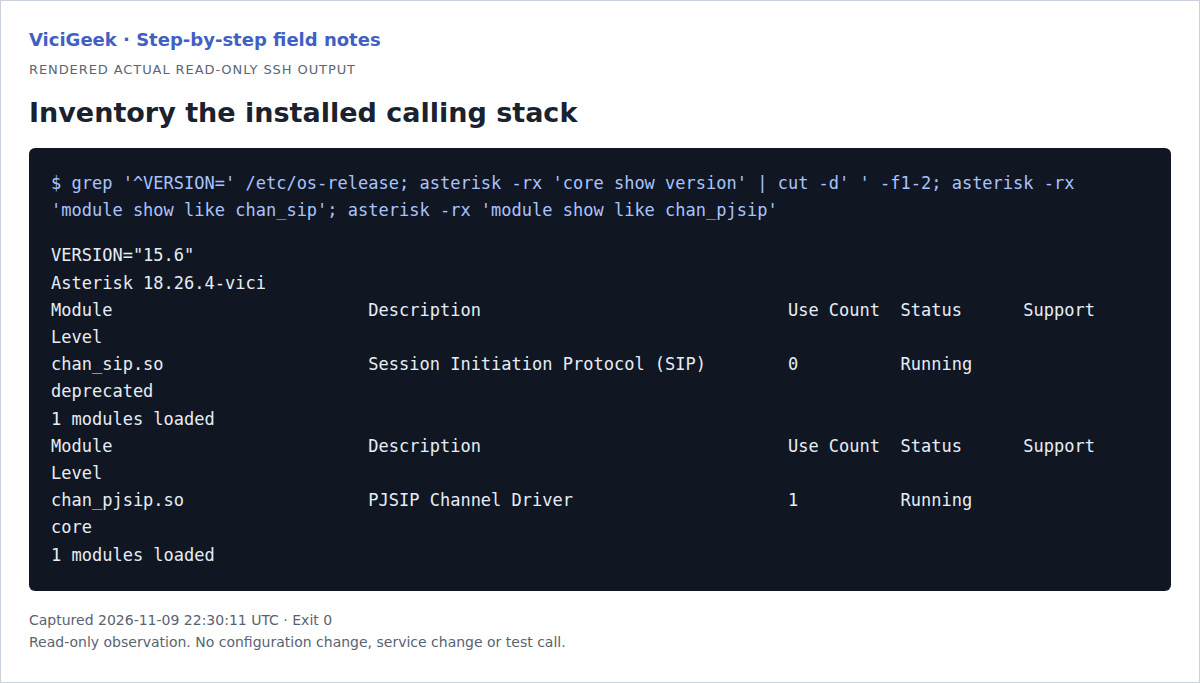
Capture details
The inventory is from one ViciBox 12 demo. Module presence does not prove endpoint correctness, target compatibility or a migration.You should seeEach old dependency has a named PJSIP counterpart or an unresolved item assigned to an owner.
04 / 06
4. Rehearse on an isolated system
Prepare an isolated system matching the approved target as closely as practical. Do not reuse a production carrier route or phone credential without explicit authorization. Keep the existing system and its recovery materials available throughout the rehearsal.
If the server or agent is behind NAT, sketch the network boundaries and compare signaling and media addresses separately. Transport-level external addresses and endpoint NAT options answer different questions; do not copy values before identifying your topology.
- Record the current configuration, generated-file ownership and restore procedure. Confirm a restore is possible before making a rehearsal change.
- Create the approved synthetic station and route using the target system's supported VICIdial controls. Allow configuration generation to finish, then inspect the effective PJSIP endpoint and dialplan.
- If a carrier test is authorized, use its approved test destination and exact provider settings. Otherwise leave the carrier acceptance item open.
- Change one issue at a time, retain the prior value and repeat only the failed observation.
You should seeThe test system has a reviewable mapping and unresolved items remain visible; a generated configuration is not itself proof of calling.
05 / 06
5. Test each call leg and decide
A connected call is not the complete acceptance result. Use one synthetic call at a time and note the timestamp, route and outcome without retaining customer audio or secrets. Test features that your installation actually uses.
- Confirm the test station registers to the intended endpoint and can join its agent conference.
- Call an approved internal destination and confirm audio in both directions, DTMF where needed and normal hangup.
- With separate authorization, make one outbound carrier call and one inbound test. Confirm the expected route, caller ID and two-way audio with the test participant.
- Check transfer, recording and listen/whisper only if used, with consent and the appropriate test permissions. Record each pass, failure or not tested.
- Review the open items and support evidence. If a required check fails, keep the prior production route active and assign the failure; do not declare the migration ready.
You should seeA signed-off worksheet identifies the version pair, tested paths, failures and untested features.
06 / 06
6. Keep a specific way back
Before a separately approved production change, agree on a trigger and an owner for restoring the previous configuration and routing. A backup alone is not a recovery plan: establish which files and generated records must be restored, in what order, and how a test confirms service.
- Record the previous driver, route and station settings in the protected change record and retain the approved backup.
- Define the failure threshold and decision time, such as inability to complete the agreed test call during the window.
- Have the assigned operator restore the documented previous state under the change procedure, then repeat an approved internal and, if authorized, carrier test.
- Record what was restored and leave unresolved migration work for another rehearsal.
Checks and sources
What was checked
- Source review on November 9, 2026: Asterisk documents chan_sip removal in Asterisk 21 and a migration tool whose output requires review. No VICIdial migration or calling test was performed for this guide.
- Examples are reader-run planning aids; screenshots and acceptance outcomes must come from the reader's own authorized environment.
Primary references
Sources
- Asterisk 21 Module Removal – chan_sipAsterisk · accessed November 9, 2026
- Migrating from chan_sip to res_pjsipAsterisk · accessed November 9, 2026
- Configuring res_pjsip to work through NATAsterisk · accessed November 9, 2026