01 / 06
1. Collect the provider's actual settings
- Ask whether the trunk uses registration or IP authentication, and obtain the signaling host, port, codecs, DTMF method, number format and permitted caller IDs.
- Identify the server's actual outbound public address with the network owner if the provider requires an IP allowlist.
- Obtain the provider's PJSIP example for your version and store any secret in the approved credential store.
You should seeDo not proceed if the provider's authentication or dial format is unknown; an IP-authenticated trunk may have no outbound registration.
02 / 06
Choose the matching provider and SIP driver
Use the provider recipe that matches your actual account. Twilio’s example uses Credential List authentication without registration; Telnyx’s example uses an IP-authenticated connection with no Tech Prefix. Vonage distinguishes its current PJSIP download from a chan_sip fragment with unresolved registration requirements.
The native PJSIP worksheet on this page identifies the form fields. Each provider guide separates Account Entry and Dialplan Entry, shows the SIP/chan_sip alternative where applicable, and explains its own prefix conversion. Choose one driver branch rather than combining the blocks.
Twilio: PJSIP and chan_sip dialplans
03 / 06
2. Add a carrier in Administration
- Open Admin → Carriers → Add A New Carrier. Enter the approved unused Carrier ID and Carrier Name; the worksheet uses PJSIPCARRIER only as an example.
- Set Server IP to the assigned dialer from Admin → Servers and Protocol to PJSIP only if enabled. The initial Add Carrier screen on this build has no Active field.
- Use the provider-reviewed Account Entry and separate Dialplan Entry. The worksheet is a version-scoped, IP-authenticated illustration, not a paste-ready provider configuration; do not enter real credentials into a ticket.
- Review every field, submit once only when the test has been approved, then reopen the carrier and compare the saved values with the plan. If the saved record differs, stop and ask the owner before routing traffic.
- Carrier ID
- PJSIPCARRIERIllustrative ID from the official example; first confirm it is unused.
- Carrier Name
- Lab test carrierA descriptive example; select a unique record for your installation.
- Admin User Group
- The permitted administration groupObtain from the site administrator.
- Protocol
- PJSIPOnly on an enabled PJSIP stack.
- Server IP
- The assigned dialer addressSelect the exact server from Admin → Servers; do not substitute the documentation address.
- Registration String / Template ID / Globals String
- Provider- and build-specificThe IP-authenticated example below is not a registering-trunk recipe; ask the provider and administrator what applies.
- Account Entry / Dialplan Entry
- Separate reviewed configuration fieldsThe worksheet illustrates their roles; do not paste it unchanged.
- Before you use it
- This adapts VICIdial’s PJSIP_SUPPORT.txt example for Asterisk 18/ViciBox 12. 198.51.100.20 is documentation-only; the worksheet has no real provider or credentials and must not be pasted unchanged.
[PJSIPCARRIER]type = aorcontact = sip:198.51.100.20qualify_frequency = 15maximum_expiration = 3600minimum_expiration = 60default_expiration = 120 [PJSIPCARRIER]type = identifyendpoint = PJSIPCARRIERmatch = 198.51.100.20 [PJSIPCARRIER]type = endpointcontext = trunkinbounddtmf_mode = rfc4733disallow = allallow = ulawrtp_symmetric = yesrewrite_contact = yesrtp_timeout = 60use_ptime = yesmoh_suggest = defaultdirect_media = notrust_id_inbound = yessend_rpid = yesinband_progress = notos_audio = eflanguage = enaors = PJSIPCARRIER DIALPLAN ENTRY (separate field):exten => _91NXXNXXXXXX,1,AGI(agi://127.0.0.1:4577/call_log)exten => _91NXXNXXXXXX,n,Dial(PJSIP/${EXTEN:1}@PJSIPCARRIER,${CAMPDTO},To)exten => _91NXXNXXXXXX,n,Hangup()This sample is a template or reading aid, not a terminal command. There is no output to show.
- Success looks like
- The Account Entry names an AoR, identify object and endpoint PJSIPCARRIER; the separate Dialplan Entry matches a 9-prefix NANP pattern and preserves VICIdial’s call-log AGI.
- Stop if
- The upstream example uses dtmf_mode none; this worksheet and recording illustrate rfc4733 instead. Neither establishes the provider’s required DTMF. Obtain the provider’s registration, codecs, DTMF, transport, address and caller-ID requirements before creating a real carrier.
Steps and result5 steps
Actual VICIdial form entry with fictional examples. The recording stops before saving; follow the field notes for deployment-specific values.
Entry shownA real carrier form contains an unsaved, deliberately non-working documentation example. No carrier, dialplan, registration or route was saved or tested.
Read the chapter notes
- Actual VICIdial form — not submitted
A real carrier form contains an unsaved, deliberately non-working documentation example. No carrier, dialplan, registration or route was saved or tested.
- Name the carrier example
Carrier ID PJSIPCARRIER matches the endpoint name used in the account and dialplan examples. The configuration is illustrative, not a working provider setup.
- Enter the endpoint structure
The AoR, identify and endpoint blocks use documentation address 198.51.100.20. Authentication, codecs, DTMF and addresses must come from your provider; rfc4733 here is illustrative, not a provider recommendation.
- Match the route to the endpoint
The illustrative dialplan strips a leading 9 and targets PJSIPCARRIER. Registration String stays blank for this IP-auth example; Server IP is intentionally unselected. Do not paste this as a production carrier config.
- Review before any real save
A real carrier form contains an unsaved, deliberately non-working documentation example. No carrier, dialplan, registration or route was saved or tested.
November 4, 2026 · VICIdial Admin 2.14-969a build 261102-0125. A real carrier form contains an unsaved, deliberately non-working documentation example. No carrier, dialplan, registration or route was saved or tested. ViciGeek attribution is encoded in the video and poster. Use fullscreen to read the original field labels.
View a still screenshot
Enter a carrier example
Open to enlarge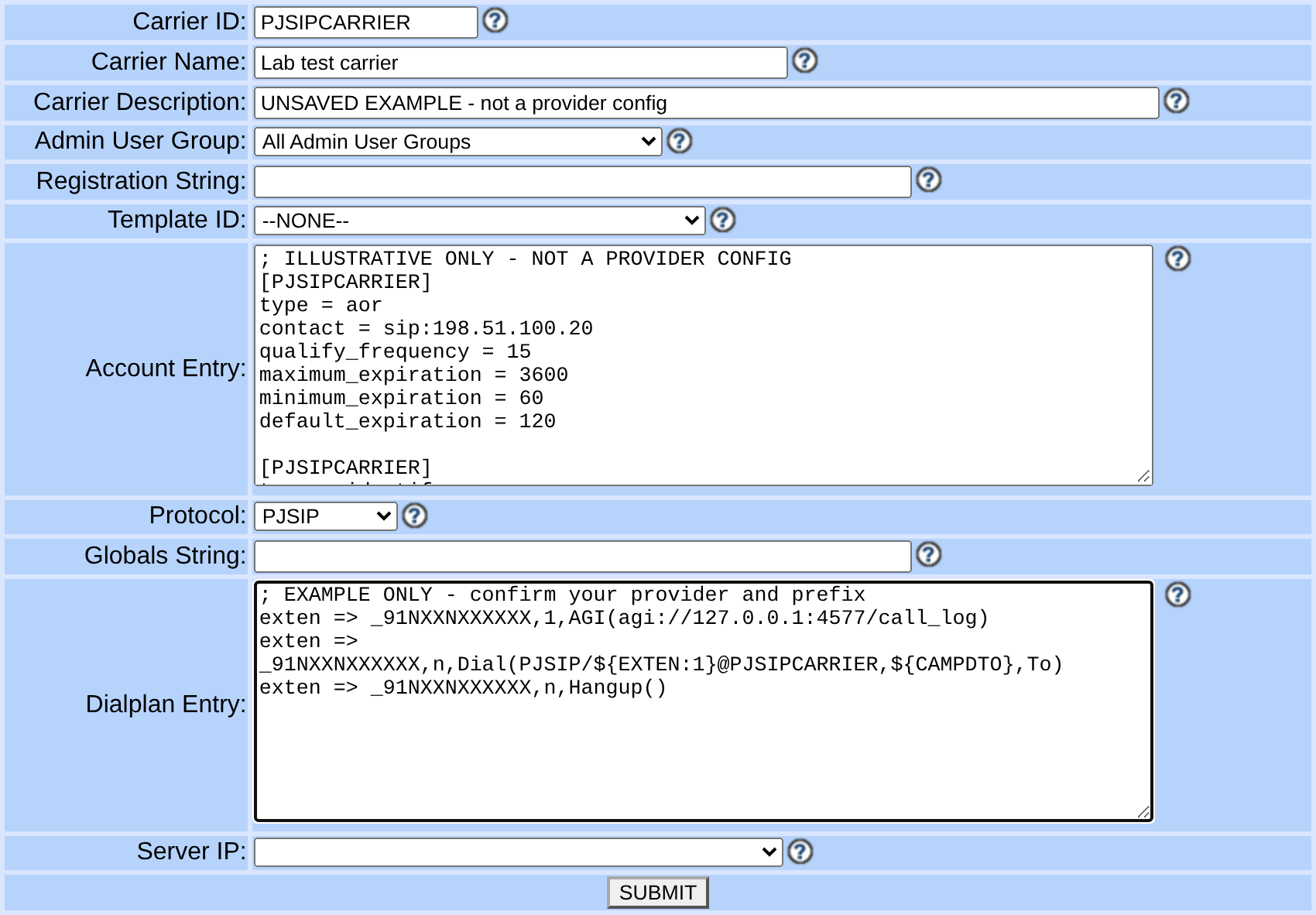
Capture details
DTMF, codecs, routing, authentication and server must come from your reviewed provider and installation settings. Server IP is unselected. No carrier, registration or call was created. Actual browser capture, November 4, 2026; Admin 2.14-969a build 261102-0125.You should seeThe Add form and worksheet show field locations and configuration shape; neither proves registration or a call.
04 / 06
3. Match digits and activate the test
- In the test campaign record note Dial Prefix and Manual Dial Prefix; in the synthetic lead note Phone Code and Phone Number. The route pattern must match the digits VICIdial actually builds.
- Illustration only: prefix 9 + phone code 1 + fictional NANP number 2025550123 gives 912025550123, matching _91NXXNXXXXXX; ${EXTEN:1} removes the leading 9. This is not an authorized call destination.
- Record earlier campaign and carrier values. After saving the carrier, open its Modify screen, set Active to Y only when the test is authorized; otherwise leave it N. Let the normal managed generation finish and check the loaded dialplan before a test.
You should seeA matching pattern is a routing prerequisite, not a successful carrier test. Other numbering plans and Omit Phone Code settings change the constructed digits.
05 / 06
4. Check the endpoint and perform a test
- On the assigned server inspect `pjsip show endpoints`, `pjsip show aors` and, only for a registering trunk, `pjsip show registrations`.
- If the endpoint is missing, inspect load errors and the saved record; if registration fails, compare the provider's authentication and network details without disclosing the secret.
- Use one authorized destination, confirm answer, two-way sound and hangup, then check the expected call record and provider result.
You should seeEndpoint or registration status is a preliminary check; an actual test is required to establish the call path.
06 / 06
5. Restore the previous route if needed
- If the test fails or other routes are affected, disable the test carrier and restore the recorded campaign and carrier values via Admin.
- Allow managed configuration generation, inspect the loaded route and repeat the previous known-good test.
- Send sanitized timing, response and route details to the provider and telephony owner.
You should seeThe previous route should again match the saved values. Escalate if it does not.
Checks and sources
What was checked
- Instructions are based on the linked project documentation and sanitized interface captures. The captures do not prove registration, a completed call, a transfer, callback or audio quality.
- The lab runs VICIdial SVN 4037, database schema 1748 and Asterisk 18.26.4-vici. Labels, enabled features and provider requirements can differ on another installation.
Primary references
Sources
- VICIdial PJSIP supportVICIdial Group · accessed November 4, 2026
- Asterisk PJSIP troubleshootingAsterisk · accessed November 4, 2026
- Asterisk outbound registrationsAsterisk · accessed November 4, 2026