01 / 13
Choose one driver, one carrier and one number format
This Twilio guide separates the carrier Account Entry from the Dialplan Entry and shows PJSIP and chan_sip alternatives. PJSIP is the current Asterisk driver. Use chan_sip only when your installed older build actually loads it; upstream Asterisk removed it in version 21.
These are outbound configuration worksheets, not captured working Twilio trunks. No provider login, registration or call was performed for this update. The existing native screenshot identifies VICIdial fields; it does not establish provider acceptance.
02 / 13
1. Check which SIP driver your server actually has
On the Twilio target server, run these read-only CLI checks before changing carrier records. A module name in this list establishes installation/loading only; it does not establish registration, NAT or audio.
- Before you use it
- Use an authorized shell on the actual Twilio dialer. These commands inspect the running Asterisk instance and make no call.
sudo asterisk -rx 'core show version'sudo asterisk -rx 'module show like chan_pjsip.so'sudo asterisk -rx 'module show like chan_sip.so'This example has no recorded result here. Follow its preparation, expected result and stop conditions before using it.
- Success looks like
- For Twilio, choose PJSIP when chan_pjsip is loaded. Choose the SIP branch only when chan_sip is loaded on your supported installed build.
- Stop if
- If the Twilio target has neither driver, stop. Do not compile a retired module or move listening ports to make this worksheet fit.
Sources for this section
- Asterisk: chan_sip lifecycle and PJSIPAsterisk · Checked November 8, 2026
03 / 13
2. Prepare the Twilio account settings
- In Twilio Console, open Elastic SIP Trunking → Trunks and choose the isolated trunk. Copy its Termination SIP URI exactly; a friendly trunk name is insufficient.
- Attach your Credential List and/or public-source IP ACL under Termination. This worksheet uses digest credentials; if an ACL is also attached, the call must satisfy both checks.
- Choose an allowed Twilio or verified caller ID. Keep the Registration String empty: Elastic SIP Trunking does not use SIP REGISTER.
You should seeYou have the Twilio host, selected authentication path, allowed caller ID and agreed destination format. A dashboard-ready label alone is insufficient.
Sources for this section
- Twilio Elastic SIP Trunking setupTwilio · Checked November 8, 2026
- Twilio Asterisk interconnection guide (2018 PJSIP reference)Twilio · Checked November 8, 2026
- Sending SIP to Twilio: termination hostnameTwilio · Checked November 8, 2026
04 / 13
3. Put each value in the correct VICIdial field
For Twilio, use Admin → Carriers → Add A New Carrier and select an unused ID. Select the actual dialer under Server IP. PJSIP requires an installed VICIdial build with PJSIP enabled; the SIP protocol corresponds to chan_sip.
Keep Account Entry and Dialplan Entry separate. On the captured Add form there is no Active control; after an approved save, reopen Modify Carrier and check Active before permitting Twilio test traffic. Do not overwrite the original carrier.
- Carrier ID
- vg_twilioUse a new, unused ID for the isolated Twilio configuration.
- Protocol
- PJSIP for branch A; SIP for branch B
- Account Entry
- Driver configuration onlyPaste the selected Twilio account block after substituting its placeholders.
- Dialplan Entry
- The three matching exten lines onlyUse the Twilio dialplan for the SAME selected driver.
- Registration String
- Empty for this no-registration trunkTwilio authentication in this example occurs without SIP REGISTER.
- Campaign Dial Prefix / Manual Dial Prefix
- 9Review both values and the Phone Code/Phone Number combination; Omit Phone Code changes the digits Twilio receives.
Locate the two carrier configuration fields
Open to enlarge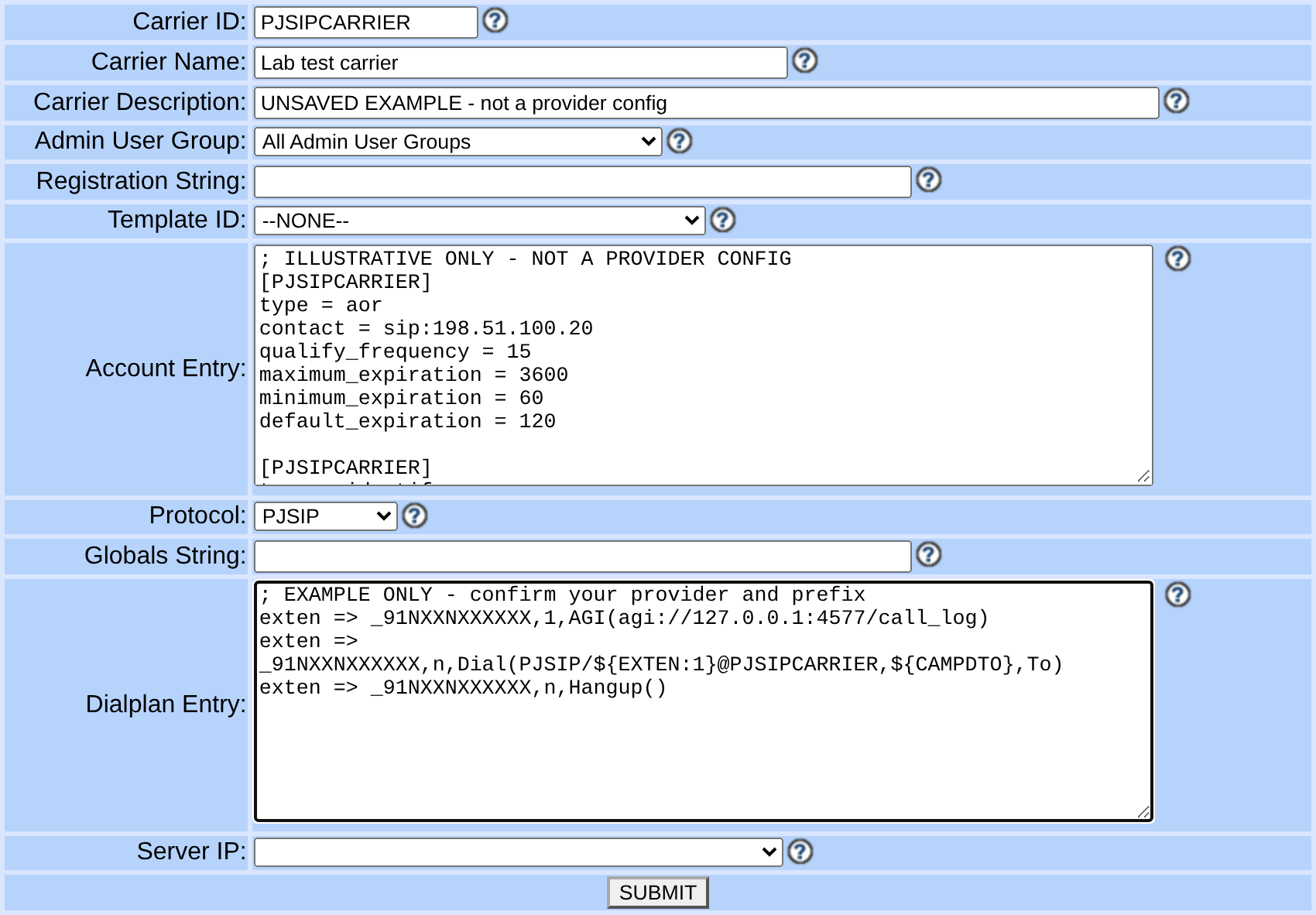
Capture details
It contains an unsaved fictional IP-auth worksheet and an unselected Server IP. Use it to locate the fields only: its values are not a Twilio, Telnyx or Vonage configuration. No carrier, registration or call was created. The complete original capture remains available through Enlarge.You should seeThe Twilio record names the right server and one driver; the campaign remains inactive while the generated route is reviewed.
05 / 13
4A. PJSIP: Account Entry
For Twilio, replace <EXISTING_PJSIP_UDP_TRANSPORT> with the transport name from pjsip show transports; it is not a new transport definition. This narrow worksheet uses UDP and ulaw, not a TLS/SRTP setup. Match your actual network, codec and security requirements before activation.
The context vg-twilio-inbound-disabled is intentionally left undefined for this outbound-only exercise. Check it is absent and do not create an outbound-capable context under that name. It rejects incoming calls instead of silently routing them into an outbound dialplan.
This single-caller-ID worksheet fixes from_user in PJSIP and fromuser in chan_sip to one permitted number. For Twilio campaigns using changing list/lead caller IDs, review the effective From and identity-header behavior separately; the fixed example must not be assumed to preserve dynamic caller-ID selection.
- Before you use it
- Review this Twilio configuration worksheet, replace every angle-bracket placeholder and select only one channel-driver branch. It has not been loaded into Asterisk.
[vg_twilio]type=aorcontact=sip:<TWILIO_TRUNK_NAME>.pstn.twilio.comqualify_frequency=60 [vg_twilio]type=endpointtransport=<EXISTING_PJSIP_UDP_TRANSPORT>aors=vg_twiliocontext=vg-twilio-inbound-disableddisallow=allallow=ulawdtmf_mode=rfc4733direct_media=nofrom_domain=<TWILIO_TRUNK_NAME>.pstn.twilio.comfrom_user=<APPROVED_TWILIO_CALLER_ID_E164>outbound_auth=vg_twilio_auth [vg_twilio_auth]type=authauth_type=userpassusername=<TWILIO_CREDENTIAL_LIST_USER>password=<TWILIO_CREDENTIAL_LIST_SECRET> This sample is a template or reading aid, not a terminal command. There is no output to show.
- Success looks like
- The Twilio field contents match the chosen driver, actual trunk host and agreed number format. This is a configuration check, not a completed call.
- Stop if
- Stop the Twilio setup if any placeholder remains, the transport does not exist, or the provider/account contract differs. Do not activate the campaign.
Sources for this section
- Asterisk PJSIP outbound trunk configurationAsterisk · Checked November 8, 2026
- Twilio Asterisk interconnection guide (2018 PJSIP reference)Twilio · Checked November 8, 2026
- VICIdial PJSIP carrier fields and dial stringVICIdial · Checked November 8, 2026
06 / 13
4A. PJSIP: Dialplan Entry
Use this Twilio dialplan only with the PJSIP endpoint named vg_twilio. The number is before @ in the PJSIP dial string. Keep the VICIdial call_log AGI and campaign timeout; do not paste a raw Asterisk-only test route over the managed campaign route.
- Before you use it
- Review this Twilio configuration worksheet, replace every angle-bracket placeholder and select only one channel-driver branch. It has not been loaded into Asterisk.
exten => _91NXXNXXXXXX,1,AGI(agi://127.0.0.1:4577/call_log)exten => _91NXXNXXXXXX,n,Dial(PJSIP/+${EXTEN:1}@vg_twilio,${CAMPDTO},To)exten => _91NXXNXXXXXX,n,Hangup()This sample is a template or reading aid, not a terminal command. There is no output to show.
- Success looks like
- The Twilio field contents match the chosen driver, actual trunk host and agreed number format. This is a configuration check, not a completed call.
- Stop if
- Stop the Twilio setup if any placeholder remains, the transport does not exist, or the provider/account contract differs. Do not activate the campaign.
You should seeFictional 912025550123 matches _91NXXNXXXXXX; the PJSIP Request-URI user becomes +12025550123. This arithmetic check does not send an INVITE.
07 / 13
4B. chan_sip: Account Entry
Choose this Twilio alternative only if the driver check found chan_sip. VICIdial Protocol is SIP, and the equivalent configuration belongs to the chan_sip generator, not pjsip.conf. Never paste type=endpoint, aors or outbound_auth into this branch.
- Before you use it
- Review this Twilio configuration worksheet, replace every angle-bracket placeholder and select only one channel-driver branch. It has not been loaded into Asterisk.
[vg_twilio]type=peerhost=<TWILIO_TRUNK_NAME>.pstn.twilio.comtransport=udpcontext=vg-twilio-inbound-disableddisallow=allallow=ulawdtmfmode=rfc2833directmedia=noqualify=yesqualifyfreq=60fromdomain=<TWILIO_TRUNK_NAME>.pstn.twilio.comfromuser=<APPROVED_TWILIO_CALLER_ID_E164>defaultuser=<TWILIO_CREDENTIAL_LIST_USER>secret=<TWILIO_CREDENTIAL_LIST_SECRET> This sample is a template or reading aid, not a terminal command. There is no output to show.
- Success looks like
- The Twilio field contents match the chosen driver, actual trunk host and agreed number format. This is a configuration check, not a completed call.
- Stop if
- Stop the Twilio setup if any placeholder remains, the transport does not exist, or the provider/account contract differs. Do not activate the campaign.
Sources for this section
- Asterisk: chan_sip lifecycle and PJSIPAsterisk · Checked November 8, 2026
- Twilio Elastic SIP Trunking setupTwilio · Checked November 8, 2026
08 / 13
4B. chan_sip: Dialplan Entry
The Twilio chan_sip dial string puts the peer name immediately after SIP/ and the destination after the next slash. PJSIP/+${EXTEN:1}@vg_twilio and SIP/vg_twilio/+${EXTEN:1} are alternatives, not interchangeable spellings.
- Before you use it
- Review this Twilio configuration worksheet, replace every angle-bracket placeholder and select only one channel-driver branch. It has not been loaded into Asterisk.
exten => _91NXXNXXXXXX,1,AGI(agi://127.0.0.1:4577/call_log)exten => _91NXXNXXXXXX,n,Dial(SIP/vg_twilio/+${EXTEN:1},${CAMPDTO},To)exten => _91NXXNXXXXXX,n,Hangup()This sample is a template or reading aid, not a terminal command. There is no output to show.
- Success looks like
- The Twilio field contents match the chosen driver, actual trunk host and agreed number format. This is a configuration check, not a completed call.
- Stop if
- Stop the Twilio setup if any placeholder remains, the transport does not exist, or the provider/account contract differs. Do not activate the campaign.
You should seeFor the same fictional 912025550123, the chan_sip destination is +12025550123. Only the channel syntax changes between the two Twilio branches.
09 / 13
5. Check saved values, then the loaded route
After an approved save and normal managed generation, reopen the Twilio carrier and compare its saved fields. On the selected server inspect the chosen driver only; a missing sip command on a PJSIP-only build is not a provider outage.
Use the actual campaign dialplan context shown by your installed VICIdial configuration. The illustrative 912025550123 is used for a read-only lookup, never a dial attempt. A loaded route may still have unresolved placeholders; inspect the full Dial line.
- Before you use it
- Review this Twilio configuration worksheet, replace every angle-bracket placeholder and select only one channel-driver branch. It has not been loaded into Asterisk.
# Run only the branch selected for Twilio.# PJSIP branch:sudo asterisk -rx 'pjsip show endpoint vg_twilio'sudo asterisk -rx 'pjsip show aor vg_twilio'# chan_sip branch instead:sudo asterisk -rx 'sip show peer vg_twilio'# Both branches: replace the context with the actual generated campaign context.sudo asterisk -rx 'dialplan show 912025550123@<ACTUAL_CAMPAIGN_CONTEXT>'sudo asterisk -rx 'dialplan show vg-twilio-inbound-disabled'This example has no recorded result here. Follow its preparation, expected result and stop conditions before using it.
- Success looks like
- The selected Twilio object has the expected host, transport and caller ID. The campaign lookup has exactly the chosen prefix and channel syntax. The vg-twilio-inbound-disabled lookup reports that no such context exists.
- Stop if
- For Twilio, stop on duplicate extensions, unknown context, missing endpoint, stale saved values or any angle-bracket placeholder. An OPTIONS result cannot establish a PSTN call.
You should seeThe Twilio configuration is loaded as intended. Only a later, separately approved call can establish signaling and media.
10 / 13
Incoming calls need their own routing
The Twilio blocks above deliberately reject inbound calls. Do not remove that boundary until you have the current provider signaling ranges, restricted inbound matching, reviewed trunkinbound context and a specific DID route. Incoming provider IPs are not necessarily the IP your outbound hostname currently resolves to.
- For Twilio, save a reviewed Origination URI for the actual public PBX address, listening port and transport, then associate the intended owned number with this trunk.
- After the Twilio inbound source matching and network rules have been reviewed, configure a real inbound context and the exact delivered DID in VICIdial. Verify the intended in-group or destination independently.
You should seeAn outgoing Twilio call pass does not establish incoming delivery. An inbound setting screenshot does not establish agent audio.
11 / 13
6. Test one approved destination and record the result
Keep Twilio traffic isolated. Have a bounded test window, owned/consenting destination and recorded caller ID before enabling the new carrier and campaign. Do not dial the fictional 555 example or run a bulk campaign as a test.
- Place one approved Twilio call through the actual VICIdial agent workflow so the campaign prefix, caller ID and call logging are included.
- Record the constructed digits, sent Request-URI user, selected Twilio peer/endpoint, final SIP result and provider call identifier privately.
- Check ringing/answer, two-way audio, DTMF, hangup from each side and the VICIdial report row separately. Mark each Twilio observation pass, fail or not tested.
- For Twilio, pause/log out the test agent and disable the test route when the approved window ends; preserve the exact observed outcome rather than inferring it from a saved form.
12 / 13
If it fails, follow the first broken boundary
13 / 13
Rollback and continue
For Twilio, pause test traffic, restore the previous campaign Dial Prefix and Manual Dial Prefix, and disable only the new carrier in its Modify screen. Restore the recorded fields and use the installation’s normal configuration generation procedure.
Confirm the previous route is loaded again. Leave unrelated Twilio trunks and other providers unchanged. Rotate only an exposed secret, and record which provider and PBX settings were restored.
Telnyx: IP-authenticated driver examples
Checks and sources
What was checked
- Twilio primary documentation and Asterisk/VICIdial syntax were source-reviewed on November 8, 2026. The NANP prefix transformation was checked offline; no provider authentication, registration or call was performed.
- The PJSIP and chan_sip Twilio Account Entry and Dialplan Entry blocks are configuration worksheets. Native field media is a historical unsaved reference, not this provider’s console or a saved working trunk.
- For Twilio, registration state, outbound signaling, incoming routing, two-way audio, DTMF, hangup and report evidence remain separate acceptance checks.
Primary references
Sources
- Twilio Elastic SIP Trunking setupTwilio · accessed November 8, 2026
- Twilio Asterisk interconnection guide (2018 PJSIP reference)Twilio · accessed November 8, 2026
- Sending SIP to Twilio: termination hostnameTwilio · accessed November 8, 2026
- Twilio network rangesTwilio · accessed November 8, 2026
- Twilio trunk verificationTwilio · accessed November 8, 2026
- Asterisk: chan_sip lifecycle and PJSIPAsterisk · accessed November 8, 2026
- Asterisk PJSIP outbound trunk configurationAsterisk · accessed November 8, 2026
- VICIdial PJSIP carrier fields and dial stringVICIdial · accessed November 8, 2026