01 / 05
1. Create the in-group
These steps target VICIdial Admin 2.14-969a, SVN 4037 / database schema 1748. Substitute unused IDs for LAB01, LABTEAM, learner1, 8001, 90001, SALESDEMO and DEMOIVR if any already exist. Labels and options may differ on other builds. The configuration checks below do not establish that a call, audio, or carrier route has been tested.
- Open Inbound → In-Groups → Add New In-Group.
- Enter Group ID SALESDEMO and Group Name Sales Demo, choose the appropriate Admin User Group, and set Active to Y for the isolated test. Submit, then reopen SALESDEMO.
- Review its call-time, queue, no-agent and after-hours actions with the owner before directing a DID to it.
- Group ID / Group Name
- SALESDEMO / Sales Demo (or unused substitutes)
- Admin User Group
- Select the group permitted to administer this lab
- Active
- Y only when ready for the isolated test
Steps and result4 steps
Actual VICIdial form entry with fictional examples. The recording stops before saving; follow the field notes for deployment-specific values.
Entry shownOnly the actual initial Add In-Group form was filled. SUBMIT was not clicked; no group was saved or activated. Saved routing, agent eligibility, queue handling and no-agent behavior are not demonstrated.
Read the chapter notes
- Actual VICIdial form — not submitted
Only the actual initial Add In-Group form was filled. Saved routing, agent eligibility, queue handling and no-agent behavior are not demonstrated.
- Identify the inbound group
Group ID SALESDEMO and Group Name Sales Demo are the worked example. This is separate from an agent User Group.
- Set display and initial state
Group Color 0077AA is an example six-digit color. Active Y is shown only as unsaved form input; no DID is connected and no queue traffic is created.
- Review before any real save
Only the actual initial Add In-Group form was filled. Saved routing, agent eligibility, queue handling and no-agent behavior are not demonstrated.
November 4, 2026 · VICIdial Admin 2.14-969a build 261102-0125. Only the actual initial Add In-Group form was filled. SUBMIT was not clicked; no group was saved or activated. Saved routing, agent eligibility, queue handling and no-agent behavior are not demonstrated. ViciGeek attribution is encoded in the video and poster. Use fullscreen to read the original field labels.
View a still screenshot
Enter an inbound group
Open to enlarge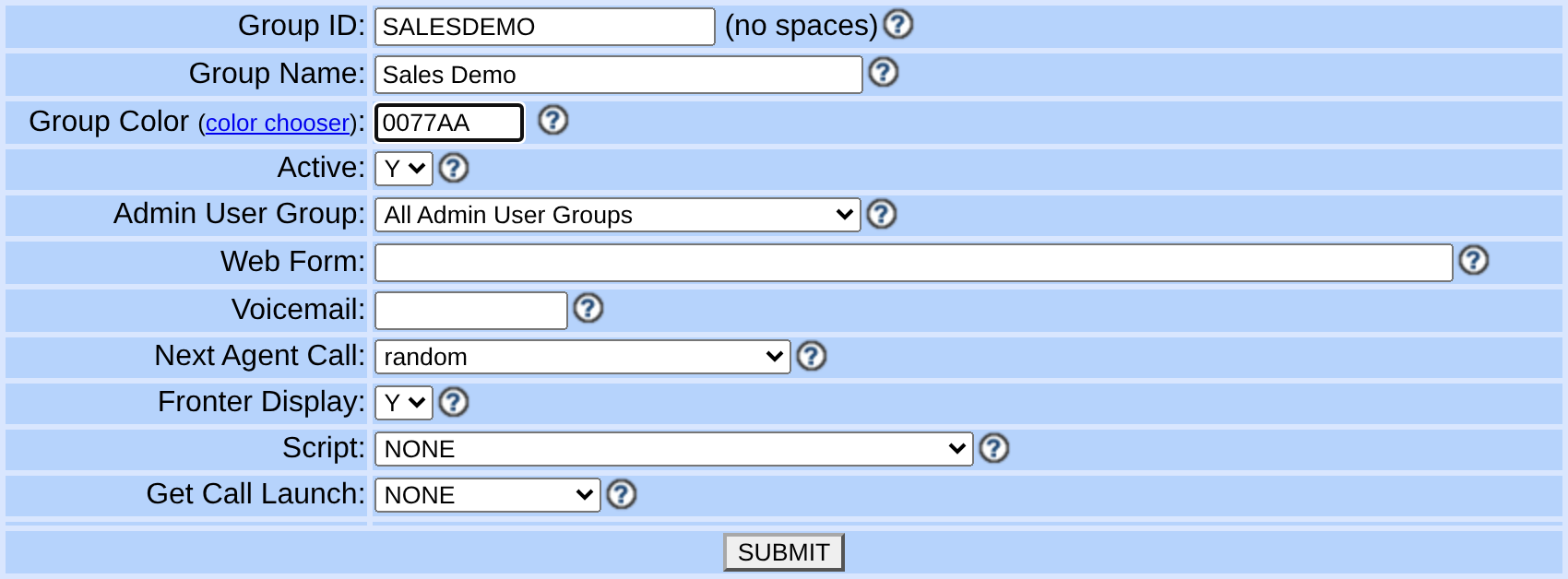
Capture details
Active Y is visible in an unsaved form; no queue was created or activated. Queue exits, agents and routing require configuration and testing on the saved record. Actual browser capture, November 4, 2026; Admin 2.14-969a build 261102-0125.You should seeReopen the group and check Group ID, Group Name and Active. If the ID already exists, stop and choose an unused ID; do not overwrite an existing group. The form image is not proof of a saved group.
02 / 05
2. Route the test DID
Obtain from the carrier or trunk administrator the exact DID digits delivered to the system. Do not assume they match the public display format.
- Open Inbound → DIDs → Add A New DID, or open the dedicated test DID.
- For a new DID, enter the exact delivered digits in DID Extension, enter DID Description Test line and choose the Admin User Group permitted to administer it, then submit. Reopen the DID, set DID Route to IN_GROUP and select SALESDEMO in In-Group ID.
- Save and reopen the DID to verify the pattern, route, target and Active state.
- DID Extension
- Use the exact delivered test digits from the carrier or trunk administrator, without spaces or dashes. The unsaved demonstration uses 18005550101 as a fictional example; it is not an assigned or callable DID.
- DID Description
- Test line
- Admin User Group
- The group permitted to administer this test DID
- DID Route
- IN_GROUP
- In-Group ID
- SALESDEMOSALESDEMO is the course target only if it already exists on your system; the unsaved lab illustration uses the distinct existing KPIDEMOQ option.
Steps and result4 steps
Actual VICIdial form entry with fictional examples. The recording stops before saving; follow the field notes for deployment-specific values.
Entry shownThe initial DID form shows a fictional digit pattern and description. No DID was saved, assigned by a carrier, routed or called.
Read the chapter notes
- Actual VICIdial form — not submitted
The initial DID form shows a fictional digit pattern and description. No DID was saved, assigned by a carrier, routed or called.
- Use exact carrier-delivered digits
18005550101 is a fictional documentation example, not an assigned or callable number. On your server enter the exact digits your carrier delivers, without spaces or dashes.
- Describe the test line
DID Description Test line identifies the example. Routing options are on the saved record; this clip stops before saving or routing.
- Review before any real save
The initial DID form shows a fictional digit pattern and description. No DID was saved, assigned by a carrier, routed or called.
November 4, 2026 · VICIdial Admin 2.14-969a build 261102-0125. The initial DID form shows a fictional digit pattern and description. No DID was saved, assigned by a carrier, routed or called. ViciGeek attribution is encoded in the video and poster. Use fullscreen to read the original field labels.
Steps and result4 steps
Actual native VICIdial controls, filled with example values in the browser. This recording stops before submission. Use the field notes to distinguish lab fixtures, missing prerequisites and deployment-specific values.
Entry shownAn existing native Modify DID form shows unsaved IN_GROUP and KPIDEMOQ selections. The original DID and unrelated values are not published. No DID route was saved and no call was placed.
Read the chapter notes
- Actual native form — not submitted
An existing native Modify DID form shows unsaved IN_GROUP and KPIDEMOQ selections. The original DID and unrelated values are not published. No DID route was saved and no call was placed.
- Choose IN_GROUP routing
The native Modify DID form exposes destinations after the initial Add identity form. The original number is outside this crop.
- Select an existing synthetic queue
KPIDEMOQ is a real native Synthetic KPI queue option. The fresh setup guide instead uses its separately created SALESDEMO group.
- Review the unsaved example
An existing native Modify DID form shows unsaved IN_GROUP and KPIDEMOQ selections. The original DID and unrelated values are not published. No DID route was saved and no call was placed.
November 4, 2026 · VICIdial 2.14-969a build 261102-0125. An existing native Modify DID form shows unsaved IN_GROUP and KPIDEMOQ selections. The original DID and unrelated values are not published. No DID route was saved and no call was placed. ViciGeek attribution is encoded in the video and poster. Use fullscreen to read the original field labels.
View still screenshots
Enter a DID identity
Open to enlarge
Capture details
Use the exact digits delivered by your carrier. Only initial identity fields are shown; no DID was saved, routed or called. Actual browser capture, November 4, 2026; Admin 2.14-969a build 261102-0125.Select the DID in-group routing controls
Open to enlarge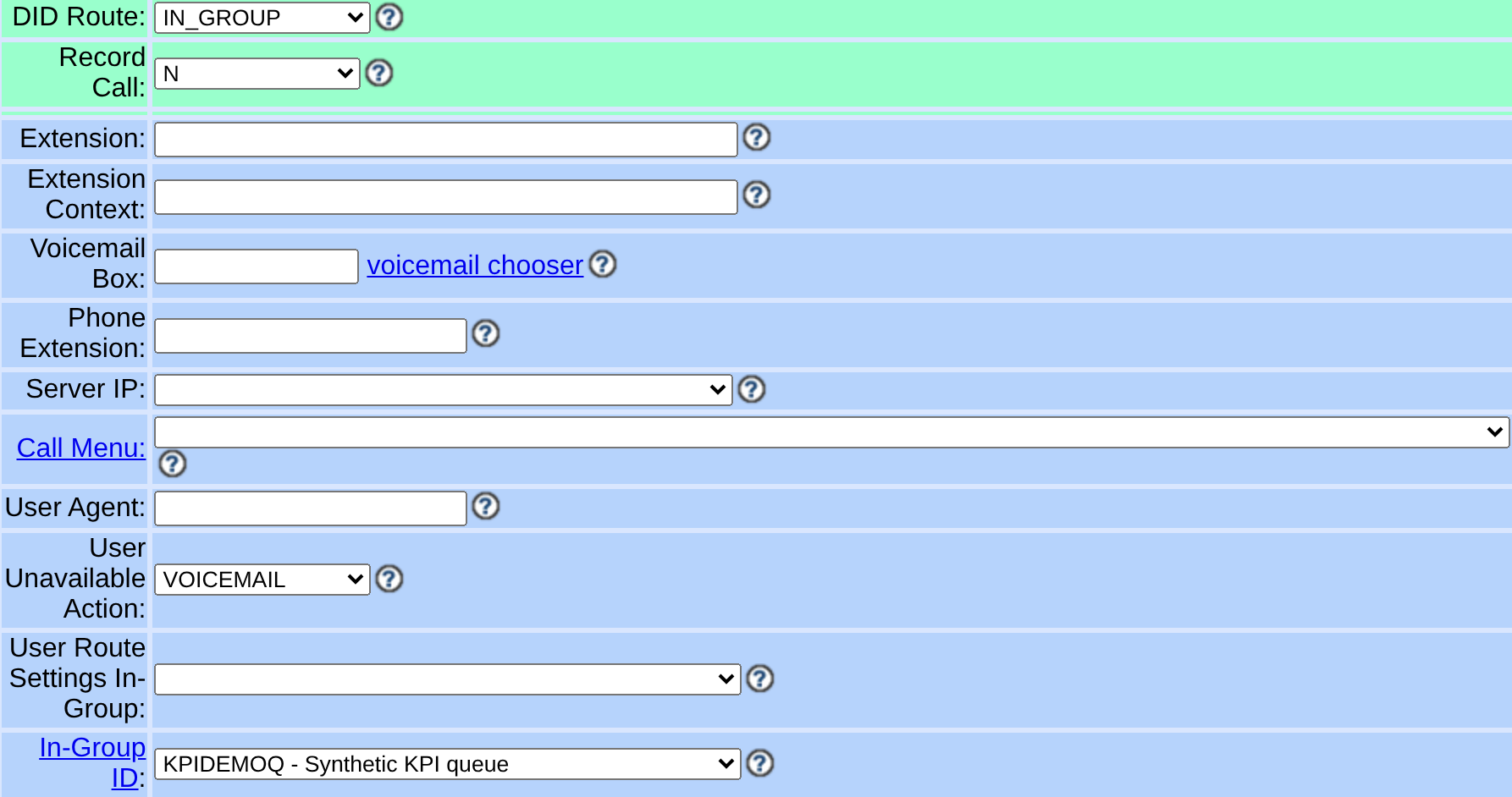
Capture details
Unsaved lab example, distinct from the guide’s fresh SALESDEMO setup. Original DID digits and private values are outside the crop. Do not substitute unrelated targets; no route was saved or call placed. Actual browser capture, November 4, 2026; VICIdial 2.14-969a build 261102-0125.You should seeReopen the DID: its delivered-digit pattern, Active state, IN_GROUP route and SALESDEMO target must match your change record. If the target is absent, verify the group exists and is accessible before saving again. This does not establish carrier delivery.
03 / 05
3. Allow and select the in-group
For the inbound DID exercise, the companion LAB01 starts as MANUAL. On the captured SVN4037 build, MANUAL excludes the inbound group chooser. For this exercise use INBOUND_MAN: agents may place manual calls and receive inbound calls between them; it does not enable predictive outbound dialing. The native form stores Auto Dial Level 1.0 in this method.
An in-group and a DID alone do not make an agent available.
- Keep the agent paused/logged out and record LAB01’s current Dial Method, Auto Dial Level, Active, Allow Inbound and Blended and allowed groups. This method change belongs to the isolated lab only.
- Open Campaigns → Show Campaigns → LAB01. Set Dial Method to INBOUND_MAN; save and reopen. Accept the native 1.0 level for this method; do not force a database0 or change to RATIO to expose inbound controls.
- Set Allow Inbound and Blended to Y; save/reopen and select only SALESDEMO under Allowed Inbound Groups. Save and reopen again to check both the method and group. Allow Closers is a separate transfer permission.
- After the DID/in-group, station and user permissions are ready and the test window is approved, set this isolated campaign Active Y only for the exercise; save/reopen before Agent login. Keep the agent paused until the intended SALESDEMO membership and phone connection are verified. If the campaign remains inactive or login/group selection is unavailable, stop before testing.
- Open Inbound → In-Groups → SALESDEMO. Under Agent Ranks For This Inbound Group, check SELECTED for learner1 and submit; leave Rank and Grade unchanged for this first test.
- Open Users → Show Users → learner1 and inspect Agent Choose Ingroups; this setting affects whether the agent can choose groups at login. Have the agent log in to LAB01, select SALESDEMO if prompted and reach READY for an authorized test.
- Dial Method
- INBOUND_MAN for this manual + inbound exercise
- Auto Dial Level
- 1.0 native value in INBOUND_MANThis method excludes automated outbound dialing; it is not a predictive rate.
- Allow Inbound and Blended / Allowed Inbound Groups
- Y / SALESDEMO only, then save and reopen
LAB01 baseline after the call lab was restored
Open to enlarge
Capture details
This baseline cannot receive the intended inbound handoff. The approved inbound/manual exercise uses INBOUND_MAN; the screenshot does not show that exercise enabled.The restored inbound permission baseline
Open to enlarge
Capture details
Compare its saved value with the guide’s INBOUND_MAN plus Allow Inbound Y target; this capture is configuration inspection, not an inbound call.You should seeThe reopened campaign is INBOUND_MAN with inbound Y and SALESDEMO selected. If the group chooser remains absent, stop at this configuration gate; do not change queue exits or use predictive dialing as a workaround. At agent login, verify SALESDEMO is actually selected before an authorized READY test.
04 / 05
4. Plan the controlled call
A test call requires an authorized originating phone, working trunk and available agent; none was exercised for this guide.
- Agree on the test window and record the existing DID route for rollback.
- During the approved test, follow the call through DID, queue and agent; compare each observation with the configuration.
- Restore the original DID route and verify it after the test.
- After the supervised exercise, pause and log out the test agent. Restore the recorded Dial Method, Auto Dial Level, inbound flag, allowed groups and Active state through Admin; save/reopen. Confirm the intended idle state and retain the test record.
You should seeIf the call never enters the system, involve the carrier/trunk operator. If it queues without an agent, inspect agent selection and readiness; if it reaches the wrong destination, recheck the DID’s saved route.
05 / 05
Recorded lab terminal checks
Recorded lab checks were run against the synthetic demo on November 4, 2026. These read-only observations supplement the configuration steps above; they do not establish that a call, route, recording or report workflow succeeded.
Recorded lab observation: Four configured inbound groups; no routing or call outcome tested.
Recorded lab observation: Two configured DID records; no carrier delivery or routing tested.
Recorded lab observation: No current inbound auto-call rows at capture; not an inbound routing test.
Recorded lab observation: The inbound queue columns result describes the installed schema, not a completed workflow.
Recorded lab observation: The did columns result describes the installed schema, not a completed workflow.
- Before you use it
- These historical commands were captured in a root shell using database vicidb and /etc/vicidial-readonly.cnf. The private client file in Create a read-only database account for safe VICIdial queries is root-owned with mode 0600: use the approved root context from that guide, or invoke mysql through sudo as it describes. A regular user cannot read that file. On your own server use your authorized connection and test campaign/list IDs; changed commands are not this exact capture. Do not print the credential file. Historical exact-command/root-shell evidence is retained. For a current invocation outside that root shell, use the approved sudo mysql --defaults-file=/etc/vicidial-readonly.cnf client and confirm CURRENT_USER() and DATABASE();the changed invocation is not this capture.
mysql --defaults-extra-file=/etc/vicidial-readonly.cnf --batch vicidb -e "SELECT COUNT(*) AS inbound_group_count FROM vicidial_inbound_groups;"mysql --defaults-extra-file=/etc/vicidial-readonly.cnf --batch vicidb -e "SELECT COUNT(*) AS did_count FROM vicidial_inbound_dids;"mysql --defaults-extra-file=/etc/vicidial-readonly.cnf --batch vicidb -e "SELECT COUNT(*) AS active_inbound_rows FROM vicidial_auto_calls WHERE call_type='IN';"mysql --defaults-extra-file=/etc/vicidial-readonly.cnf --batch vicidb -e "SHOW COLUMNS FROM vicidial_auto_calls WHERE Field IN ('campaign_id','status','call_type');"mysql --defaults-extra-file=/etc/vicidial-readonly.cnf --batch vicidb -e "SHOW COLUMNS FROM vicidial_inbound_dids WHERE Field IN ('did_id','did_active','group_id');"Captured demo response · 2026-11-04T22:37:53.685525Z. Any filtering, hidden values or test-only data are identified in the capture label. Select Replay transcript to read the recorded output.
- Success looks like
- Compare the returned rows with the specific task and capture time. An empty result or zero count is an observation to explain, not a complete diagnosis or evidence of a working call.
- Stop if
- For a connection, permission, schema or missing-test-ID error, check the approved client configuration and installed version first. Do not broaden permissions or change production data to match this demonstration.
Steps and result4 steps
Review read-only aggregate and configuration results; no live call or audio was tested.
Observed read-only resultThe lab contained four inbound groups and two DIDs; LAB01 recording mode was ONDEMAND and its scoped call-log count was zero.
Read the captured terminal transcript
Read the chapter notes
- The database contained four inbound groups.
Read-only captured command and output; rendered for this replay.
- The database contained two DID records. These counts do not prove routing.
Read-only captured command and output; rendered for this replay.
- LAB01 recording mode was ONDEMAND. No recording or audio was tested.
Read-only captured command and output; rendered for this replay.
- The scoped LAB01 and list 90001 call-log count was zero. Reports were not validated.
Read-only captured command and output; rendered for this replay.
November 4, 2026 · ViciBox 12 · SVN 4037. Configuration and counts only: routing, calls, audio, and reports were not exercised. Rendered actual SSH capture using xterm.js; paced still frames, not a live terminal recording. SSH client warning omitted from captured output. Use fullscreen to read the terminal output.
View still screenshots
Recorded lab terminal: inbound aggregate
Open to enlarge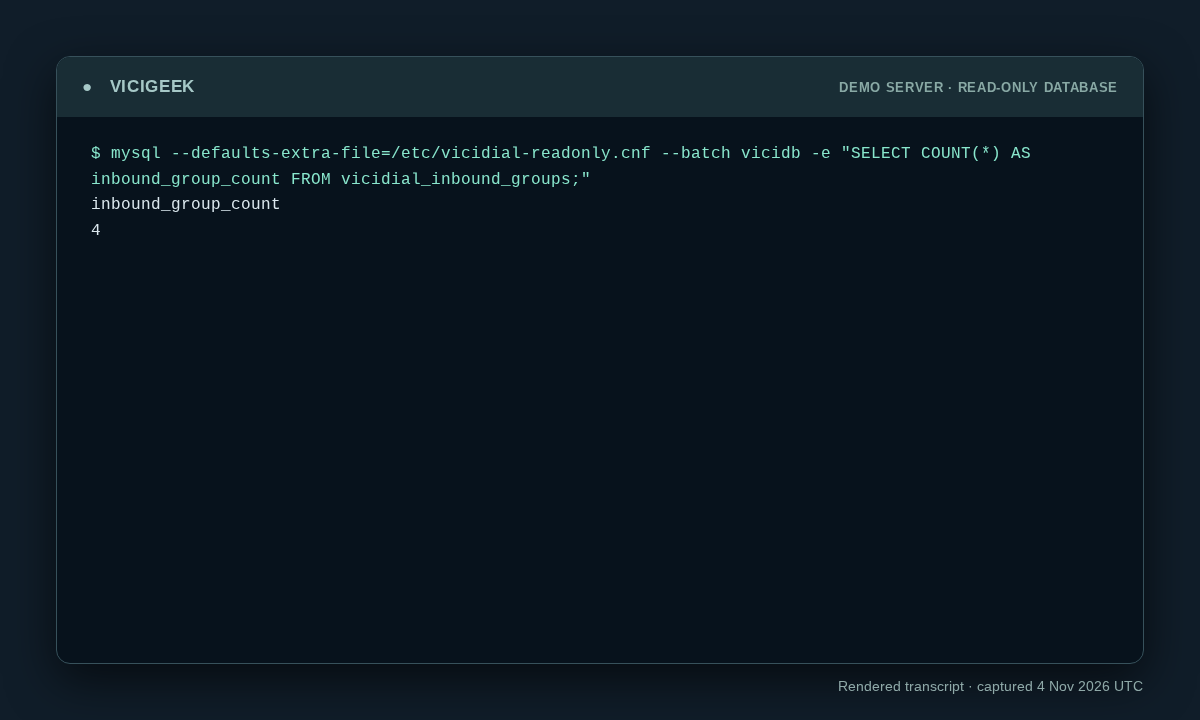
Capture details
Read-only observation, not a completed call or routing test. Display trims blank space; enlargement opens the complete original. SSH client post-quantum warning on stderr omitted; SQL stdout preserved. Aggregate counts or schema only; no customer rows.Recorded lab terminal: did aggregate
Open to enlarge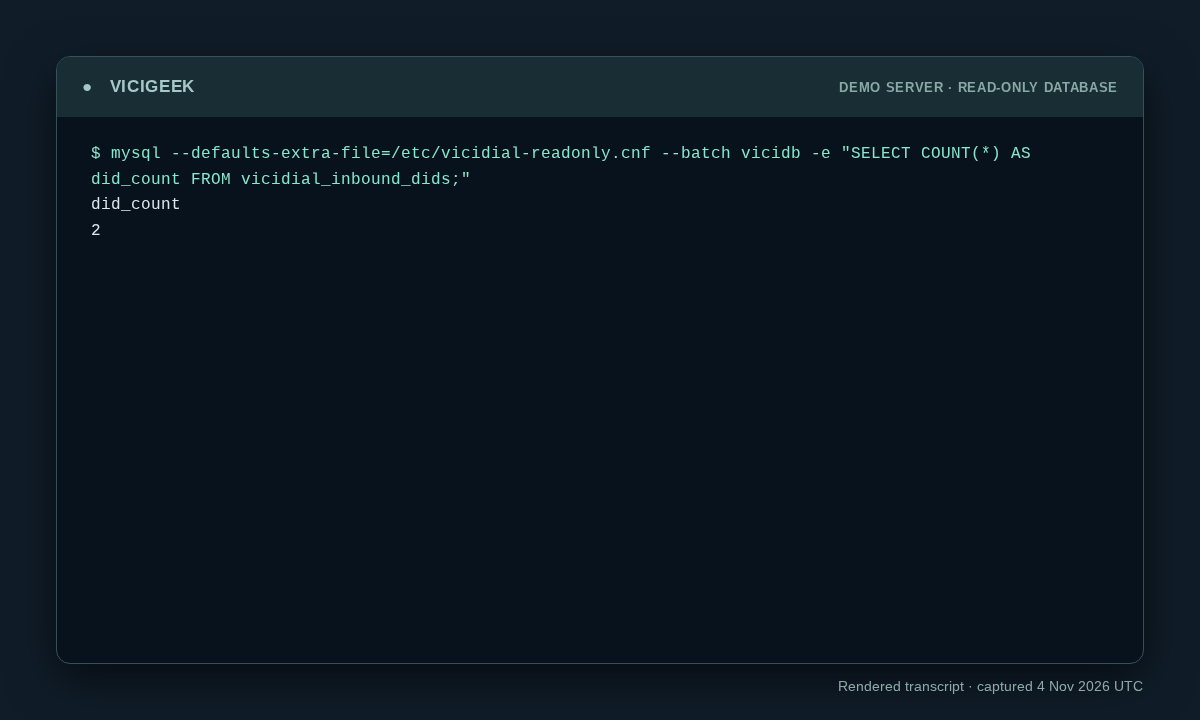
Capture details
Read-only observation, not a completed call or routing test. Display trims blank space; enlargement opens the complete original. SSH client post-quantum warning on stderr omitted; SQL stdout preserved. Aggregate counts or schema only; no customer rows.You should seeThe recorded lab command and output show exactly what the demo returned. Use the original workflow’s separate end-to-end acceptance checks before declaring success.
Checks and sources
What was checked
- These steps target VICIdial Admin 2.14-969a, SVN 4037 / database schema 1748. Substitute unused IDs for LAB01, LABTEAM, learner1, 8001, 90001, SALESDEMO and DEMOIVR if any already exist. Labels and options may differ on other builds. The configuration checks below do not establish that a call, audio, or carrier route has been tested.
- Admin form captures are visual orientation only; no live call, audio, or carrier drill was performed for this guide.
- Reviewed read-only SSH observations were added from the ViciBox 12 / SVN 4037 demo on November 4, 2026. Captures show point-in-time state, not successful calling, routing, audio, API writes or recovery.
Primary references
Sources
- VICIdial source and documentationVICIdial · accessed November 4, 2026
- VICIdial Non-Agent API referenceVICIdial · accessed November 4, 2026
- VICIdial statuses referenceVICIdial · accessed November 4, 2026
- Agent inbound/manual method boundaryVICIdial · accessed November 7, 2026