01 / 04
1. Open the test list
- Open Admin → System Settings and use page Find for Custom Fields. Read the saved feature setting with the administrator; the documented database setting is system_settings.custom_fields_enabled. Do not submit or enable it just to follow this lesson.
- If disabled or inaccessible, stop here. Hand the owner the installed revision, list ID, observed setting or permission failure, and the need for a separately approved feature enablement. Do not copy the old reference document’s GRANT/ALTER examples.
- If already enabled, confirm the account’s custom-field modification permission with its owner, then choose Lists → Show Lists and open the disposable list.
- Open that list’s Custom Fields link and recheck its ID. If the link is missing, return to the feature/permission check rather than editing a guessed custom table.
- Read the installed CUSTOM_FIELDS.txt naming/type limits, then continue to Add a New Custom Field.
- Before you use it
- Use the approved sudo/read-only client from Create a read-only database account for safe VICIdial queries. This does not change the feature.
sudo mysql --defaults-file=/etc/vicidial-readonly.cnf -e "SELECT CURRENT_USER(), DATABASE(); SHOW COLUMNS FROM system_settings LIKE 'custom_fields_enabled'; SELECT custom_fields_enabled FROM system_settings;"This example has no recorded result here. Follow its preparation, expected result and stop conditions before using it.
- Success looks like
- The selected account/database are correct and the installed setting is returned. 0 is the stop branch;1 establishes only that this gate is enabled.
- Stop if
- On unknown column, denied read or no authorized client, have the owner inspect the matching installed version. Do not apply schema changes from an old document.
You should seeEither the enabled feature, authorized account and correct list are confirmed, or a precise prerequisite handoff is complete. The public-demo form below remains an unsaved illustration.
02 / 04
2. Add one field
- Choose Add a New Custom Field on the list's custom-fields page.
- Enter test_note in Field Label and Test note in Field Name; choose TEXT in Field Type. Leave Field Required as NO for this practice field and review the other defaults before saving.
- Save, reopen the field, and confirm its label and type. Do not use real personal information for the test.
- Field Label
- test_noteFictional example on a disposable list.
- Field Name
- Test note
- Field Type
- TEXT
- Field Size
- 25
- Field Max
- 100
- Field Required
- NOVerify your installed form’s exact label and options.
Steps and result5 steps
Actual native VICIdial controls, filled with example values in the browser. This recording stops before submission. Use the field notes to distinguish lab fixtures, missing prerequisites and deployment-specific values.
Entry shownReal custom-field definition inputs on the official public demo were filled with an unsaved test_note example. The user-provided lab has custom fields disabled. No field or table was created.
Read the chapter notes
- Actual native form — not submitted
Real custom-field definition inputs on the official public demo were filled with an unsaved test_note example. The user-provided lab has custom fields disabled. No field or table was created.
- Separate the column label from display name
Field Label test_note is the database-style identifier; Field Name Test note is the readable label.
- Choose TEXT and length limits
TEXT, size 25 and maximum 100 are illustrative values for a short training note.
- Keep the example optional
Field Required N avoids making the practice field mandatory. The form is never submitted.
- Review the unsaved example
Real custom-field definition inputs on the official public demo were filled with an unsaved test_note example. The user-provided lab has custom fields disabled. No field or table was created.
November 4, 2026 · VICIdial 2.14-50 build 250307-1057. Real custom-field definition inputs on the official public demo were filled with an unsaved test_note example. The user-provided lab has custom fields disabled. No field or table was created. ViciGeek attribution is encoded in the video and poster. Use fullscreen to read the original field labels.
View a still screenshot
Enter a real custom-field definition
Open to enlarge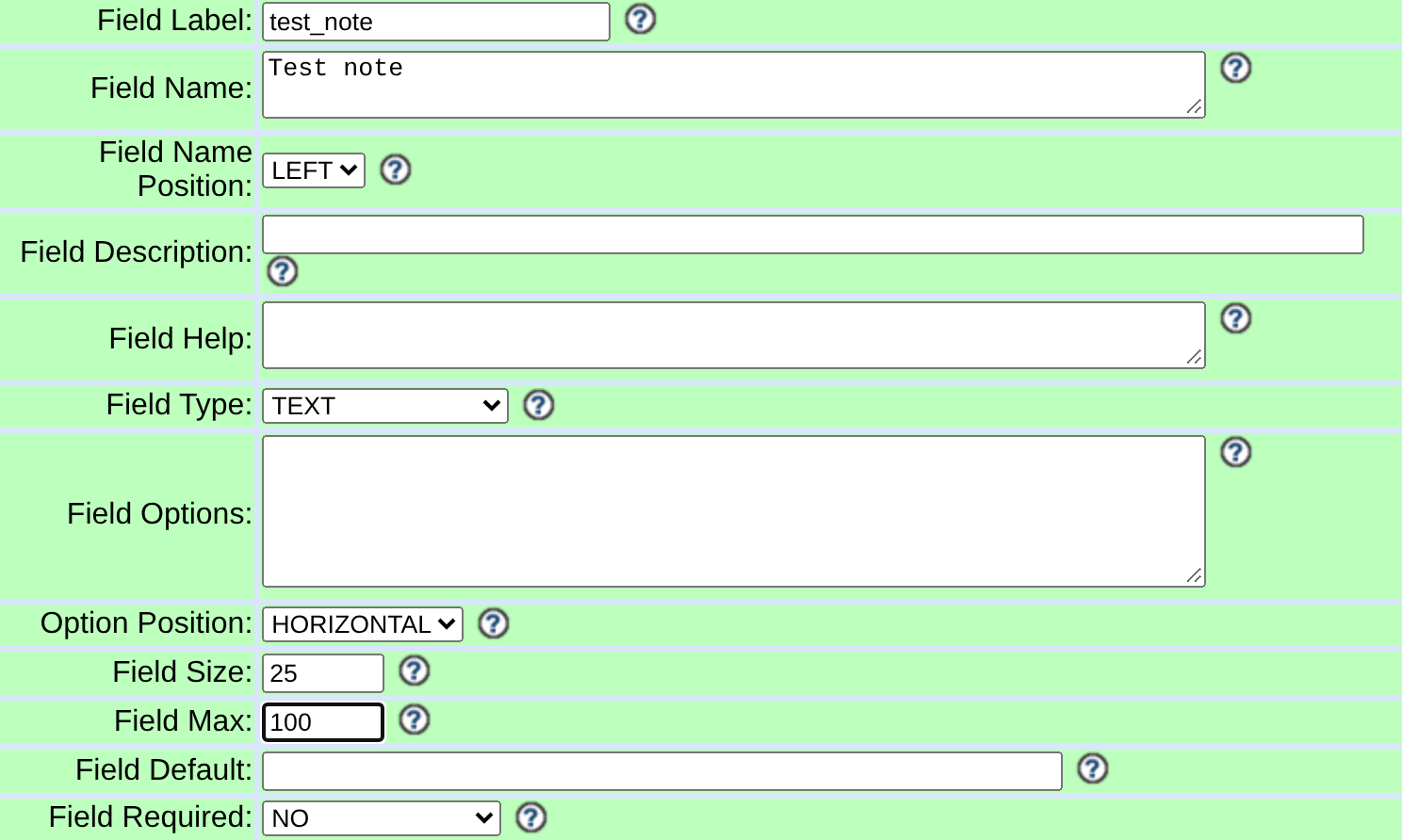
Capture details
Captured on the official public demo, separately from the user-provided lab where custom fields are disabled. These unsaved example inputs did not create a field or table. Actual browser capture, November 4, 2026; VICIdial 2.14-50 build 250307-1057.You should seeAfter saving and reopening your own test field, confirm its label and type. The unsaved public-demo form uses a different build and does not establish that a field was created.
03 / 04
3. Verify the data path
- Open a synthetic test lead in that same list and enter blue in test_note. This value is an example; it has not been saved by this guide.
- Save and reopen the same lead; confirm the value persisted.
- If an API integration needs the value, check the installed API reference for custom-field support and test that specific function against the same record.
You should seeA field visible in Admin does not by itself prove the campaign's Agent form or API is configured to show or update it.
04 / 04
4. If the field is missing
- Confirm the lead belongs to the list whose custom fields you edited.
- Compare field settings, campaign display settings and permissions with the installed custom-fields document.
- Keep the test field until the owner has recorded the results; deleting a field can destroy stored values.
You should seeStop before changing a production list or directly editing its custom table.
Checks and sources
What was checked
- In this lab, custom fields are list-scoped dynamic tables (vicidial_lists_fields plus custom_<list_id>); the feature was present but not enabled at the time of writing.
- No production custom-field rows, credentials, backups or migration result counts were reviewed for this article.
Primary references
Sources
- VICIdial custom fields referenceVICIdial Group · accessed November 4, 2026
- VICIdial demonstrationVICIdial Group · accessed November 4, 2026
- Official custom-field design and feature gateVICIdial Group · accessed November 7, 2026