1. Identify the affected calls
- When investigating a possible recording merge, open Reports → Agent Reports → User Stats for the synthetic agent. Enter the known test date range; confirm the selected user and report timezone. Leave Call status blank unless intentionally filtering one exact code.
- When investigating a possible recording merge, in Outbound Calls for this Time Period, locate the known DATE/TIME, CAMPAIGN, LIST, LEAD and STATUS. Use the inbound section instead for an inbound event. More than one candidate means narrow the known time/scope, not choose by filename.
- When investigating a possible recording merge, in the same user/time scope find the available recording entry/link. If this build/report omits it, ask the report owner to locate the exact synthetic recording with recording_lookup or the bounded metadata read below.
- When investigating a possible recording merge, before opening audio, compare recording start/end, lead and agent with the known test. Keep full URLs and filenames in the private incident record; a link is a reference, not proof of its audio contents.
- Before you use it
- Run separately for each known synthetic lead/user/time window in the verified read-only client. Confirm columns first and preserve private identifiers.
SHOW COLUMNS FROM recording_log;SELECT recording_id,lead_id,user,start_time,end_time,length_in_sec,filenameFROM recording_logWHERE lead_id=12345 AND user='YOUR_SYNTHETIC_USER' AND start_time >= '2026-11-07 00:00:00' AND start_time < '2026-11-08 00:00:00'ORDER BY start_time,recording_id LIMIT 20;This example has no recorded result here. Follow its preparation, expected result and stop conditions before using it.
- Success looks like
- Each known event has a candidate recording identity plus start/end/duration. A shared lead or similar filename does not merge two call identities.
- Stop if
- An absent, open or ambiguous row goes to the report/storage owner before downloading or renaming anything.
Observed recording log columns
Open to enlarge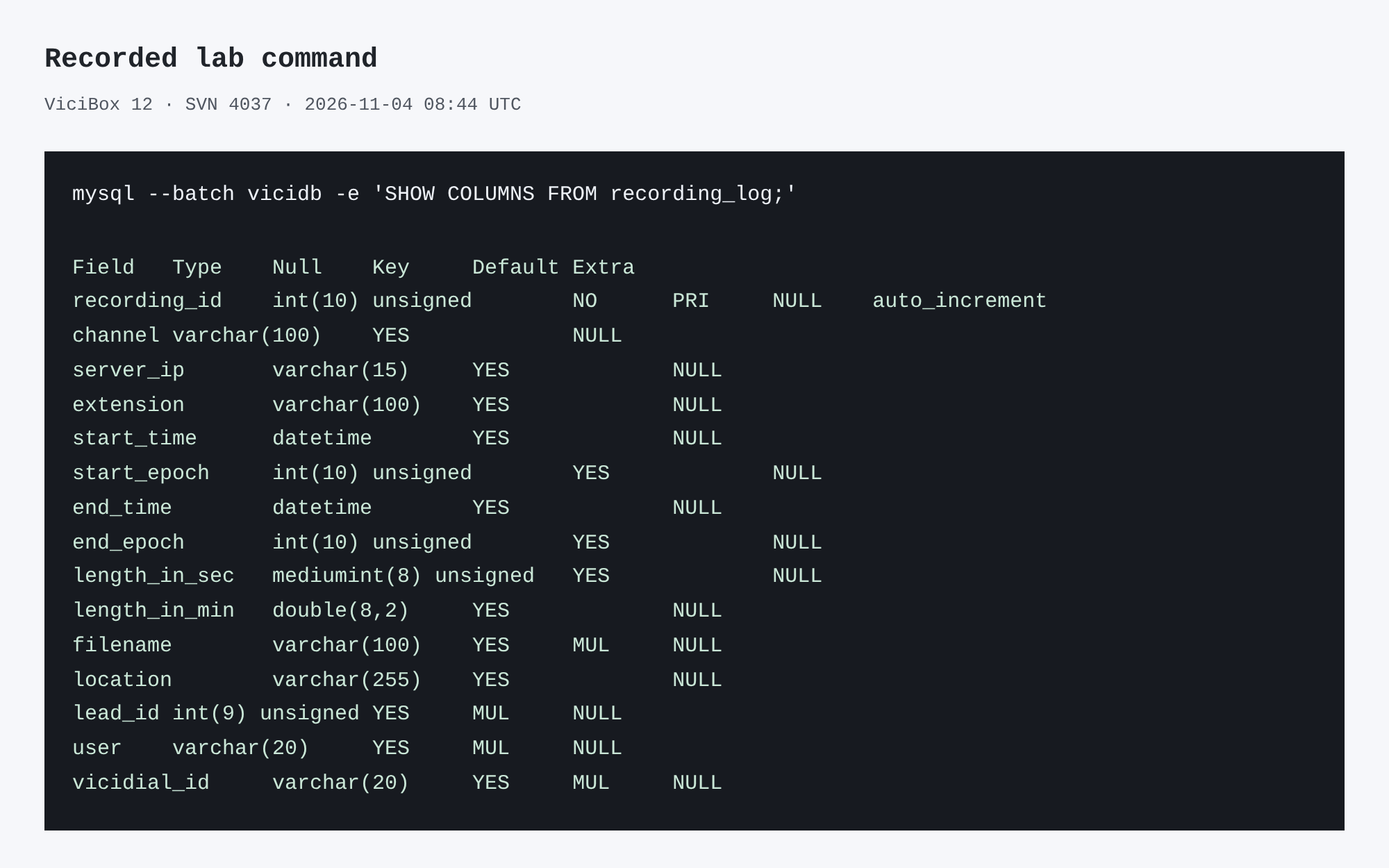
Capture details
This inspection does not establish a completed call or restore.You should seeSeparate call identifiers establish whether the report points to one or several recording references; a filename alone does not prove the audio content.
2. Classify association and audio separately
Preserve each closed original and its privately recorded hash through the storage owner. An authorized reviewer then listens for the two deliberately distinct fictional phrases from controlled callA and callB. Do not relabel files before the comparison.
The table is an invented diagnostic example, not a capture. Two sequential calls test a basic boundary; they do not reproduce an overlap-only incident. If overlap is suspected, hand the owner the original overlap window and request a separately approved two-call overlap test with distinct synthetic phrases, exact start/end times and per-call recording identities. No new calls were placed for this repair.
- Build a private row for each test: opaque call reference, time window, agent/lead, recording_id, file hash and whether phraseA/phraseB is present.
- Compare actual metadata and the reviewed content with the table. A single recording may legitimately span a configured whole-call/session scope; confirm the intended policy first.
- Give the owner the earliest mismatch: report→recording association, recording→closed file, or closed file→audio boundary.
You should seeThe incident is classified by independently matched metadata and authorized content, or remains explicitly unknown with the next evidence owner.
3. Escalate a proposed fix
- Have the system owner trace recording configuration, storage and logs for the identified calls.
- Test any proposed configuration change on the lab first and repeat the same two-call comparison.
- Only schedule a production change after the owner approves its impact and rollback plan.
You should seeDo not assume that a generic setting will resolve every merged or misassociated recording.
Checks and sources
What was checked
- On our ViciBox 12 lab, dialplan show 8309@default runs Answer(), Monitor(wav,${CALLERID(name)}), Wait(3600), Hangup() — VICIdial does not use MixMonitor for this path, and monitorDONE holds format/stage subfolders such as MP3 and ORIG, not one folder per day or campaign.
Primary references
Sources
- VICIdial demonstrationVICIdial Group · accessed November 4, 2026
- VICIdial Quality Control ManualVICIdial Group · accessed November 4, 2026