01 / 05
1. Prepare the identity and destination
Create an inactive disposable list and choose one fictional external key, such as fictional-001. Confirm that the sample number and list ID are safe in your environment; 999 is a placeholder, not a universal test list. Record the planned values before sending anything.
If you need the custom-field exercise, enable the feature and define favorite_color for this test list. A field label is the API parameter name; a label on a different list does not prove this list has the field. Confirm add_lead permissions and the installed reference before the write.
- Use the existing Non-Agent API guide to check your endpoint, build and account access.
- Inspect the test list for the intended phone number and external key; resolve existing matches before proceeding.
- Download the ledger and fill in the request identity, test list and owner. Keep it protected if you later add real operational identifiers.
Recorded API access flag and function allowlist without add_lead
Open to enlarge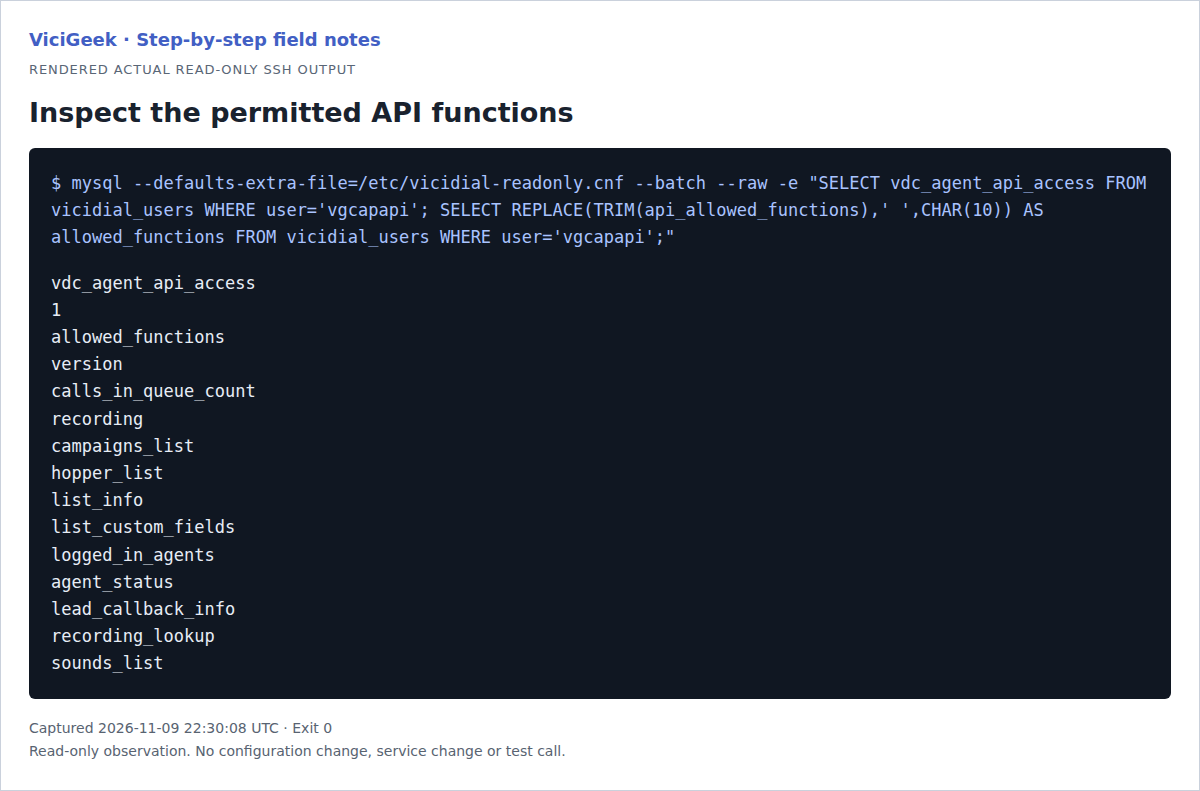
Capture details
This existing capture account’s allowlist does not grant add_lead. No API write or permission change was made.02 / 05
2. Choose duplicate scope and a field mapping
The documented duplicate_check values DUPLIST, DUPCAMP and DUPSYS compare the phone number within the list, its campaign lists or the system respectively. Other options compare alternative phones or combinations of name and phone. Choose deliberately: a shared phone may legitimately belong to multiple contacts, and the right scope depends on the workflow.
DUPLIST is used below only for a disposable list. A phone check is not a general idempotency key, and the documentation does not establish that simultaneous submissions cannot race. vendor_lead_code carries the external key for reconciliation; check whether it is unique in your own integration rather than assuming it is enforced.
03 / 05
3. Construct one reader-run request
This example is not executed here. Use a private host with a trusted certificate and replace the endpoint, account, list and synthetic data. Keep the password out of URLs, shell history, shared logs and the ledger. The example reads it without echo and passes it to curl through standard input, not a command argument or file. The API supports POST parameters; verify the installed version and web server before use.
Run the request once in a subshell with shell tracing disabled. It clears the shell variable on exit; the password still exists briefly in process memory. Capture the response securely because it may contain identifiers.
- Before you use it
- Replace placeholders and confirm the list, field, access and TLS certificate. This sends a real write when run; omit custom_fields and favorite_color if not testing them.
(set +xtrap 'unset API_PASSWORD' EXITread -r -s -p 'API password: ' API_PASSWORD || exit 1printf '\n' >&2printf '%s' "$API_PASSWORD" | curl --fail-with-body --silent --show-error --request POST \ --data-urlencode 'source=roadmap_test' \ --data-urlencode 'user=TEST_API_USER' \ --data-urlencode 'pass@-' \ --data-urlencode 'function=add_lead' \ --data-urlencode 'phone_code=1' \ --data-urlencode 'phone_number=2025550101' \ --data-urlencode 'list_id=999' \ --data-urlencode 'vendor_lead_code=fictional-001' \ --data-urlencode 'duplicate_check=DUPLIST' \ --data-urlencode 'custom_fields=Y' \ --data-urlencode 'favorite_color=blue' \ 'https://YOUR-TEST-HOST/vicidial/non_agent_api.php')This example has no recorded result here. Follow its preparation, expected result and stop conditions before using it.
- Success looks like
- Read every response line and verify the saved record independently; HTTP success alone is insufficient.
- Stop if
- If the request times out or output is incomplete, mark the outcome UNKNOWN and reconcile before another attempt.
04 / 05
4. Interpret the whole response
The reference shows a SUCCESS line for lead creation and separate NOTICE lines for custom-field results. Save a redacted receipt and the returned lead ID. A lead-created line followed by CUSTOM FIELDS NOT ADDED means that the base lead may exist while the custom data still needs investigation; do not create the lead again to fix that field.
A duplicate error is a rejected insertion according to the reference, and includes information about the matched record. Verify the match is the intended record and scope before deciding what to do. A network error or missing response is different: it cannot establish whether a write happened.
- Compare every returned line with your installed reference; record success, duplicate, custom-field notice or unknown separately.
- Open the test lead in the admin interface or use an authorized read-only lookup. Match list, external key and phone; verify the custom value separately.
- If the field is absent, check enablement, list and exact label. Plan any correction as a separately reviewed update to the identified lead.
05 / 05
5. Reconcile a missing or ambiguous result
Mark the ledger UNKNOWN when a response is lost. Independently search the approved scope using the recorded external key, phone and list, and compare all candidate records with the pre-request state. A single confirmed new record with matching values can be recorded as applied; verify the custom field independently.
If the record is absent, first establish that the lookup and its scope are reliable and that no attempt remains in flight. Review the cause and explicitly approve any retry. If multiple candidates, conflicting values or an unavailable lookup prevent a reliable decision, leave the case open for an owner; do not automatically retry or overwrite.
The update_lead reference describes search_method, search_location and no_update=Y, but matching order and default record count matter. A lookup that returns one candidate is not proof of uniqueness. Use the installed documentation and an authorized read-only method, and avoid insert_if_not_found or delete options during reconciliation.
Checks and sources
What was checked
- The official Non-Agent API reference reviewed November 9, 2026 has a November 2, 2026 update date. It documents duplicate_check options, custom-field switches and separate response notices.
- Source inspection of the supplied non_agent_api.php version 2.14-212, build 261101-1200, found POST handling for these parameters, list-scoped duplicate checks and the shown notice formats. The example request and fictional receipts were not run against a VICIdial installation; confirm your own build and permissions.
Primary references
Sources
- VICIdial Non-Agent API referenceVICIdial · accessed November 9, 2026
- VICIdial custom fieldsVICIdial · accessed November 9, 2026