01 / 05
1. Check the endpoint and version
- Ask the administrator for the HTTPS base URL and the Non-Agent API endpoint from this installation.
- Find the version function in the installed NON-AGENT_API.txt. The documented endpoint is /vicidial/non_agent_api.php?function=version.
- From an approved client run curl --fail --show-error 'https://YOUR_HOSTNAME/vicidial/non_agent_api.php?function=version', substituting the verified host. Record the VERSION and BUILD fields.
You should seeThe November 2026 lab returned NonAgentAPI 2.14-212. The documented version function can be called without credentials, so a version response establishes endpoint availability, not authentication or function permissions.
02 / 05
2. Inspect API permissions
- In Admin, open Users → Show Users and open the approved synthetic API user.
- Find Agent API Access and API Allowed Functions. Ask the account owner whether access and the specific user_details function are allowed; inspect the user's level as well.
- Record the settings without sharing the password. Do not change this account solely to make the check pass.
- Agent API Access
- 1 in unsaved exampleThe dated November 4 source checks this flag for authenticated Non-Agent API functions; verify your installed revision.
- API Only User
- 1 in unsaved exampleA separate account restriction, not evidence of API authentication.
- API Allowed Functions
- lead_search in unsaved exampleFor this guide’s user_details test, an account owner must review that function’s actual permission; lead_search alone does not authorize it.
Steps and result5 steps
Actual native VICIdial controls, filled with example values in the browser. This recording stops before submission. Use the field notes to distinguish lab fixtures, missing prerequisites and deployment-specific values.
Entry shownReal native Modify controls with example values entered only in browser state. The form was not submitted; no configuration, route, permission, registration or call was changed.
Read the chapter notes
- Actual native form — not submitted
Real native Modify controls with example values entered only in browser state. The form was not submitted; no configuration, route, permission, registration or call was changed.
- Set the version-scoped API gate
The inspected November 4 source also checks Agent API Access for authenticated Non-Agent API functions. Enter 1 without saving.
- Choose only lead_search
Use the real API Allowed Functions multi-select. No ALL_FUNCTIONS permission and no API request are demonstrated.
- Use an API-only account policy
API Only User 1 illustrates the account setting; it does not establish the full user level, group or function authorization.
- Review the unsaved example
Real native Modify controls with example values entered only in browser state. The form was not submitted; no configuration, route, permission, registration or call was changed.
November 4, 2026 · VICIdial 2.14-969a build 261102-0125. Real native Modify controls with example values entered only in browser state. The form was not submitted; no configuration, route, permission, registration or call was changed. ViciGeek attribution is encoded in the video and poster. Use fullscreen to read the original field labels.
View a still screenshot
Restrict an API example to lead_search
Open to enlarge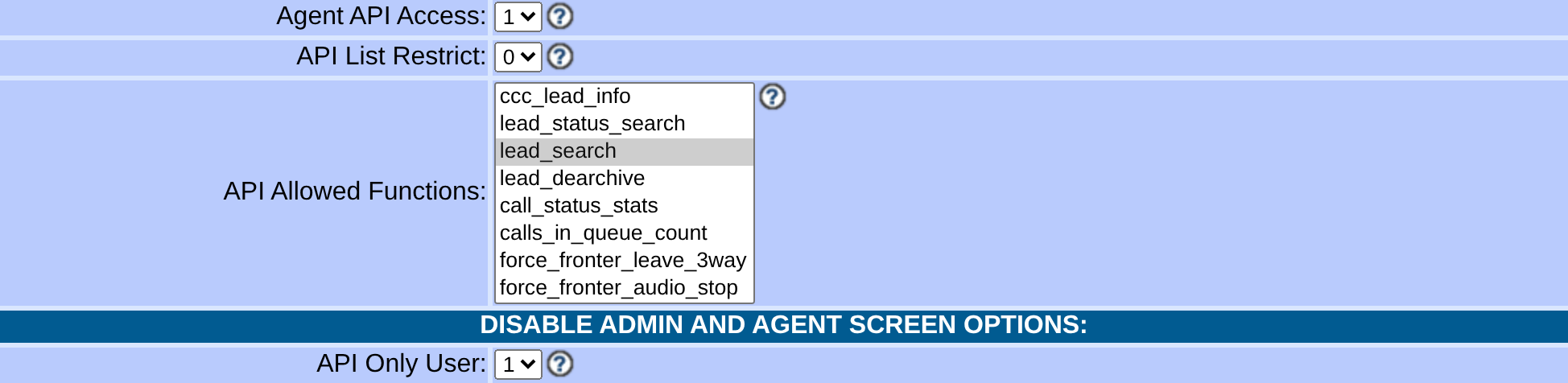
Capture details
The dated November 4 source also checks this API-access flag for authenticated Non-Agent API functions. These unsaved selections do not establish user level, group/list scope, authentication or request success; version is not an allowlist option. Actual browser capture, November 4, 2026; VICIdial 2.14-969a build 261102-0125.You should seeThe current-lab screenshot shows the allowed-functions control on a synthetic account; its displayed selection alone does not prove that a request succeeded.
Sources for this section
- VICIdial dated trunk source archive (November 4, 2026)VICIdial Group · Checked November 4, 2026
03 / 05
3. Check report permission
- On the same user record find View Reports.
- The documented user_details function requires API user level 7 or higher and View Reports enabled, in addition to applicable API function restrictions.
- If access is missing, stop and ask the account owner to review the intended scope rather than broadening privileges yourself.
Steps and result4 steps
Actual native VICIdial controls, filled with example values in the browser. This recording stops before submission. Use the field notes to distinguish lab fixtures, missing prerequisites and deployment-specific values.
Entry shownReal native Modify controls with example values entered only in browser state. The form was not submitted; no configuration, route, permission, registration or call was changed.
Read the chapter notes
- Actual native form — not submitted
Real native Modify controls with example values entered only in browser state. The form was not submitted; no configuration, route, permission, registration or call was changed.
- Allow report viewing in the example
View Reports 1 is an unsaved example on a native user form. The report and user scope must also be authorized.
- Keep export disabled unless needed
Export Reports stays 0 for this example. No report was run or exported.
- Review the unsaved example
Real native Modify controls with example values entered only in browser state. The form was not submitted; no configuration, route, permission, registration or call was changed.
November 4, 2026 · VICIdial 2.14-969a build 261102-0125. Real native Modify controls with example values entered only in browser state. The form was not submitted; no configuration, route, permission, registration or call was changed. ViciGeek attribution is encoded in the video and poster. Use fullscreen to read the original field labels.
View a still screenshot
Review report viewing and export separately
Open to enlarge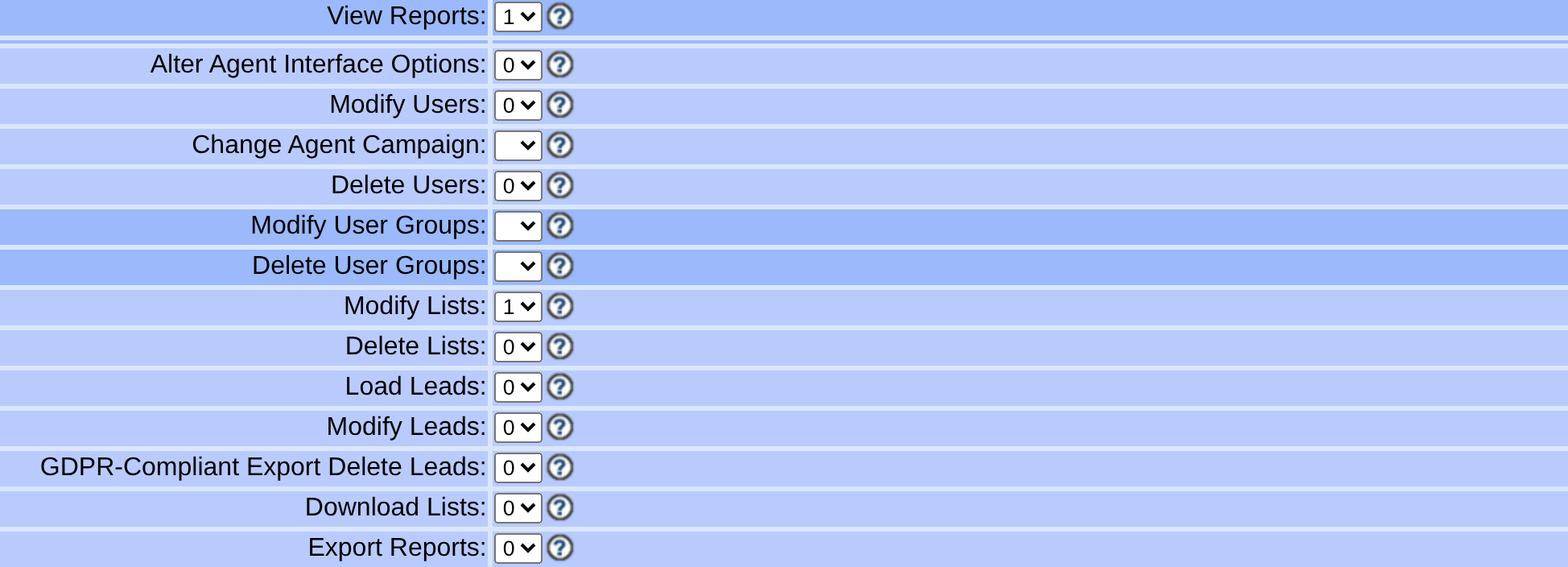
Capture details
No permission was saved, report run or file exported. Neighboring inherited controls do not establish a least-privilege account; review each required function and scope independently. Actual browser capture, November 4, 2026; VICIdial 2.14-969a build 261102-0125.You should seeThe setting is one prerequisite; a response from the protected function is needed to establish that it succeeded.
04 / 05
4. Prepare a single test operation
- For a protected read-only check, find user_details in the installed document. It requires source, API user and password, and agent_user; the API account needs level 7 or higher and View Reports enabled.
- In an owner-readable-only curl config file outside the web root, add data-urlencode = "user=YOUR_API_USER" and data-urlencode = "pass=YOUR_API_PASSWORD" with actual values; do not paste secrets into shell commands. Then run curl --config /secure/api.curl --data-urlencode source=lab --data-urlencode function=user_details --data-urlencode agent_user=TESTUSER --data-urlencode stage=csv --data-urlencode header=YES https://YOUR_HOSTNAME/vicidial/non_agent_api.php, substituting your protected config, synthetic user and verified host.
- Compare the response with the documented CSV fields user, full_name, user_group, user_level and active. This function returns a row rather than a literal SUCCESS; an authentication, permission or USER NOT FOUND error is not a successful check.
- Before you use it
- Store the API user and password as data-urlencode entries in an owner-only curl config outside the web root; verify its owner and mode with stat -c '%U %a %n' /secure/api.curl. Replace the test user and HTTPS host. This example was not executed.
curl --config /secure/api.curl --data-urlencode source=lab --data-urlencode function=user_details --data-urlencode agent_user=TESTUSER --data-urlencode stage=csv --data-urlencode header=YES https://YOUR_HOSTNAME/vicidial/non_agent_api.phpThis example has no recorded result here. Follow its preparation, expected result and stop conditions before using it.
- Success looks like
- A matching CSV row for the synthetic user is a successful protected-function result. The version response alone does not prove this.
- Stop if
- Authentication, permission or USER NOT FOUND errors are not success. The lab's protected probe was denied by account scope; no permission was changed.
You should seeA matching synthetic user row confirms the protected function succeeded with that account. An HTTP 200 by itself does not. Before a separate modifying request, review its parameters and duplicate behavior and use a disposable record.
05 / 05
5. Resolve a failure
- For a connection or TLS failure, check the endpoint name and certificate before considering application permissions.
- For an authentication or authorization error, check the API account and function permissions with its owner.
- For parameter errors, compare spelling and allowed values with the document for the installed revision. Redact credentials and personal data before sharing evidence.
You should seeRetest one request only after identifying the cause; do not expose credentials in a URL pasted into support channels.
Checks and sources
What was checked
- NON-AGENT_API.txt's header states Updated: 2025-07-18; its own 59 dashed function-detail sections outnumber its top-of-file summary list by one — update_log_entry has a full detail section but is missing from that summary, a gap in VICIdial's own document.
- phone_number_log is a function, not a table: the official document's own warning is that the phone_number field is not indexed by default on the vicidial_log and vicidial_closer_log tables that function actually queries.
- Custom fields are scoped to one list: definitions live in `vicidial_lists_fields` and values live in a dynamically created `custom_<list_id>` table, with up to 255 fields and one field set per list ID.
- Report and API access can itself be logged — run_time logging of API functions, optional logging of all non-admin.php requests (enabled in options.php), and URL/IP logging are three separate, dated additions to the shipped source, each configurable per install rather than on by default.
Primary references
Sources
- VICIdial Non-Agent API referenceVICIdial Group · accessed November 4, 2026
- VICIdial demonstrationVICIdial Group · accessed November 4, 2026
- VICIdial dated trunk source archive (November 4, 2026)VICIdial Group · accessed November 4, 2026