01 / 03
1. Prepare the list and CSV
These steps target VICIdial Admin 2.14-969a, SVN 4037 / database schema 1748. Substitute unused IDs for LAB01, LABTEAM, learner1, 8001, 90001, SALESDEMO and DEMOIVR if any already exist. Labels and options may differ on other builds. The configuration checks below do not establish that a call, audio, or carrier route has been tested.
The real browser recording uses the fifth-generation loader on SVN 4037. The practice file has three rows and no header; all three fictional contacts share 9001001. No call is placed.
- Open Lists → Show Lists → 90001 and confirm Campaign is LAB01 and Active is Y. Keep campaign LAB01 inactive for this import demonstration.
- Download vicidial-practice-leads.csv below. Its columns are phone_number, phone_code, first_name, last_name and vendor_lead_code, with no header row.
- Confirm the destination list is empty before this first load. If the three practice records are already present, inspect them rather than importing again.
- List ID
- 90001
- phone_number / phone_code
- 9001001 / 1
- Practice records
- Test One, Test Two and Test Three; BEGINNER-01 through BEGINNER-03
You should seeList 90001 belongs to LAB01 and the file has three fictional data rows without a header.
02 / 03
2. Upload and map fields
The recording shows the actual file selection, two loader submissions and saved result. Field positions differ between loader versions; use the visible field names.
- Open Lists → Load New Leads and choose vicidial-practice-leads.csv in Load leads from this file.
- Select 90001 - Practice list in List ID Override. Set Phone Code Override to Load from Lead File, File layout to use to Custom layout, and Attempt column auto-detection to No.
- For this three-row synthetic file, choose NO DUPLICATE CHECK, NO USACAN VALID CHECK and DISABLED for Required Phone Number Length. Disabling the duplicate check preserves the three different fictional contacts that share one internal number.
- Click SUBMIT to open the mapping screen. Map Phone Number to column 1 (9001001), Phone Code to column 2 (1), First Name to column 3 (Test), Last Name to column 4 (One), and Vendor Lead Code to column 5 (BEGINNER-01). Leave unused fields unmapped.
- Review the mapping; this file has no header row to skip. Click OK TO PROCESS once and read the actual Load Summary.
Steps and result17 steps
Follow the real file selection, list override, five column mappings, OK TO PROCESS, Load Summary, list count and a saved lead.
Observed resultThe real Load Summary reports Good 3, Bad 0, Total 3. List 90001 contains the three fictional contacts, and the saved record fields were checked. No call was placed.
Read the chapter notes
- Open the actual lead loader
This recording uses the fifth-generation VICIdial loader and the downloadable three-row practice CSV.
- Choose the practice CSV
Select the real three-row practice file. It has no header row and contains only fictional records.
- List ID Override → 90001
Select 90001 - Practice list. Its Campaign is LAB01, which remains inactive.
- Read Phone Code from the file
Select Load from Lead File for Phone Code Override so the CSV’s second column can be mapped.
- Choose Custom layout
Select Custom layout and No for automatic column detection.
- Set the synthetic-lab checks
For this file only: NO DUPLICATE CHECK, NO USACAN VALID CHECK and disabled phone-length checking. All three fictional contacts share one internal number.
- Upload and inspect the columns
Click SUBMIT to upload the CSV and open the real mapping screen.
- Vendor Lead Code → column 5
Select the preview value BEGINNER-01 for Vendor Lead Code.
- Phone Number and Phone Code
Map Phone Number to 9001001 from column 1, then Phone Code to 1 from column 2.
- First Name and Last Name
Map First Name to Test from column 3 and Last Name to One from column 4.
- Review before processing
Check the mapped values. The file has no header row to skip, and the destination list is 90001.
- Click OK TO PROCESS once
Submit the mapped file once to insert the synthetic records.
- Read the real loader result
Inspect the actual inserted, rejected and duplicate counts before leaving the result screen.
- Confirm list 90001 in LAB01
Reopen the actual list and check Campaign LAB01 and Active Y.
- Click the real lead count: 3
The saved list contains three leads. Click its count to open the filtered search.
- Inspect the saved fictional leads
The filtered search shows Test One, Test Two and Test Three in list 90001.
- Open an actual saved lead
Check the record’s list, number, phone code, name and vendor code. These are persisted values, not an illustration.
November 4, 2026 · VICIdial Admin 2.14-969a · SVN 4037. Synthetic lab records; campaign LAB01 stays inactive. ViciGeek watermark is burned into the recording. Use fullscreen to read the original field labels.
View a still screenshot
Lead loader
Open to enlarge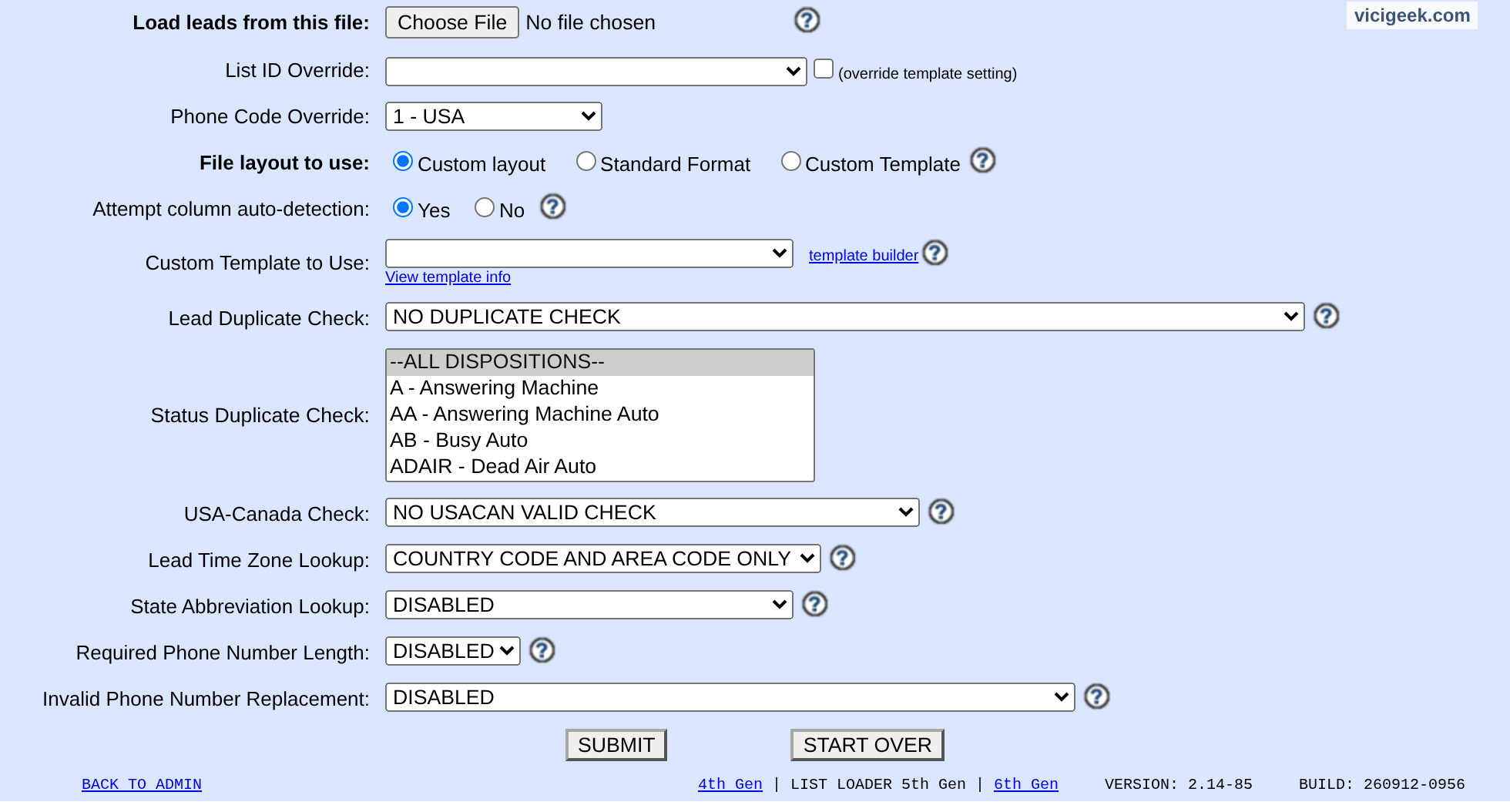
Capture details
Sensitive selections were cleared or set to an existing generic option in browser state only; no form was submitted. ViciGeek attribution appears at the top.You should seeThe recorded first import reports Good 3, Bad 0, Total 3. If a field or count differs, inspect the file and existing leads before retrying.
03 / 03
3. Verify the saved leads
An import result establishes ingestion. It does not establish dial eligibility, registration, audio or a completed call.
- Reopen list 90001 and check Campaign LAB01, Active Y and the lead count of 3.
- Click the lead count to open its filtered search. Inspect Test One, Test Two and Test Three and their vendor lead codes.
- Open one lead and check list_id 90001, phone_number 9001001 and phone_code 1. Keep the campaign inactive until a separate authorized call test is ready.
Steps and result4 steps
Actual native VICIdial controls, filled with example values in the browser. This recording stops before submission. Use the field notes to distinguish lab fixtures, missing prerequisites and deployment-specific values.
Entry shownOnly native lead-search inputs were filled with synthetic practice values. No search was submitted, and this recording does not demonstrate returned or matching lead rows.
Read the chapter notes
- Actual native form — not submitted
Only native lead-search inputs were filled with synthetic practice values. No search was submitted, and this recording does not demonstrate returned or matching lead rows.
- Use the practice CSV vendor code
The vendor code comes from the downloadable synthetic practice CSV. It is not a real customer identity.
- Scope to the practice list
List ID 90001 is the saved practice list. This search is not submitted and no matching result is claimed.
- Review the unsaved example
Only native lead-search inputs were filled with synthetic practice values. No search was submitted, and this recording does not demonstrate returned or matching lead rows.
November 4, 2026 · VICIdial Admin 2.14-969a build 261102-0125. Only native lead-search inputs were filled with synthetic practice values. No search was submitted, and this recording does not demonstrate returned or matching lead rows. ViciGeek attribution is encoded in the video and poster. Use fullscreen to read the original field labels.
View a still screenshot
Enter practice lead search filters
Open to enlarge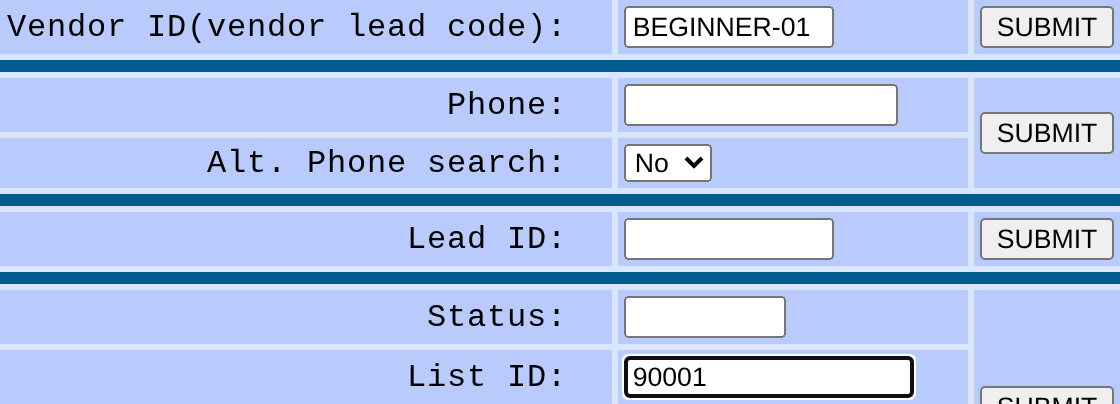
Capture details
Only inputs are shown. This crop does not establish a combined query or its matching rules, and no search was submitted. Use returned authorized rows to verify the separate saved import. Actual browser capture, November 4, 2026; VICIdial Admin 2.14-969a build 261102-0125.You should seeVerify the three fictional leads using the actual loader report, list count and authorized lead records. The separate unsent search-form example shows criteria only; do not re-import to fix an unexplained discrepancy.
Checks and sources
What was checked
- These steps target VICIdial Admin 2.14-969a, SVN 4037 / database schema 1748. Substitute unused IDs for LAB01, LABTEAM, learner1, 8001, 90001, SALESDEMO and DEMOIVR if any already exist. Labels and options may differ on other builds. The configuration checks below do not establish that a call, audio, or carrier route has been tested.
- Admin form captures are visual orientation only; no live call, audio, or carrier drill was performed for this guide.
Primary references
Sources
- VICIdial source and documentationVICIdial · accessed November 4, 2026
- VICIdial Non-Agent API referenceVICIdial · accessed November 4, 2026
- VICIdial statuses referenceVICIdial · accessed November 4, 2026