01 / 05
1. Identify the database and version
- Ask the administrator for the database name and a least-privilege read-only connection; do not assume the name is asterisk.
- In the SQL client run SELECT DATABASE(), VERSION(); and confirm the selected database with the administrator.
- Inspect the installed application and schema versions in Admin → System Settings or with your administrator's version inventory.
- Before you use it
- Use a read-only account configured for the lab database. Substitute your own database name on another system.
mysql --batch --skip-column-names vicidb -e 'SELECT db_schema_version FROM system_settings;'Captured demo response · 2026-11-04T08:36:24.038361Z. Any filtering, hidden values or test-only data are identified in the capture label. Select Replay transcript to read the recorded output.
- Success looks like
- The lab returned 1748 at 08:36 UTC on November 4, 2026.
- Stop if
- Check the actual database name and read privileges; do not assume a missing result means schema 1748.
Observed database schema version
Open to enlarge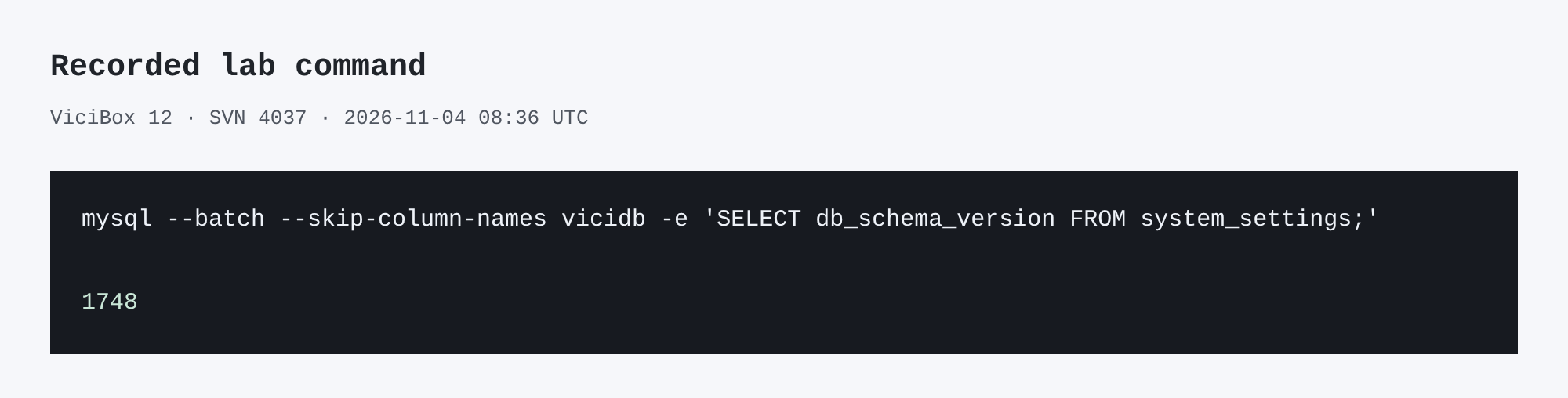
Capture details
This inspection does not establish a completed call or restore.You should seeThe selected name and server version identify the instance you are inspecting. In the November 2026 lab the configured database was vicidb; that is an observation, not a universal default.
02 / 05
2. Inspect tables and engines
- Run SHOW TABLES; to see the tables present in this database.
- Run SELECT TABLE_NAME, ENGINE FROM information_schema.TABLES WHERE TABLE_SCHEMA = DATABASE() ORDER BY TABLE_NAME;.
- Run DESCRIBE vicidial_list; and DESCRIBE vicidial_lists; before writing a query against either table.
You should seeThe live column definitions and engine values are authoritative for this installation. A missing table or denied query means stop and check the selected database and grants.
03 / 05
3. Trace one test lead
- In Lists → Show Lists open the disposable list and privately record its List ID. In authorized lead search open one known synthetic lead and record its Lead ID.
- Open the verified read-only client: sudo mysql --defaults-file=/etc/vicidial-readonly.cnf. Check SELECT CURRENT_USER(), DATABASE(); before any query.
- Inspect the columns, then replace12345,90001 and the date bounds in the query below. Use the test’s actual database/report timezone and an inclusive start/exclusive end.
- Read the lead/list/campaign result first. Read outbound vicidial_log and inbound vicidial_closer_log separately; one lead can have several attempts and not every call path writes the same source.
- Compare the candidate event with the independently known test time, campaign/list and saved disposition in User Stats. An empty result is a scoped observation, not proof that no call happened elsewhere. Type quit when finished.
- Before you use it
- Enter in the verified read-only SQL client, not a shell. Replace the fixture IDs/date window and confirm every selected column exists on this build. Keep record-level results private.
SHOW COLUMNS FROM vicidial_list;SHOW COLUMNS FROM vicidial_lists;SHOW COLUMNS FROM vicidial_log;SHOW COLUMNS FROM vicidial_closer_log; SELECT l.lead_id,l.list_id,l.status AS current_lead_status,ls.campaign_idFROM vicidial_list AS l JOIN vicidial_lists AS ls ON ls.list_id=l.list_idWHERE l.lead_id=12345 AND l.list_id=90001; SELECT uniqueid,lead_id,list_id,campaign_id,call_date,status,length_in_secFROM vicidial_logWHERE lead_id=12345 AND list_id=90001 AND call_date >= '2026-11-07 00:00:00' AND call_date < '2026-11-08 00:00:00'ORDER BY call_date,uniqueid LIMIT 20; SELECT closecallid,lead_id,list_id,campaign_id,call_date,status,length_in_secFROM vicidial_closer_logWHERE lead_id=12345 AND list_id=90001 AND call_date >= '2026-11-07 00:00:00' AND call_date < '2026-11-08 00:00:00'ORDER BY call_date,closecallid LIMIT 20;This example has no recorded result here. Follow its preparation, expected result and stop conditions before using it.
- Success looks like
- The lead maps to one expected list/campaign; each history source returns zero or bounded candidate events. Match a known event independently rather than picking the latest row.
- Stop if
- Stop on wrong identity, schema differences, denied reads, timezone uncertainty or20 rows indicating the small scope may be truncated. Ask the report owner for archive coverage before widening the query.
You should seeThe current lead relationship and each selected history source have been checked independently; current lead status is not substituted for a call’s recorded outcome.
04 / 05
4. Check custom data separately
- Open the test list's Custom Fields screen and note the list ID and field labels.
- Run SHOW TABLES; and find the exact table name for your verified numeric test list ID. For example, only if custom_90001 is present, run DESCRIBE custom_90001;.
- Compare the installed schema with the official custom-fields document before integrating.
You should seeCustom fields are list-specific. Never infer that another list has identical columns or write directly to a table merely because it exists.
05 / 05
Recorded lab terminal checks
Recorded lab checks were run against the synthetic demo on November 4, 2026. These read-only observations supplement the configuration steps above; they do not establish that a call, route, recording or report workflow succeeded.
Recorded lab observation: List 90001 was active and associated with LAB01; active list does not override inactive campaign.
Recorded lab observation: Three synthetic lab leads were NEW. Status counts do not prove eligibility, successful dialing or lead handling.
Recorded lab observation: Schema metadata only; no application behavior tested.
Recorded lab observation: The hopper relation columns result describes the installed schema, not a completed workflow.
- Before you use it
- These historical commands were captured in a root shell using database vicidb and /etc/vicidial-readonly.cnf. The private client file in Create a read-only database account for safe VICIdial queries is root-owned with mode 0600: use the approved root context from that guide, or invoke mysql through sudo as it describes. A regular user cannot read that file. On your own server use your authorized connection and test campaign/list IDs; changed commands are not this exact capture. Do not print the credential file.
mysql --defaults-extra-file=/etc/vicidial-readonly.cnf --batch vicidb -e "SELECT list_id, campaign_id, active FROM vicidial_lists WHERE list_id=90001 AND campaign_id='LAB01';"mysql --defaults-extra-file=/etc/vicidial-readonly.cnf --batch vicidb -e "SELECT status, COUNT(*) AS lead_count FROM vicidial_list WHERE list_id=90001 GROUP BY status ORDER BY status;"mysql --defaults-extra-file=/etc/vicidial-readonly.cnf --batch vicidb -e "SHOW COLUMNS FROM vicidial_list LIKE 'list_id';"mysql --defaults-extra-file=/etc/vicidial-readonly.cnf --batch vicidb -e "SHOW COLUMNS FROM vicidial_hopper WHERE Field IN ('campaign_id','list_id','status');"Captured demo response · 2026-11-04T22:37:48.369112Z. Any filtering, hidden values or test-only data are identified in the capture label. Select Replay transcript to read the recorded output.
- Success looks like
- Compare the returned rows with the specific task and capture time. An empty result or zero count is an observation to explain, not a complete diagnosis or evidence of a working call.
- Stop if
- For a connection, permission, schema or missing-test-ID error, check the approved client configuration and installed version first. Do not broaden permissions or change production data to match this demonstration.
Recorded lab terminal: lab list
Open to enlarge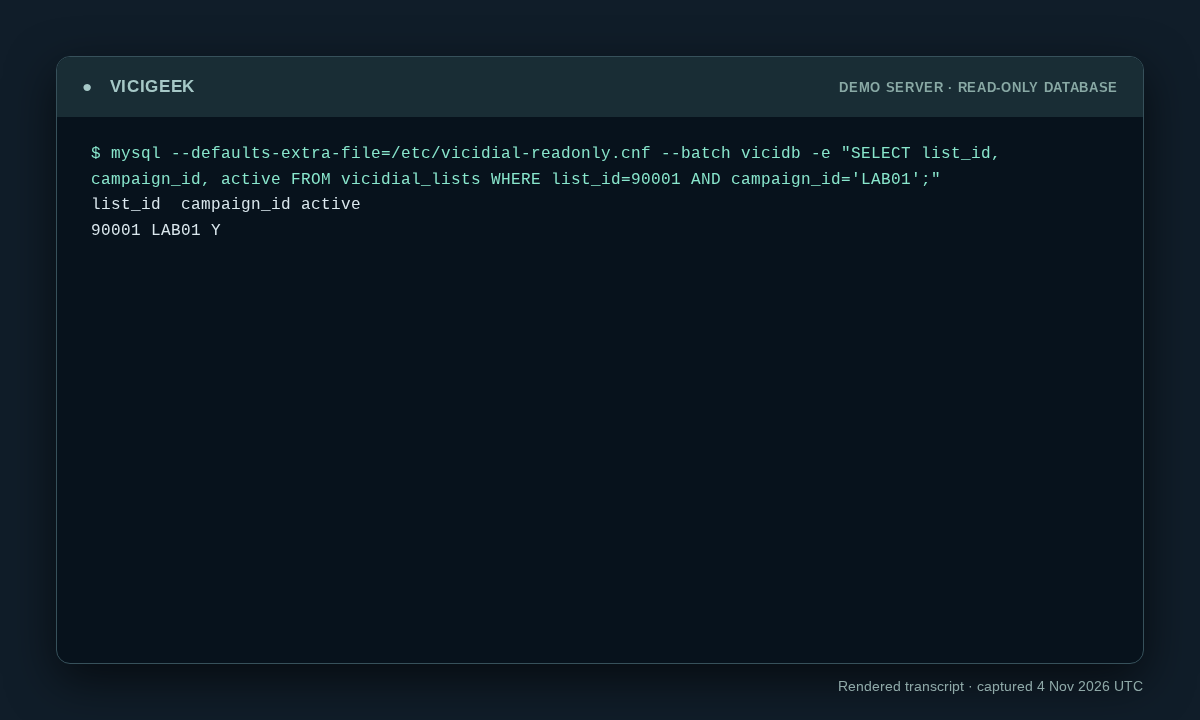
Capture details
Read-only observation, not a completed call or routing test. Display trims blank space; enlargement opens the complete original. SSH client post-quantum warning on stderr omitted; SQL stdout preserved. Aggregate counts or schema only; no customer rows.Recorded lab terminal: lab list status counts
Open to enlarge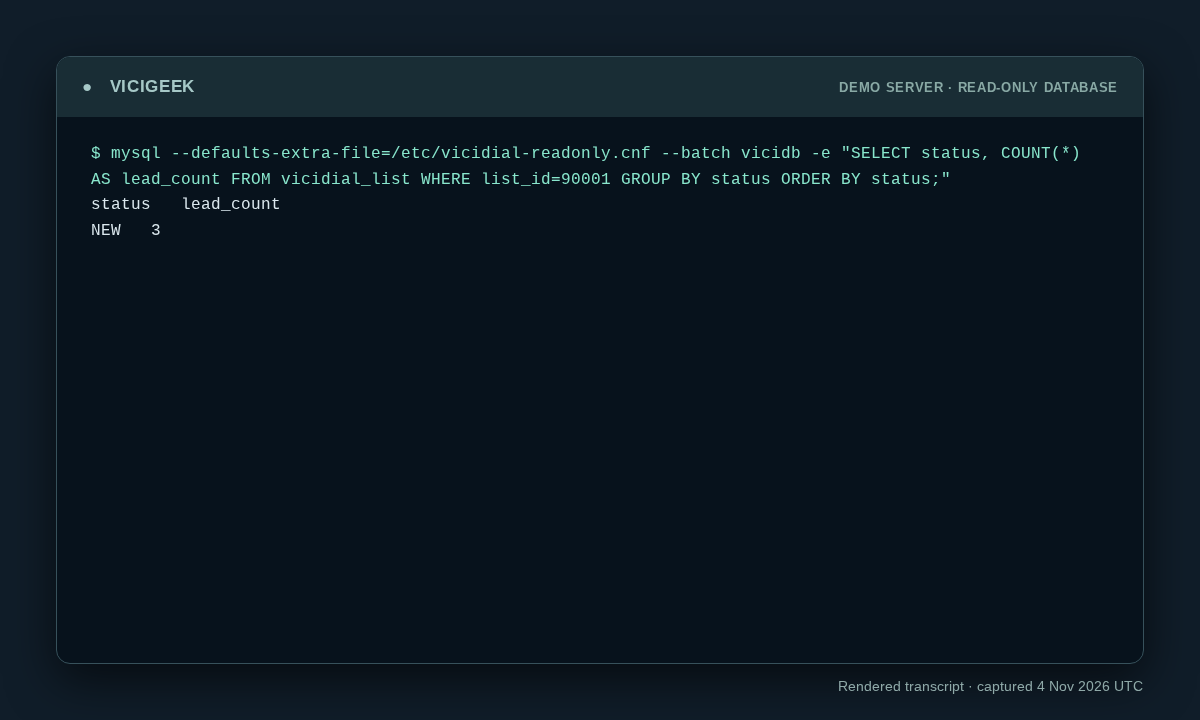
Capture details
Read-only observation, not a completed call or routing test. Display trims blank space; enlargement opens the complete original. SSH client post-quantum warning on stderr omitted; SQL stdout preserved. Aggregate counts or schema only; no customer rows.You should seeThe recorded lab command and output show exactly what the demo returned. Use the original workflow’s separate end-to-end acceptance checks before declaring success.
Checks and sources
What was checked
- Table/column inspections and the retained November 4 lab captures establish that installation’s schema and synthetic counts only.
- The new lead/history queries are unexecuted templates with explicit IDs, timezone and source limits; no matching event is invented.
- Custom-field tables remain list-specific. Installed definitions and the report owner determine archive coverage; this page does not claim a universal object count or callback-queue identity.
Primary references
Sources
- VICIdial custom fields referenceVICIdial Group · accessed November 4, 2026
- VICIdial Non-Agent API referenceVICIdial Group · accessed November 4, 2026
- MariaDB information_schema tablesMariaDB · accessed November 4, 2026