ISO or scratch: which route fits your installation?
For a first VICIdial lab, the official ViciBox ISO plus the single-server Express path provides the clearest vendor-documented starting point. The ISO installs a prepared operating system; Express then configures the database, web and telephony roles. Select a release only after checking its current lifecycle and the vendor’s security guidance.
Build from source on an existing Linux system when you have an explicit platform requirement, an experienced maintainer, a pinned compatibility plan and a way to test the complete stack. The current source includes install.pl, but that file is not a turnkey operating-system, database and telephony installer.
A hosted installation or provider-managed deployment is another way to obtain VICIdial, but its access, patching, backup and support contract belongs to that provider; it is not a third official ISO.
Sources for this section
- ViciBox downloads and release statusViciBox · Checked November 4, 2026
- ViciBox 12 Express BoxViciBox · Checked November 4, 2026
- ViciBox 13 Beta4 ExpressViciBox · Checked November 4, 2026
- Official nightly VICIdial trunk snapshotsVICIdial Group · Checked November 4, 2026
Version check: what the official sources say on November 4, 2026
The ViciBox download page still calls 12.0.2 its current stable release and lists 13.0.0-beta4 as a release candidate. Its planned October 31 release date has passed, but the listing alone does not confirm that a final 13 release shipped. Recheck the download page and ask the vendor which image and support arrangement are approved for a new deployment.
Official release labels checked on November 4, 2026
Open to enlarge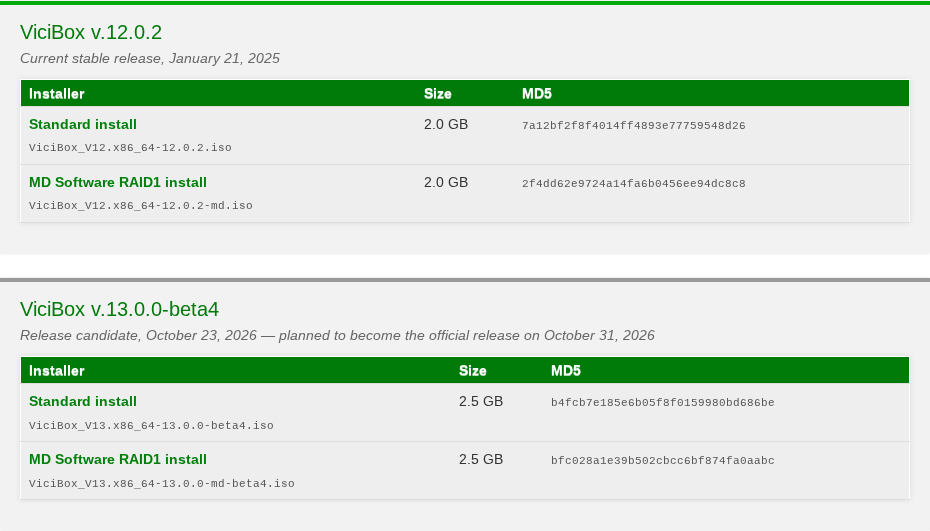
Capture details
It shows the vendor’s published release labels and download choices; it is not an installation screen or evidence that either release was installed. Source: www.vicibox.com.Sources for this section
- ViciBox downloads and release statusViciBox · Checked November 4, 2026
- ViciBox Server 12.0.2 build detailsViciBox · Checked November 4, 2026
- Leap 15.6 end of lifeopenSUSE · Checked November 4, 2026
- Asterisk release lifecycleAsterisk · Checked November 4, 2026
- ViciBox 13 Beta4 manual and differencesViciBox · Checked November 4, 2026
- Official nightly VICIdial trunk snapshotsVICIdial Group · Checked November 4, 2026
Compare the actual work
Sources for this section
- ViciBox 12 Phase 1ViciBox · Checked November 4, 2026
- ViciBox 12 Express BoxViciBox · Checked November 4, 2026
- ViciBox 13 Beta4 ExpressViciBox · Checked November 4, 2026
- Official nightly VICIdial trunk snapshotsVICIdial Group · Checked November 4, 2026
Prepare before choosing an image
- Choose an isolated x86_64 lab or approved target with console access, adequate storage and a named recovery owner. Check the current release’s hardware guidance against expected simultaneous calls and recording retention; do not treat an agent-count rule as a capacity guarantee.
- Identify the exact target disk and verify backups or replacement media for anything on it. ISO installation erases the selected target; stop if disk identity or ownership is uncertain. Standard and MD RAID images have different disk arrangements.
- Plan the server’s hostname, static address, gateway, DNS, time zone, restricted administration path and certificate name; decide how the server reaches authorized update repositories. Confirm the address will remain appropriate when VICIdial is configured.
- Record the chosen image, checksum, release notes, support status and network layout. Verify the published checksum before writing installation media; an MD5 check detects accidental corruption but is not by itself independent publisher authentication.
- For an existing service, document a tested backup and rollback decision before the change window. A clean rebuild is not an automatic recovery of databases, recordings, custom code or credentials.
- Example scope
- One isolated server; all three roles togetherThis article compares single-server paths. Cluster installation and migrations need their own reviewed design.
- Record before disk selection
- Console access, disk model/identifier and recovery decisionUse the actual approved target. Do not reuse a disk just because it is the only one the installer lists.
- Record before Phase 2
- Hostname, assigned static address, gateway, DNS and time zoneUse a real network plan. A generic package or role name is not a valid value for these fields.
Sources for this section
- ViciBox 13 Beta4 installation mediaViciBox · Checked November 4, 2026
- ViciBox 12 Phase 1ViciBox · Checked November 4, 2026
- ViciBox 13 Beta4 Phase 1ViciBox · Checked November 4, 2026
- ViciBox 13 Beta4 backup scopeViciBox · Checked November 4, 2026
ISO journey: boot and install the base system
- Download the vendor’s Standard or MD image for the approved release and verify it using the accompanying checksum. Write it to install media using the release’s instructions; writing the media also replaces the selected USB device contents.
- Boot the target using its console or virtual-media interface. Choose Install ViciBox, identify the destination disk from the installer and stop if it is not the approved empty target. Confirming installation erases that disk.
- Complete first boot: choose locale, keyboard and time zone, set a new root password, and address any version-specific network or RAID prompts. Remove the installer and reboot as the applicable manual directs.
- Checkpoint: the system boots from the intended disk and you can reach the correct console. This confirms the base OS booted; VICIdial’s database, web and telephony roles have not yet been established merely by Phase 1.
You should seeAt the console, the chosen hostname appears after booting from the intended disk. This is the base-system checkpoint; continue with network preparation before calling the application installed.
ViciBox 12 Phase 1 lab checklist
Sources for this section
- ViciBox 12 Phase 1ViciBox · Checked November 4, 2026
- ViciBox 13 Beta4 Phase 1ViciBox · Checked November 4, 2026
- ViciBox 13 Beta4 installation mediaViciBox · Checked November 4, 2026
ISO journey: network and security before VICIdial
- Apply the approved fixed network configuration and verify address, gateway, DNS and time synchronization from the console. On 12 follow the 12.0 Phase 1.5 workflow; on 13 Beta4 the ViciBox Manager supplies Network Setup.
- Apply the release-specific security advisories and updates under the approved change procedure. Keep management access restricted; the 12 PHP advisory specifies a minimum fixed PHP version, not a blanket statement that every other component is supported.
- Decide the trusted HTTPS name and certificate and review the firewall rules needed by the intended clients and carrier. Do not expose the default administrative login publicly while preparing the server.
You should seeThe server has its assigned address, a working route and DNS, correct time, and restricted management access. Failed repository or security-update checks remain open items.
Sources for this section
- ViciBox 12 Phase 1.5ViciBox · Checked November 4, 2026
- ViciBox 13 Beta4 manual and differencesViciBox · Checked November 4, 2026
- ViciBox 12 PHP security advisoryViciBox · Checked November 4, 2026
- ViciBox 13 Beta4 SSL guidanceViciBox · Checked November 4, 2026
ISO journey: install Express for the selected release
Express installs the three roles on one server. The manual’s small-deployment guidance is a starting point, not a measured guarantee for your workload. These are different release-specific interfaces; do not copy one version’s commands into the other.
- For ViciBox 12.0, the official Express manual starts from a root console with vicibox-express, asks for confirmation, and directs a reboot after the command completes. Follow the linked 12.0 manual and current advisory rather than assuming the old ISO’s package set is sufficient.
- For ViciBox 13.0.0-beta4, start the vicibox Manager, choose Install Express, review the detected network and summary, confirm Install, and reboot after Finished. This flow is documented for that beta, not verified here on a final release.
- After reboot allow startup to settle. The 12 manual suggests checking screen sessions and connecting to the Asterisk console; the 13 manual uses the Manager’s Services panel and Asterisk console. Session counts and process names vary with roles and version: investigate a missing service, not a fixed count in isolation.
- Open the trusted Administration entry point, follow Initial Setup and replace the documented default administrative credentials immediately. Verify certificate trust and the effective firewall policy before permitting remote users.
You should seeAfter the installation’s startup checks, Administration opens at the intended address; complete Initial Setup and replace the default credentials. This verifies an application entry point, not a working carrier, agent station or call.
ViciBox 12 Express lab and first verification
Sources for this section
- ViciBox 12 Express BoxViciBox · Checked November 4, 2026
- ViciBox 13 Beta4 ExpressViciBox · Checked November 4, 2026
- ViciBox 12 PHP security advisoryViciBox · Checked November 4, 2026
- ViciBox 13 Beta4 SSL guidanceViciBox · Checked November 4, 2026
Scratch journey: what the operator must assemble
The official source archive is real and current, but its top-level INSTALL still refers readers to 2010-era SCRATCH_INSTALL, BASE_INSTALL and REQUIREMENTS documents. SCRATCH_INSTALL itself says it was to be unsupported after version 2.2.0. Those files explain historical architecture; their old operating-system, Asterisk, PHP, database, commands and public defaults are not a current compatibility matrix.
The November 4, 2026 official nightly archive’s current install.pl identifies itself as version 2.14. Its help says it reads existing configuration or prompts, then copies application files; it also advertises role-specific file-copy options. Although the help advertises --test as not copying files, inspection shows its test flag is not subsequently checked: do not treat it as a dry run. That is useful source evidence, but it does not establish that the script installs every OS package, initializes a matching schema or secures an entire server.
- Pin a VICIdial revision and agree an exact supported combination of OS, repository, Asterisk/VICIdial patches and SIP driver, database, PHP, web server and Perl dependencies with the maintainer or vendor. If no current supported combination and patch source can be established, stop before building a production service.
- Prepare the OS, accounts, time, DNS, host firewall, storage, database and web runtime for the approved roles. Provision Asterisk and required timing, conference, audio and media components according to that version’s supported build; an upstream Asterisk install alone is not a complete VICIdial install.
- Obtain the pinned official source, inspect its INSTALL, install.pl, version-specific notes, sample configurations, database creation and upgrade files. Record the exact sources and versions; do not treat an archive filename or copied defaults as proof of compatibility.
- Using the approved release-specific procedure, provision the matching database schema and least-privilege service credentials, application paths, web files, AGI scripts, generated dialplan, sounds, scheduled jobs and long-running processes. Review the actual script and file destinations before running it; preserve existing configuration.
- Start and inspect each role under the approved plan, then perform the same web, telephony and backup acceptance checks as the ISO path. If a required step cannot be verified from current source or vendor documentation, treat the build as an engineering gap rather than silently borrowing a 2010 command.
Sources for this section
- Official nightly VICIdial trunk snapshotsVICIdial Group · Checked November 4, 2026
- VICIdial 2010 scratch installation documentVICIdial Group · Checked November 4, 2026
- VICIdial 2010 base installation documentVICIdial Group · Checked November 4, 2026
- VICIdial PJSIP support notesVICIdial Group · Checked November 4, 2026
- Asterisk release lifecycleAsterisk · Checked November 4, 2026
- Inspected VICIdial trunk archive, November 4, 2026VICIdial Group · Checked November 4, 2026
Scratch installation checklist: files, services and ownership
Use the dated source tree as an inventory, then match it to the maintainer’s approved build procedure. The paths below were inspected in the November 4, 2026 archive; they are source locations and script defaults, not proof that your installed host uses those paths. A copied SQL file is not an initialized database, and an executable on disk is not a running scheduled job.
Sources for this section
- Inspected VICIdial trunk archive, November 4, 2026VICIdial Group · Checked November 4, 2026
- Official nightly VICIdial trunk snapshotsVICIdial Group · Checked November 4, 2026
- VICIdial PJSIP support notesVICIdial Group · Checked November 4, 2026
Acceptance checks before handoff
- Record the actual OS release, VICIdial revision and schema, Asterisk version and vendor package state. Compare them with the approved version plan rather than treating the original ISO version as the updated system version.
- Confirm the database, web server and Asterisk services are running, scheduled VICIdial processes are present for the assigned role, and Administration and Agent entry points load over the intended trusted HTTPS path. A web page loading does not prove an agent or carrier is ready.
- In an authorized isolated test, verify the station registration appropriate to the installed SIP driver and the intended agent conference; only then place a permitted test call and check both directions of audio, hangup and disposition. If no test call is authorized, report this acceptance item as unverified.
- Verify that the backup policy covers the database, configuration, custom files and recordings for the stated retention period; confirm delivery and conduct recovery testing under a separately approved plan. A successful compressed-file integrity check is not a successful restoration.
You should seeA handoff record identifies the installed versions, service checks, permitted call/audio result, and backup/recovery status. Anything not tested is recorded as unverified, rather than inferred from the login page.
Check an agent that is not dialing
Inspect the installed database schema
Continue with the first agent and internal-call course
cat /etc/os-releaseuname -rcommand -v asteriskasterisk -rx 'core show version'This sample changes a system, contacts an outside service, needs a live call, or would print real data from a shared server, so it was not run on the demo. Run it only where you are authorized, and compare the result with the success and stop guidance.
- Before you run it
- Use an approved console account with permission to inspect the local Asterisk instance. These commands are read-only; they were not run for this article and do not install or repair anything.
- Success looks like
- The output identifies the actual OS, kernel and running Asterisk version. Compare those values with the approved build record. Record the VICIdial revision and schema separately using their installed source and database checks.
- Stop if
- If Asterisk is absent, stopped or inaccessible, retain the exact error and investigate that layer. Do not treat a missing command as permission to install a different Asterisk package.
Sources for this section
- ViciBox 12 Express BoxViciBox · Checked November 4, 2026
- ViciBox 13 Beta4 ExpressViciBox · Checked November 4, 2026
- Asterisk phone registration checksAsterisk · Checked November 4, 2026
- ViciBox 13 Beta4 backup scopeViciBox · Checked November 4, 2026
What to do when a phase fails
Sources for this section
- ViciBox 13 Beta4 installation mediaViciBox · Checked November 4, 2026
- ViciBox 13 Beta4 ExpressViciBox · Checked November 4, 2026
- Asterisk phone registration checksAsterisk · Checked November 4, 2026
- ViciBox 13 Beta4 updates and schema directionViciBox · Checked November 4, 2026
- ViciBox 13 Beta4 backup scopeViciBox · Checked November 4, 2026
Common installation questions
Sources for this section
- ViciBox downloads and release statusViciBox · Checked November 4, 2026
- Official nightly VICIdial trunk snapshotsVICIdial Group · Checked November 4, 2026
- VICIdial 2010 scratch installation documentVICIdial Group · Checked November 4, 2026
- Leap 15.6 end of lifeopenSUSE · Checked November 4, 2026
- Asterisk release lifecycleAsterisk · Checked November 4, 2026
Checks and sources
What was checked
- Primary documentation and the official November 4, 2026 trunk snapshot were inspected. No installation, upgrade, registration, test call or restoration was performed for this article. The walkthrough is a version-specific deployment map, not a verified universal install script.
- The release-selection image is a real read-only capture of the official download page. It documents release labels, not a completed VICIdial installation.
- Source inspection used vicidial-trunk-2026-11-04.zip with SHA-256 c1bf6a0dfd050506123ab111a8c11ab9ae26ec8b5cdce2d83d7caf0b3db4b240. The --test finding applies to that inspected script and is not inferred from its help text alone.
- Version and support statements were checked on November 4, 2026. Planned release dates, upstream lifecycle dates and vendor-maintained fork/backport support are separate questions.
Primary references
Sources
- ViciBox downloads and release statusViciBox · accessed November 4, 2026
- ViciBox Server 12.0.2 build detailsViciBox · accessed November 4, 2026
- Leap 15.6 end of lifeopenSUSE · accessed November 4, 2026
- Asterisk release lifecycleAsterisk · accessed November 4, 2026
- ViciBox 12 PHP security advisoryViciBox · accessed November 4, 2026
- ViciBox 13 Beta4 manual and differencesViciBox · accessed November 4, 2026
- ViciBox 13 Beta4 installation mediaViciBox · accessed November 4, 2026
- ViciBox 12 Phase 1ViciBox · accessed November 4, 2026
- ViciBox 12 Phase 1.5ViciBox · accessed November 4, 2026
- ViciBox 12 Express BoxViciBox · accessed November 4, 2026
- ViciBox 13 Beta4 Phase 1ViciBox · accessed November 4, 2026
- ViciBox 13 Beta4 ExpressViciBox · accessed November 4, 2026
- VICIdial 2010 scratch installation documentVICIdial Group · accessed November 4, 2026
- VICIdial 2010 base installation documentVICIdial Group · accessed November 4, 2026
- Official nightly VICIdial trunk snapshotsVICIdial Group · accessed November 4, 2026
- ViciBox 13 Beta4 updates and schema directionViciBox · accessed November 4, 2026
- ViciBox 13 Beta4 backup scopeViciBox · accessed November 4, 2026
- VICIdial PJSIP support notesVICIdial Group · accessed November 4, 2026
- Asterisk phone registration checksAsterisk · accessed November 4, 2026
- ViciBox 13 Beta4 SSL guidanceViciBox · accessed November 4, 2026
- Inspected VICIdial trunk archive, November 4, 2026VICIdial Group · accessed November 4, 2026