1. Review the campaign's choices
- Open Administration → Campaigns, select the test campaign LAB01 and open Statuses. Record the available code and description for the test outcome and callback.
- Separately, Admin → System Statuses contains shared system definitions and flags. The pictured system screen is not the LAB01 campaign-status screen; compare the screen and the owner’s policy before selecting a status.
- For a promised callback, confirm the intended callback code and scheduling settings. For DNC, have the campaign owner explain the applicable DNC flag and policy; do not infer compliance from a status label.
Review system statuses
Open to enlarge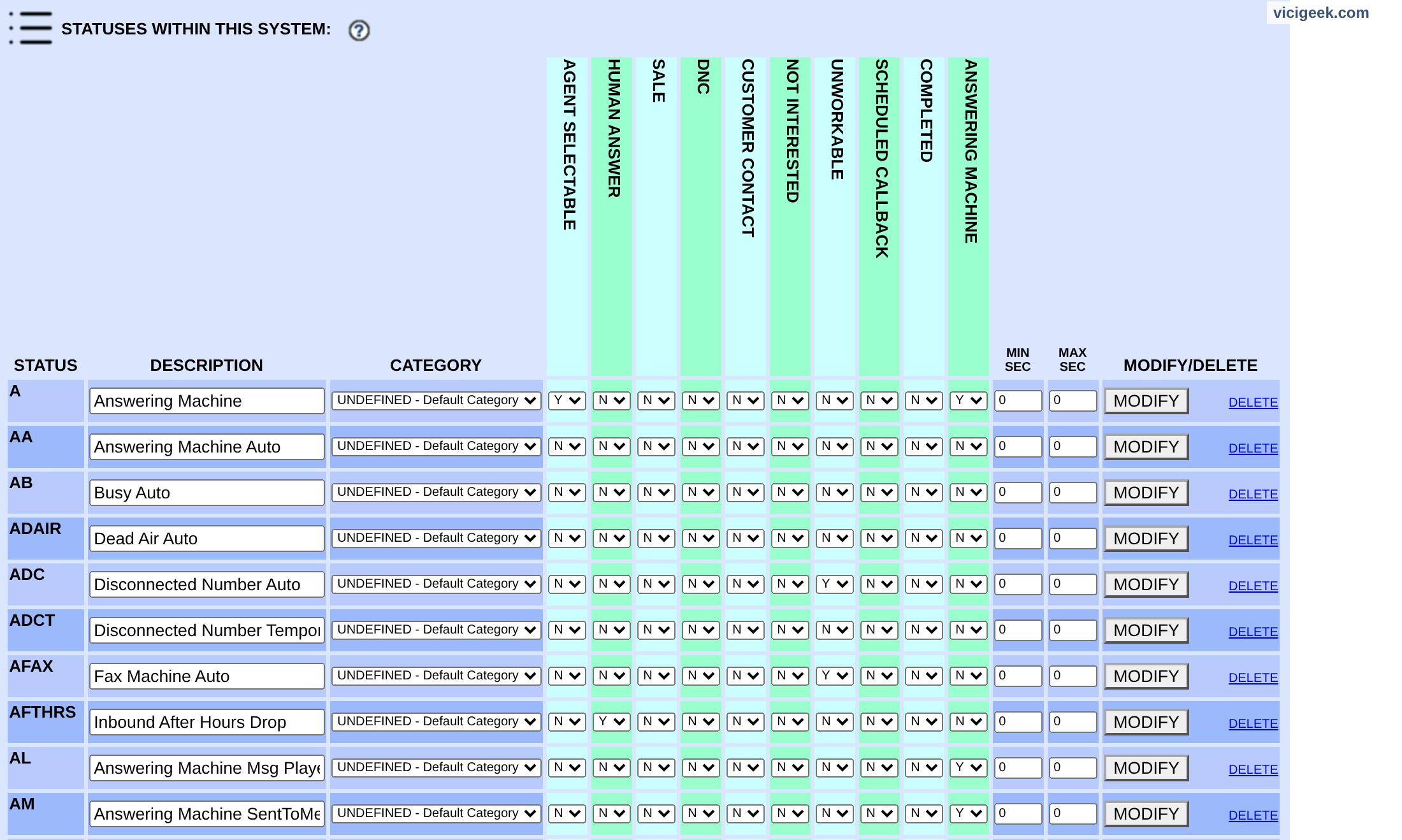
Capture details
It shows the header and the first status rows; no status was changed. ViciGeek attribution appears at the top.You should seeThe campaign’s configured choices control what the agent can select; the screenshot depicts only system status examples.
2. Save the observed outcome
- Complete an authorized test interaction and use Hangup Customer.
- On the disposition screen choose the status that reflects what actually happened and submit once.
- If the expected status is absent, pause and ask the supervisor; do not substitute a misleading outcome.
You should seeThe disposition screen closes after the saved selection; confirm the record rather than assuming a click was saved.
3. Distinguish callback from call outcome
- For a promised follow-up, select the campaign's callback disposition and complete the scheduling fields shown.
- Check the assigned owner, date and time in the callback list.
- If a callback is missing, check the campaign and user permissions and time zone before recreating it.
You should seeThe official status reference describes CALLBK as callback and CBHOLD as a holding state for scheduled callbacks; local workflow may add statuses.
4. Check the record
- Filter Reports → User Stats for the test user and date and locate the test by time and campaign.
- Compare the saved status to the outcome and check the lead through the authorized lead search if required.
- If they differ, ask the campaign owner for the supported correction procedure; do not alter call history directly.
Enter User Stats filters
Open to enlarge
Capture details
Call status is empty for any status; a nonempty value is an exact disposition filter. No report was submitted and no call or report row was demonstrated. Actual browser capture, November 4, 2026; Admin 2.14-969a build 261102-0125.You should seeThe report and lead can serve different purposes, so confirm which record each screen displays.
Checks and sources
What was checked
- Instructions are based on the linked project documentation and sanitized interface captures. The captures do not prove registration, a completed call, a transfer, callback or audio quality.
- The lab runs VICIdial SVN 4037, database schema 1748 and Asterisk 18.26.4-vici. Labels, enabled features and provider requirements can differ on another installation.
Primary references
Sources
- VICIdial status definitionsVICIdial Group · accessed November 4, 2026
- VICIdial Agent API referenceVICIdial Group · accessed November 4, 2026