01 / 03
1. Confirm the name
- Identify the public HTTPS hostname and expected certificate owner with the administrator.
- Run getent ahosts YOUR_HOSTNAME and compare the addresses with the approved inventory.
- If the name resolves unexpectedly, investigate DNS before changing TLS configuration.
You should seeA DNS answer identifies the destination; it does not prove the certificate is valid.
02 / 03
2. Inspect the certificate
- Run openssl s_client -connect YOUR_HOSTNAME:443 -servername YOUR_HOSTNAME -verify_hostname YOUR_HOSTNAME -verify_return_error </dev/null, substituting the approved name.
- Read the certificate chain and verification result, and check its validity dates and hostname.
- If verification fails, record the error and stop; do not bypass certificate verification to declare success.
Observed certificate validity dates
Open to enlarge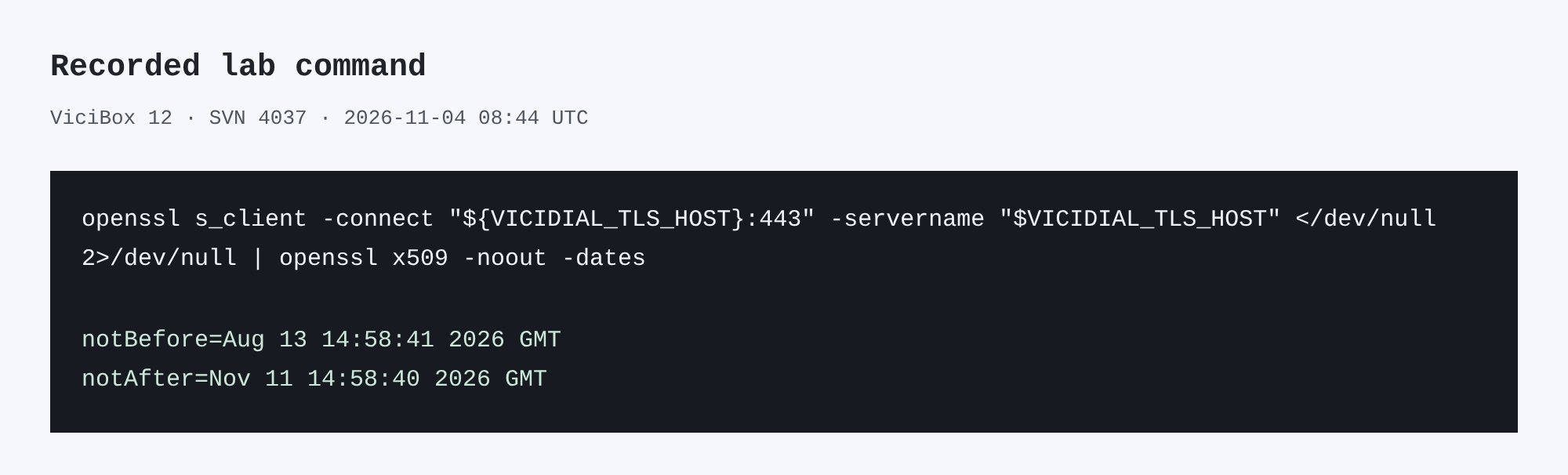
Capture details
This inspection does not establish a completed call or restore.You should seeA verified chain and hostname establish TLS identity for this connection, subject to the client's trust store.
openssl s_client -connect "${VICIDIAL_TLS_HOST}:443" -servername "$VICIDIAL_TLS_HOST" </dev/null 2>/dev/null | openssl x509 -noout -datesCaptured demo response · 2026-11-04T08:44:38.879644Z. Any filtering, hidden values or test-only data are identified in the capture label. Select Replay transcript to read the recorded output.
- Before you run it
- Set VICIDIAL_TLS_HOST to the approved host name before running this date inspection.
- Success looks like
- The lab certificate dates were August 13 to November 11, 2026. Dates alone do not verify the chain or hostname.
- Stop if
- If no dates appear, inspect the TLS connection and certificate separately.
03 / 03
3. Check the application
- Run curl -I https://YOUR_HOSTNAME/ from the approved client.
- Check the HTTP status and redirect destination without supplying credentials.
- If TLS succeeds but the application fails, inspect the web service and its logs with the owner.
Observed HTTPS response
Open to enlarge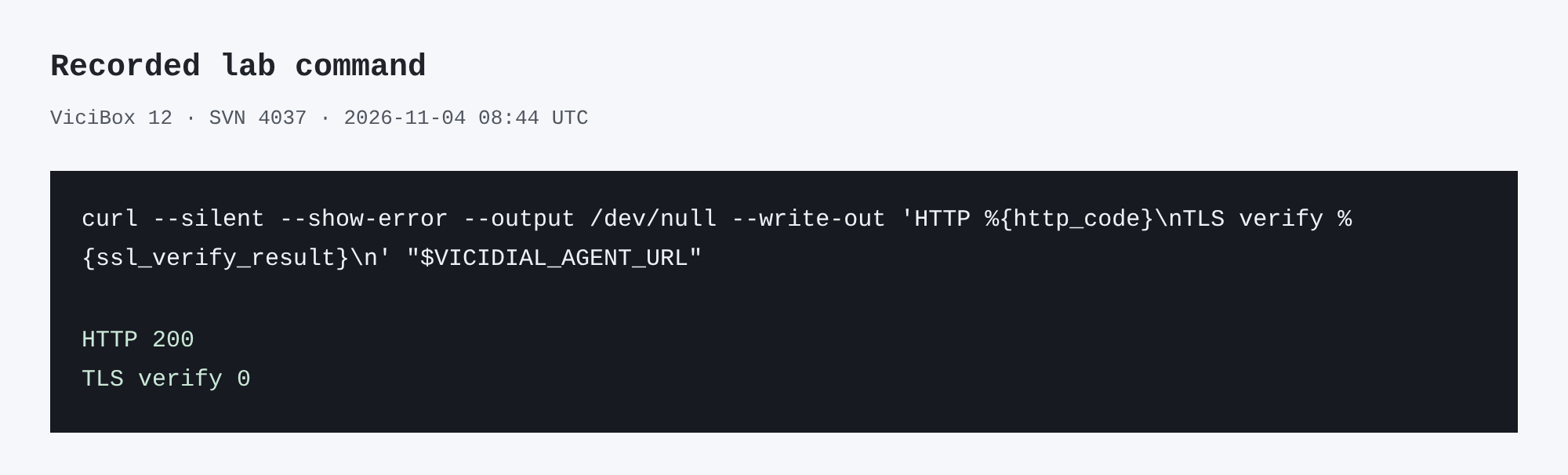
Capture details
This inspection does not establish a completed call or restore.You should seeAn HTTP response proves a web endpoint answered; it does not prove Agent login or call audio.
curl --silent --show-error --output /dev/null --write-out 'HTTP %{http_code}\nTLS verify %{ssl_verify_result}\n' "$VICIDIAL_AGENT_URL"Captured demo response · 2026-11-04T08:44:38.837626Z. Any filtering, hidden values or test-only data are identified in the capture label. Select Replay transcript to read the recorded output.
- Before you run it
- Set VICIDIAL_AGENT_URL to the approved HTTPS Agent URL before running.
- Success looks like
- The lab returned HTTP 200 and TLS verify 0 for this request; it did not test login or audio.
- Stop if
- On a curl failure or nonzero verification result, investigate the endpoint and certificate without bypassing validation.
Primary references
Sources
- openssl s_client manualOpenSSL · accessed November 4, 2026
- curl certificate verificationcurl · accessed November 4, 2026