01 / 03
1. Prepare the menu destinations
These steps target VICIdial Admin 2.14-969a, SVN 4037 / database schema 1748. Substitute unused IDs for LAB01, LABTEAM, learner1, 8001, 90001, SALESDEMO and DEMOIVR if any already exist. Labels and options may differ on other builds. The configuration checks below do not establish that a call, audio, or carrier route has been tested.
A call menu collects digits and routes each selection; the destination objects must exist before they can be selected.
- Open Inbound → In-Groups → Show In-Groups and confirm the isolated SALESDEMO group exists and is active for the test.
- Open Admin → Audio Store and identify the existing approved prompt filename; use its name without the extension in Menu Prompt. Identify an existing destination for timeout and invalid input before changing the DID.
- Record the current test DID route and the exact digits delivered by its trunk.
You should seeThe prompt, target in-group and fallback are identified. Their existence alone does not prove audio or call routing.
02 / 03
2. Create the call menu
Menu form fields and available actions can vary with the installed build; use the screen’s field help for the exact action parameters.
- Open Inbound → Call Menus → Add A New Call Menu.
- Enter Menu ID DEMOIVR, Menu Name Demo IVR and an Admin User Group, then submit. On the modify screen, enter the approved Audio Store filename without its extension in Menu Prompt. Set Menu Timeout to 10 seconds, Menu Repeat to 0, and choose existing Menu Timeout Prompt and Menu Invalid Prompt filenames.
- In Call Menu Options, add option 1, set Route to INGROUP and select the intended existing SALESDEMO group. Add TIMEOUT and INVALID rows with Route HANGUP for this isolated exercise. An owner may choose an approved alternative fallback for production; check its real destination and behavior separately.
- Save and reopen the menu; check the prompt, digit, primary target and both HANGUP fallbacks before routing a test DID.
- Menu ID / Menu Name
- DEMOIVR / Demo IVR (or unused substitutes)
- Admin User Group
- The group permitted to administer the test menu
- Menu Prompt
- Existing Audio Store filename, without its extension
- Menu Timeout / Repeat
- 10 seconds / 0 repeats
- Option
- 1
- Destination
- SALESDEMOSALESDEMO is the guide target only when present on your installation. The separate unsaved IVR illustration selects inboundTest, not the DID example’s KPIDEMOQ.
- TIMEOUT / INVALID Route
- HANGUP / HANGUPThe isolated example ends no-input and invalid-key branches; confirm the approved fallback for your own environment.
Steps and result4 steps
Actual VICIdial form entry with fictional examples. The recording stops before saving; follow the field notes for deployment-specific values.
Read the chapter notes
- Actual VICIdial form — not submitted
Only the initial Add Call Menu fields were filled. The form was not submitted; no prompt, digit option or IVR route was saved or tested.
- Choose a menu ID
Menu ID DEMOIVR is the short example ID with no spaces or special characters.
- Name the menu
Menu Name Demo IVR is the readable label. Prompts, digit options and invalid/timeout handling need the saved menu screen and separate tests.
- Review before any real save
Only the initial Add Call Menu fields were filled. The form was not submitted; no prompt, digit option or IVR route was saved or tested.
November 4, 2026 · VICIdial Admin 2.14-969a build 261102-0125. Only the initial Add Call Menu fields were filled. The form was not submitted; no prompt, digit option or IVR route was saved or tested. ViciGeek attribution is encoded in the video and poster. Use fullscreen to read the original field labels.
Steps and result5 steps
Actual native VICIdial controls, filled with example values in the browser. This recording stops before submission. Use the field notes to distinguish lab fixtures, missing prerequisites and deployment-specific values.
Read the chapter notes
- Actual native form — not submitted
The native Modify Call Menu form shows unsaved key 1 to the available inboundTest test group, plus TIMEOUT and INVALID to HANGUP. No menu was saved, prompt uploaded, digit pressed or call placed.
- Route key 1 to the synthetic queue
Option 1 and route INGROUP expose a native destination selector. This lab’s menu picker offers inboundTest, a test target distinct from KPIDEMOQ in the DID picker and from the guide’s SALESDEMO example.
- Give TIMEOUT an explicit branch
TIMEOUT to HANGUP is an unsaved demonstration. No prompt playback or digit selection is tested.
- Handle INVALID explicitly
INVALID to HANGUP illustrates a defined invalid-key outcome. No call menu is saved.
- Review the unsaved example
The native Modify Call Menu form shows unsaved key 1 to the available inboundTest test group, plus TIMEOUT and INVALID to HANGUP. No menu was saved, prompt uploaded, digit pressed or call placed.
November 4, 2026 · VICIdial 2.14-969a build 261102-0125. The native Modify Call Menu form shows unsaved key 1 to the available inboundTest test group, plus TIMEOUT and INVALID to HANGUP. No menu was saved, prompt uploaded, digit pressed or call placed. ViciGeek attribution is encoded in the video and poster. Use fullscreen to read the original field labels.
View still screenshots
Enter a call-menu identity
Open to enlarge
Capture details
Prompts, timeout behavior, digit destinations and DID routing are configured later on a saved menu and are not demonstrated here. Actual browser capture, November 4, 2026; Admin 2.14-969a build 261102-0125.Fill an IVR key and its timeout branches
Open to enlarge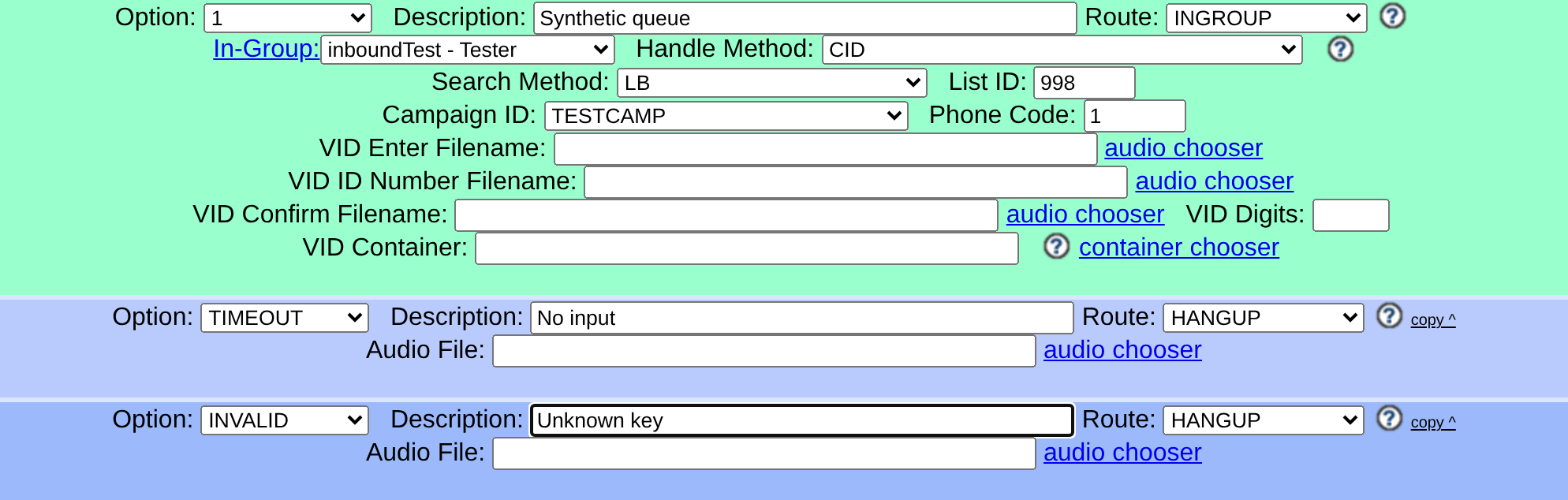
Capture details
INGROUP changes the route-value control to a native dropdown. inboundTest is an available lab test target, separate from DID queue KPIDEMOQ and the fresh guide’s SALESDEMO. Only these unsaved options are shown; no menu, prompt, digit branch or call was tested. Actual browser capture, November 4, 2026; VICIdial 2.14-969a build 261102-0125.You should seeReopen your menu and verify the approved prompt, option 1 to the intended existing SALESDEMO group, and HANGUP for TIMEOUT and INVALID. The unsaved illustration uses inboundTest for option 1, a different existing lab group; it does not validate a prompt, digit branch or call.
03 / 03
3. Connect and test the DID
The carrier must deliver the test number to this system before the menu can be reached.
- Open Inbound → DIDs and select the test DID.
- Set DID Route to CALLMENU, select DEMOIVR in Menu ID and submit; reopen to check the route.
- During an approved call window, test the prompt, each digit, invalid input and timeout from an authorized originating phone.
- Restore and verify the recorded DID route after the test.
You should seeSaved routing establishes only configuration. If no menu is reached, check trunk delivery and DID matching; if a digit fails, inspect the option and destination. No live menu or audio test was performed here.
Checks and sources
What was checked
- These steps target VICIdial Admin 2.14-969a, SVN 4037 / database schema 1748. Substitute unused IDs for LAB01, LABTEAM, learner1, 8001, 90001, SALESDEMO and DEMOIVR if any already exist. Labels and options may differ on other builds. The configuration checks below do not establish that a call, audio, or carrier route has been tested.
- Admin form captures are visual orientation only; no live call, audio, or carrier drill was performed for this guide.
Primary references
Sources
- VICIdial source and documentationVICIdial · accessed November 4, 2026
- VICIdial Non-Agent API referenceVICIdial · accessed November 4, 2026
- VICIdial statuses referenceVICIdial · accessed November 4, 2026