ViciBox 13.0 Beta 4 · fresh Express/DB installation
ViciBox 13 Beta 4 installer cannot find the MariaDB socket
vicibox-install fails with a local MySQL socket error at /var/lib/mysql/mysql.sock while MariaDB is running with /run/mysql/mysql.sock.
Source and affected scope
ViciBox 13.1.0 Beta 5 release thread: Beta 4 MariaDB socket report
- The reported defect concerns fresh ViciBox 13.0.0 Beta 4 installations on Leap 16.0 with the listed package combination.
- The reporter reproduced it on two Proxmox VMs. Kumba said the symlink was added to the build; 13.1.0 Beta 5 was announced on November 6. That announcement alone does not prove a particular downloaded image passed this test.
- The current Solarefer demo is Leap 15.6/ViciBox 12. Its healthy socket layout does not reproduce or repair the Beta 4 defect.
Before you start
- A disposable fresh Beta 4 VM with no customer data, a saved pre-install snapshot and console access. Do not use the established demo or production cluster.
- Root shell on that fresh VM, matching DBI/MariaDB packages and the installer’s initial local socket-authenticated root account. If credentials have already been changed, stop rather than weaken authentication.
- Record the exact ISO filename/checksum and whether it is the MD or standard image. A checksum detects mismatched bytes; obtain the image through the official download channel.
- If you are starting a new deployment rather than investigating Beta 4, inspect the current official release instructions first; do not choose an old affected beta merely to follow this workaround.
Diagnose the reported problem
Step 1Confirm the affected installer generation
Run the read-only inventory on the disposable fresh-install VM. Record the ISO identity from your VM build record alongside these packages.
Stop this branch on ViciBox 12/Leap 15.6 or an unrelated package combination. An error message alone does not establish this defect.
- Before you use it
- Run the read-only inventory on the disposable fresh-install VM. Record the ISO identity from your VM build record alongside these packages.
Confirm the affected installer generation cat /etc/os-releaserpm -q mariadb perl-DBD-mysql libmariadb3systemctl list-unit-files 'mariadb*' 'mysql*'systemctl is-active mariadbNot executed · deliberately not run on the demoThis sample changes a system, contacts an outside service, needs a live call, or would print real data from a shared server, so it was not run on the demo. Run it only where you are authorized, and compare the result with the success and stop guidance.
- Success looks like
- The OS/ISO/package record matches the Beta 4 report or a separately documented equivalent reproducer.
- Stop if
- If the current release already contains the maintainer’s correction, check its socket paths and do not add a second workaround.
- Expected observation
- The OS/ISO/package record matches the Beta 4 report or a separately documented equivalent reproducer.
- If this check fails
- If the current release already contains the maintainer’s correction, check its socket paths and do not add a second workaround.
Step 2Check the actual socket and existing compatibility path
Inspect both paths without editing configuration. The target /run/mysql/mysql.sock must be an actual socket owned by the expected MariaDB service.
If /var/lib/mysql/mysql.sock already exists, record whether it is a file, socket or symlink and its target; do not overwrite it.
- Before you use it
- Inspect both paths without editing configuration. The target /run/mysql/mysql.sock must be an actual socket owned by the expected MariaDB service.
Check the actual socket and existing compatibility path ls -ld /run/mysql/mysql.sockif [ -e /var/lib/mysql/mysql.sock ] || [ -L /var/lib/mysql/mysql.sock ]; then ls -ld /var/lib/mysql/mysql.sock readlink /var/lib/mysql/mysql.sock || trueelse printf 'Compatibility path is absent\n'fitest -S /run/mysql/mysql.sockNot executed · deliberately not run on the demoThis sample changes a system, contacts an outside service, needs a live call, or would print real data from a shared server, so it was not run on the demo. Run it only where you are authorized, and compare the result with the success and stop guidance.
- Success looks like
- On the reported failure, the runtime socket exists at /run/mysql/mysql.sock while the old path is absent.
- Stop if
- If MariaDB is stopped or the runtime socket is missing, diagnose service startup first. If both paths exist, this exact missing-link workaround does not apply.
- Expected observation
- On the reported failure, the runtime socket exists at /run/mysql/mysql.sock while the old path is absent.
- If this check fails
- If MariaDB is stopped or the runtime socket is missing, diagnose service startup first. If both paths exist, this exact missing-link workaround does not apply.
Step 3Isolate path selection from database availability
Run these read-only connections as root only on the fresh VM with the expected initial socket authentication. Each connection performs SELECT1 and disconnects.
Keep the two outcomes separate. The reported signature is default failure followed by explicit-socket success. No password is included in command arguments.
- Before you use it
- Run these read-only connections as root only on the fresh VM with the expected initial socket authentication. Each connection performs SELECT1 and disconnects.
Isolate path selection from database availability perl -MDBI -e 'my $db = DBI->connect("DBI:mysql::localhost:3306", "root", "", {RaiseError=>1, PrintError=>0});print $db->selectrow_array("SELECT 1"), "\n";$db->disconnect;'perl -MDBI -e 'my $db = DBI->connect("DBI:mysql:;host=localhost;mysql_socket=/run/mysql/mysql.sock", "root", "", {RaiseError=>1, PrintError=>0});print $db->selectrow_array("SELECT 1"), "\n";$db->disconnect;'Not executed · deliberately not run on the demoThis sample changes a system, contacts an outside service, needs a live call, or would print real data from a shared server, so it was not run on the demo. Run it only where you are authorized, and compare the result with the success and stop guidance.
- Success looks like
- Default DBI fails against /var/lib/mysql/mysql.sock while explicit /run/mysql/mysql.sock returns 1. This combination isolates the socket-path mismatch.
- Stop if
- If both fail, investigate authentication, MariaDB startup and permissions. If both pass, the reported defect is not reproduced and no link should be added.
- Expected observation
- Default DBI fails against /var/lib/mysql/mysql.sock while explicit /run/mysql/mysql.sock returns 1. This combination isolates the socket-path mismatch.
- If this check fails
- If both fail, investigate authentication, MariaDB startup and permissions. If both pass, the reported defect is not reproduced and no link should be added.
Step 4Check that this remains a fresh disposable installation
Inspect every non-system schema using the explicit socket. Confirm that the recorded disposable-VM snapshot predates the failed installer.
Any returned schema is a stop until its origin and contents are explained; a different customer database name must not be hidden by filtering only the usual VICIdial names. Return to the known-fresh snapshot rather than deleting schemas to make this check pass.
- Before you use it
- Inspect every non-system schema using the explicit socket. Confirm that the recorded disposable-VM snapshot predates the failed installer.
Check that this remains a fresh disposable installation mariadb --protocol=SOCKET --socket=/run/mysql/mysql.sock --batch --skip-column-names \ -e "SELECT SCHEMA_NAME FROM information_schema.SCHEMATA WHERE SCHEMA_NAME NOT IN ('information_schema','performance_schema','mysql','sys');"Not executed · deliberately not run on the demoThis sample changes a system, contacts an outside service, needs a live call, or would print real data from a shared server, so it was not run on the demo. Run it only where you are authorized, and compare the result with the success and stop guidance.
- Success looks like
- The query returns no non-system schemas and the known-fresh recovery snapshot is recorded.
- Stop if
- An existing VICIdial database or an uncertain installation history is a stop; do not delete it to satisfy a freshness check.
- Expected observation
- The query returns no non-system schemas and the known-fresh recovery snapshot is recorded.
- If this check fails
- An existing VICIdial database or an uncertain installation history is a stop; do not delete it to satisfy a freshness check.
Correct the confirmed cause
Use this branch only when your diagnostic observations match the affected scope above. The lab result states which outcomes were actually tested.
Step 5Add the reported compatibility link only when absent
This filesystem change is only for the matching disposable Beta 4 installation after the comparison above. Keep MariaDB’s actual runtime socket in place.
The guard refuses any existing file, socket or symlink at the compatibility path. Do not replace it with ln -sf if the guard stops.
- Before you use it
- This filesystem change is only for the matching disposable Beta 4 installation after the comparison above. Keep MariaDB’s actual runtime socket in place.
Add the reported compatibility link only when absent test "$(id -u)" -eq 0 || { printf 'Root required on the disposable fresh VM.\n'; exit 1; }test -S /run/mysql/mysql.sock || { printf 'Runtime socket is absent.\n'; exit 1; }if [ -e /var/lib/mysql/mysql.sock ] || [ -L /var/lib/mysql/mysql.sock ]; then printf 'Refusing to replace the existing compatibility path.\n' exit 1filn -s -- /run/mysql/mysql.sock /var/lib/mysql/mysql.sockreadlink /var/lib/mysql/mysql.socktest -S /var/lib/mysql/mysql.sockNot executed · deliberately not run on the demoThis sample changes a system, contacts an outside service, needs a live call, or would print real data from a shared server, so it was not run on the demo. Run it only where you are authorized, and compare the result with the success and stop guidance.
- Success looks like
- The new link points exactly from /var/lib/mysql/mysql.sock to the verified live /run/mysql/mysql.sock.
- Stop if
- If the path already exists or the target is not a socket, stop. Repeatedly forcing a link can mask a different configuration or damage a working socket path.
- Expected observation
- The new link points exactly from /var/lib/mysql/mysql.sock to the verified live /run/mysql/mysql.sock.
- If this check fails
- If the path already exists or the target is not a socket, stop. Repeatedly forcing a link can mask a different configuration or damage a working socket path.
Step 6Repeat the connection that actually failed
Repeat the default DSN from step 3 without changing it. That comparison is the immediate acceptance check for the workaround.
Also repeat the explicit-socket control to ensure you did not disrupt MariaDB.
- Before you use it
- Repeat the default DSN from step 3 without changing it. That comparison is the immediate acceptance check for the workaround.
Repeat the connection that actually failed perl -MDBI -e 'my $db = DBI->connect("DBI:mysql::localhost:3306", "root", "", {RaiseError=>1, PrintError=>0});print $db->selectrow_array("SELECT 1"), "\n";$db->disconnect;'Not executed · deliberately not run on the demoThis sample changes a system, contacts an outside service, needs a live call, or would print real data from a shared server, so it was not run on the demo. Run it only where you are authorized, and compare the result with the success and stop guidance.
- Success looks like
- Both read-only connections return 1. A symlink listing alone is insufficient.
- Stop if
- If the default still fails, stop and retain the exact error; do not rerun the installer on the assumption that a link proves the issue is fixed.
- Expected observation
- Both read-only connections return 1. A symlink listing alone is insufficient.
- If this check fails
- If the default still fails, stop and retain the exact error; do not rerun the installer on the assumption that a link proves the issue is fixed.
Step 7Complete only the approved fresh-install workflow
Proceed only if the VM remains the same disposable fresh installation, the original failing command now passes, and the pre-install snapshot is available.
Run the original installer and select only the already planned Express or DB role. Follow that ISO’s official installation manual for its prompts; do not change cluster addresses, roles or credentials based on this socket note.
Preserve the installer log privately. If the installer finds an existing deployment or asks to replace data, stop instead of approving it.
- Before you use it
- Proceed only if the VM remains the same disposable fresh installation, the original failing command now passes, and the pre-install snapshot is available.
Complete only the approved fresh-install workflow vicibox-installNot executed · deliberately not run on the demoThis sample changes a system, contacts an outside service, needs a live call, or would print real data from a shared server, so it was not run on the demo. Run it only where you are authorized, and compare the result with the success and stop guidance.
- Success looks like
- The installer passes the former DBI socket failure and reaches the documented completion state for the selected role.
- Stop if
- Any later failure is a separate observation, not proof that the socket change was insufficient. Stop and use the snapshot rather than repeating initialization against partial data.
- Expected observation
- The installer passes the former DBI socket failure and reaches the documented completion state for the selected role.
- If this check fails
- Any later failure is a separate observation, not proof that the socket change was insufficient. Stop and use the snapshot rather than repeating initialization against partial data.
Step 8Verify after the required installation reboot
After the fresh-install workflow’s documented reboot, check that MariaDB is active and the compatibility path resolves to the current runtime socket.
Use the installed system’s documented credentials or private option file for a read-only database check; do not assume fresh root/no-password authentication still applies.
For an Express/web role, open Administration, log in with the authorized initial account, check the version footer and open Reports. For a DB-only role, verify its intended web peer can connect using its configured service account. Do not place a carrier call to prove a database-socket fix.
- Before you use it
- After the fresh-install workflow’s documented reboot, check that MariaDB is active and the compatibility path resolves to the current runtime socket.
Verify after the required installation reboot systemctl is-active mariadbls -ld /run/mysql/mysql.sock /var/lib/mysql/mysql.sockreadlink /var/lib/mysql/mysql.socktest -S /var/lib/mysql/mysql.sockNot executed · deliberately not run on the demoThis sample changes a system, contacts an outside service, needs a live call, or would print real data from a shared server, so it was not run on the demo. Run it only where you are authorized, and compare the result with the success and stop guidance.
- Success looks like
- The configured role remains healthy after reboot and the original socket error does not return.
- Stop if
- A working CLI connection does not establish web login or a completed installation. Record each result separately and leave any untested role outcome open.
- Expected observation
- The configured role remains healthy after reboot and the original socket error does not return.
- If this check fails
- A working CLI connection does not establish web login or a completed installation. Record each result separately and leave any untested role outcome open.
Verify the outcome
- Retain exact ISO/package versions, both before/after DBI outcomes, the created-link target, installer completion evidence and post-reboot checks.
- A success in a matching disposable Beta 4 VM would support that workaround only; it would not establish a supported production deployment or every later beta’s behavior.
- A nonmatching ViciBox 12 demo should be marked not applicable, not fixed.
- No source screenshot should imply that an existing customer server was reinstalled or repaired.
Recover or roll back
- Before continuing installation, undo only a link created by this procedure after confirming it did not exist before and still points exactly to /run/mysql/mysql.sock. Use test -L and readlink before removing that single link; never delete the actual /run/mysql/mysql.sock socket.
- After the installer has created or changed databases/configuration, use the recorded pre-install VM snapshot for complete rollback. Removing the link alone does not undo an installation and may break the resulting DBI path.
- Do not erase an existing asterisk database, change root authentication or disable security controls to force this example to complete.
Screenshot evidence
Version gate: this demo does not match
Open to enlarge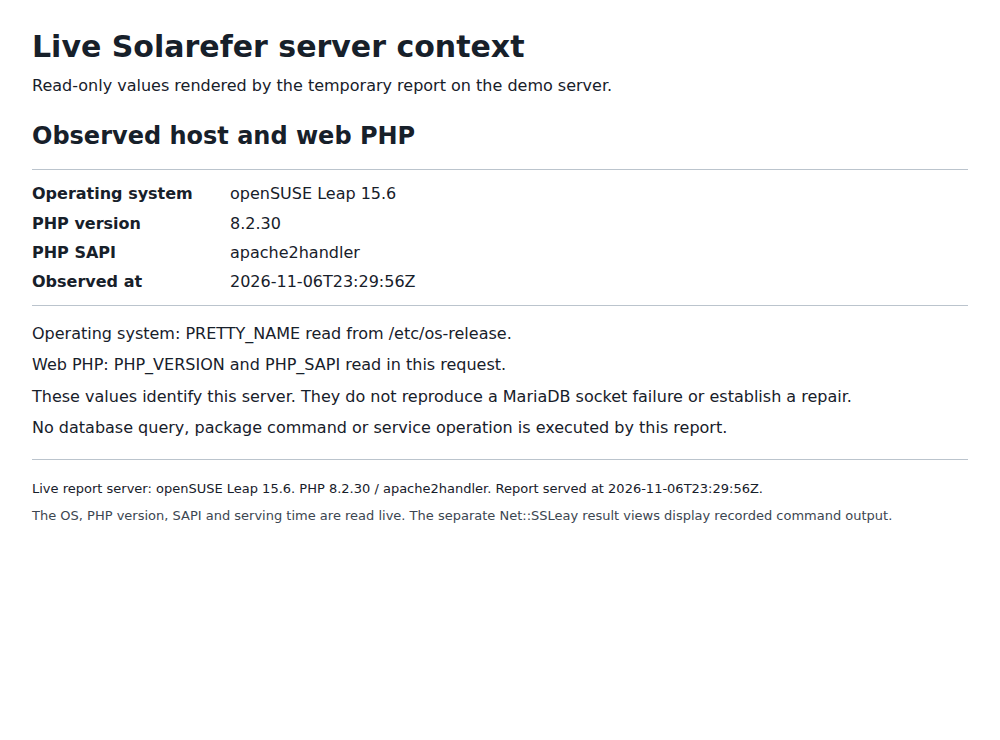
Capture details
Leap 15.6 is outside the reported Leap 16 Beta 4 environment; no socket workaround or installer was run here. This November 6 context capture predates the separate PHP update; the demo now serves PHP 8.2.35.- Reporter’s socket comparison and successful workaround · VICIdial Group forum; checked November 6, 2026
- Maintainer adds the link to the build · VICIdial Group forum; checked November 6, 2026
- November 6 Beta 5 announcement · VICIdial Group forum; checked November 6, 2026
- Official ViciBox documentation · ViciBox; checked November 6, 2026
Actions to avoid
Do not run the installer on an established server or replace an existing socket/file with ln -sf. This Beta 4 workaround is not applicable merely because another ViciBox version uses MariaDB.