01 / 09
Start with the browser course and one fixture
Use Start Here for the ordered browser course. This page explains the entry and finish checks for each stage and links to optional administration tasks. Keep one isolated fixture throughout; do not copy course identifiers over existing objects.
Complete the core course through its actual call/report checks before treating it as an end-to-end exercise. A blocked prerequisite is a useful recorded result, but it is not a completed call. Carrier and inbound work are separate branches with additional requirements.
- Before you use it
- Keep this record locally as you follow the linked pages. No server access is needed to use the syllabus.
Lesson / URL:Installed version and practice fixture:Required access and prerequisites checked:Saved-state or workflow result actually observed:Blocked step / missing value / next owner:Next lesson after the gate passes:This sample is a template or reading aid, not a terminal command. There is no output to show.
- Success looks like
- Each completed entry cites the observation that satisfied the lesson’s own finish check.
- Stop if
- Do not mark a call, import, report or configuration complete because you reached the bottom of its page.
You should seeChoose the first unmet stage below. The same lesson links remain usable without a local progress widget.
02 / 09
1. Understand the objects and reach the right lab
Begin with what VICIdial does, its main terms and the practice-lab boundary. Then open Admin using the assigned lab credentials and confirm you are on the intended installation.
If no approved lab exists, use the separate lab setup path. Do not use a production account merely because the training examples are small.
You should seeYou can identify the intended lab and distinguish user, phone/station, campaign, list and lead. If a required menu is unavailable, record the missing menu and your user ID, then request that specific access from the administrator before creating objects.
03 / 09
2. Prepare the agent identity and phone/station
Follow the agent and phone lessons in order. Record the exact saved identifiers and credentials privately; a VICIdial agent user and a phone login serve different roles.
The lesson’s station/template requirements must be satisfied on the installed build. A phone form screenshot does not establish registration or working audio.
You should seeThe saved agent and station records match the course fixture, and any missing template, TLS or station prerequisite has an explicit resolution. Audio is checked later in the actual workflow.
04 / 09
3. Create and inspect the manual practice campaign
Create the course’s manual campaign using its exact lesson. Reopen the saved object and compare the documented mode and isolation/activation state. Keep it inactive until the first-call preflight authorizes its controlled test.
Manual dialing is a learning fixture here. If the later operational task needs another dial method, use the pacing guide and that task’s separate validation rather than changing the course while learning it.
You should seeThe saved campaign matches the expected fixture. A mismatched mode or unknown activation state is corrected through its lesson before importing or dialing.
05 / 09
4. Create the list, finish its mapping and inspect the import
Create the practice list, then set the campaign’s Manual Dial List ID as the list lesson requires. Reopen both records to check the relationship; a list attached to a campaign does not by itself prove the manual-dial mapping.
Use the supplied three-row synthetic CSV in the import lesson. Follow its exact mapping and duplicate-handling instructions, then inspect the actual imported records and totals. Do not assume every new list is empty or that every valid imported status must always be NEW on every workflow.
You should seeBoth saved relationships match and the imported rows agree with the specific fixture. Unexpected counts or field values stop the exercise before dialing.
Create the list and manual-dial mapping
06 / 09
Optional branch: add carrier or inbound routing when needed
The core internal course does not require a public DID or carrier. Take these branches only with approved provider access, an owned test destination, the appropriate agent permissions and a reviewed route plan.
An inbound exercise needs its own complete path from number/routing through the chosen in-group or menu to an eligible agent, followed by observed signaling, audio and the intended outcome. Saved records are necessary checks, not a completed inbound call.
You should seeDocument the actual bounded inbound/carrier test result or its first unresolved prerequisite. A learner can defer this optional branch and finish the internal course.
Carrier prerequisites and network observations
07 / 09
5. Complete the core call/report exercise and interpret the record
Follow agent login, then the current first-call preflight. Verify the internal route and all required fixture values before the lesson’s activation or dial action. Use the real audio result, saved disposition and matching report row to determine whether the exercise passed.
Then read the reporting guide for the question your role needs to answer. Write down population, time window, timezone, filters and units before comparing totals. This syllabus does not prescribe four universally best reports or infer agent performance from an undefined count.
- Before you use it
- Fill from the actual exercise; keep identifying data in the authorized private record.
Attempt time / timezone:Lab fixture / installed versions:Preflight result:Actual internal audio observation:Saved disposition:Matching report row confirmed: yes / no / cannot checkCleanup state and remaining issue:This sample is a template or reading aid, not a terminal command. There is no output to show.
- Success looks like
- The same attempt’s observed audio, saved outcome and report row agree, and the lesson’s cleanup is complete.
- Stop if
- No audio observation, missing report row or unverified route leaves the corresponding part unfinished; use the first-call failure branch.
You should seeThe completed record states what happened. It does not generalize an internal exercise to a carrier route or production capacity.
Log in with the practice agent and phone
First-call preflight and outcome checks
Find the matching first report row
08 / 09
Choose the next task from the failed boundary
When blocked, preserve the exact step, expected observation, actual observation, installed version and time. Open the matching diagnostic instead of changing several unrelated settings. A useful escalation names what cannot be checked and which owner can check it.
For maintenance, use the backup/security/upgrade pages with their own evidence and approval boundaries. A training course is not a production-readiness certification.
You should seeYour next action follows the observed problem or assigned responsibility, with a specific guide and finish check.
09 / 09
Recorded lab terminal checks
Recorded lab checks were run against the synthetic demo on November 4, 2026. These read-only observations supplement the configuration steps above; they do not establish that a call, route, recording or report workflow succeeded.
Recorded lab observation: At capture LAB01 was inactive and MANUAL; this is a configuration observation, not proof of dial readiness.
Recorded lab observation: List 90001 was active and associated with LAB01; active list does not override inactive campaign.
Recorded lab observation: Three synthetic lab leads were NEW. Status counts do not prove eligibility, successful dialing or lead handling.
- Before you use it
- These historical commands were captured in a root shell using database vicidb and /etc/vicidial-readonly.cnf. The private client file in Create a read-only database account for safe VICIdial queries is root-owned with mode 0600: use the approved root context from that guide, or invoke mysql through sudo as it describes. A regular user cannot read that file. On your own server use your authorized connection and test campaign/list IDs; changed commands are not this exact capture. Do not print the credential file.
mysql --defaults-extra-file=/etc/vicidial-readonly.cnf --batch vicidb -e "SELECT campaign_id, active, dial_method FROM vicidial_campaigns WHERE campaign_id='LAB01';"mysql --defaults-extra-file=/etc/vicidial-readonly.cnf --batch vicidb -e "SELECT list_id, campaign_id, active FROM vicidial_lists WHERE list_id=90001 AND campaign_id='LAB01';"mysql --defaults-extra-file=/etc/vicidial-readonly.cnf --batch vicidb -e "SELECT status, COUNT(*) AS lead_count FROM vicidial_list WHERE list_id=90001 GROUP BY status ORDER BY status;"Captured demo response · 2026-11-04T22:37:45.695257Z. Any filtering, hidden values or test-only data are identified in the capture label. Select Replay transcript to read the recorded output.
- Success looks like
- Compare the returned rows with the specific task and capture time. An empty result or zero count is an observation to explain, not a complete diagnosis or evidence of a working call.
- Stop if
- For a connection, permission, schema or missing-test-ID error, check the approved client configuration and installed version first. Do not broaden permissions or change production data to match this demonstration.
Recorded lab terminal: lab campaign
Open to enlarge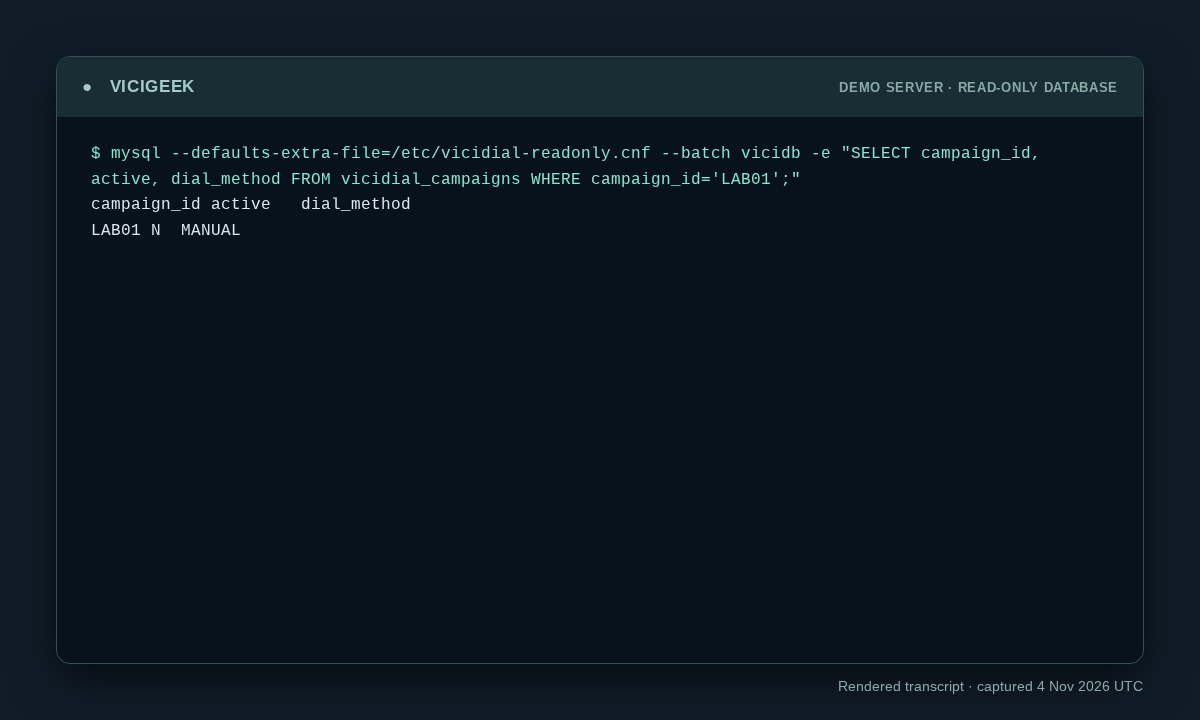
Capture details
Read-only observation, not a completed call or routing test. Display trims blank space; enlargement opens the complete original. SSH client post-quantum warning on stderr omitted; SQL stdout preserved. Aggregate counts or schema only; no customer rows.Recorded lab terminal: lab list
Open to enlarge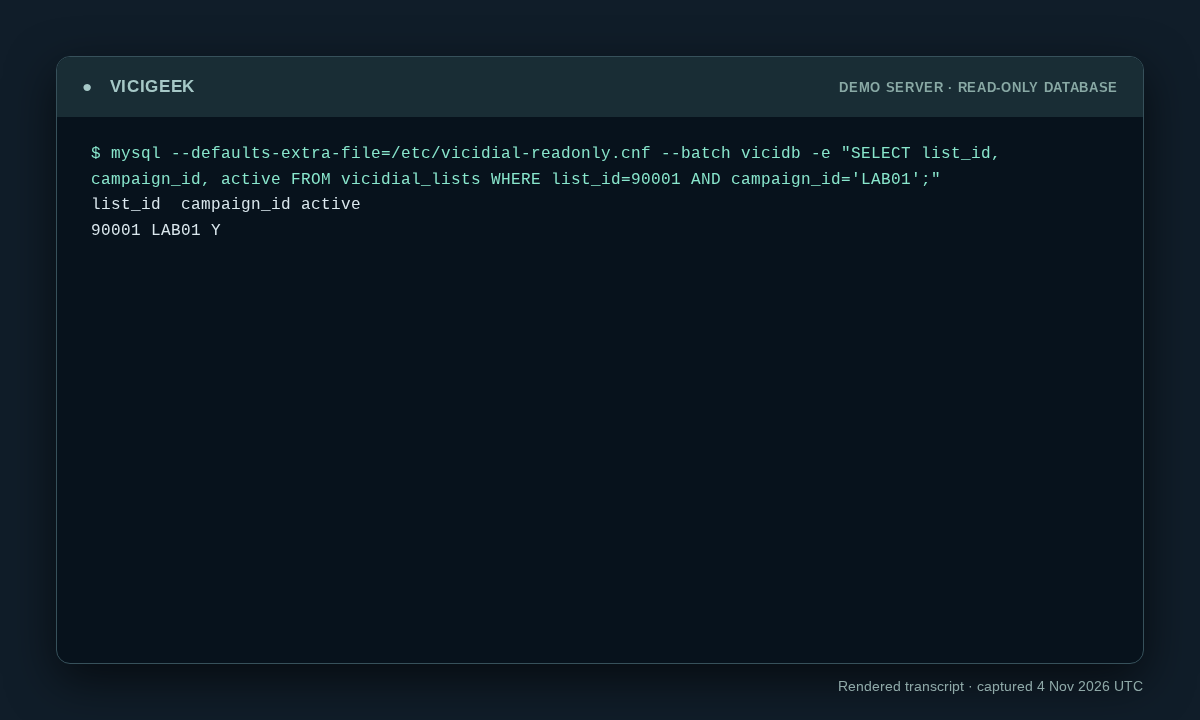
Capture details
Read-only observation, not a completed call or routing test. Display trims blank space; enlargement opens the complete original. SSH client post-quantum warning on stderr omitted; SQL stdout preserved. Aggregate counts or schema only; no customer rows.You should seeThe recorded lab command and output show exactly what the demo returned. Use the original workflow’s separate end-to-end acceptance checks before declaring success.
Checks and sources
What was checked
- This syllabus follows the current course registry and links to the pages that own each procedure, screenshot and evidence boundary.
- It does not claim a completed internal call, working carrier, inbound route, restore or report solely because a lesson or saved form exists. Use the actual outcome checks in the linked guide.
- No blanket weekly report ranking, universal foreign-key claim or quantitative performance result is asserted by this training map.
- Reviewed read-only SSH observations were added from the ViciBox 12 / SVN 4037 demo on November 4, 2026. Captures show point-in-time state, not successful calling, routing, audio, API writes or recovery.
Primary references
Sources
- VICIdial official manuals and documentationVICIdial Group · accessed November 6, 2026
- VICIdial product and official manual entry pointsVICIdial Group · accessed November 6, 2026