01 / 04
1. Prepare the list
A list holds contacts for a campaign. Create the empty list now; a later lesson adds fictional contacts.
02 / 04
2. Create list 90001
- Click Lists in VICIdial Admin.
- Click Add A New List.
- Complete the fields below and submit.
- Open list 90001 from Show Lists.
- List ID
- 90001The course list ID.
- List Name
- Practice listA readable name.
- List Description
- Fictional practice contactsDescribes its intended contents.
- Campaign
- LAB01Connects the list to the lab campaign.
- Active
- YMakes the list available to the campaign.
Attach a list to a campaign
Open image to zoom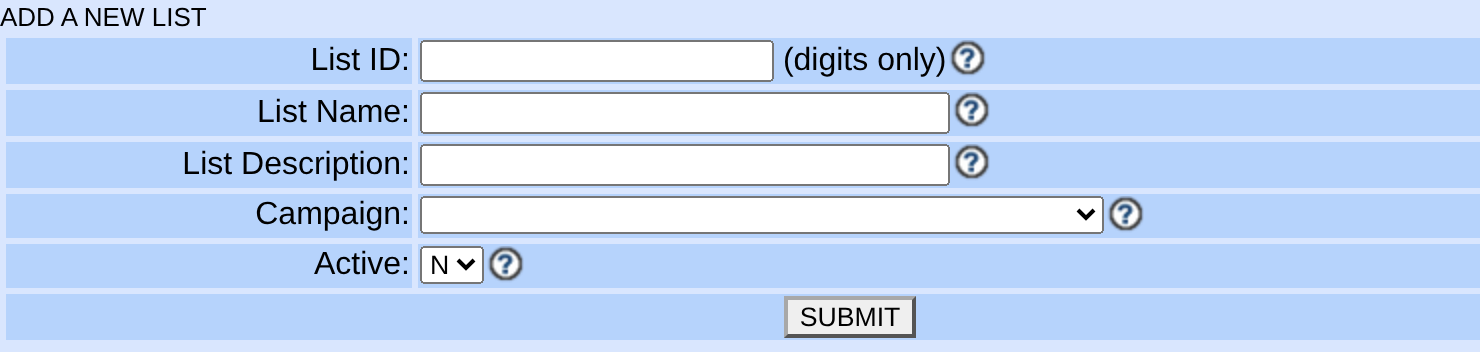
You should seeList 90001 appears under LAB01 and is empty.
03 / 04
3. Check the connection
- Open Lists and select 90001.
- Confirm Campaign is LAB01 and Active is Y.
- Confirm the new list contains zero leads before the next lesson.
You should seeYour empty practice list belongs to LAB01 and is ready for the three test contacts.
04 / 04
If it fails
If LAB01 is absent from the campaign menu, confirm it exists and ask the lab owner to check administrator visibility.
If 90001 already belongs to another campaign, do not reassign it. Agree on an unused lab ID and use it throughout the remaining lessons. Read any form error if the setting does not save.
Primary references
Sources
- VICIdial public demonstrationVICIdial · accessed November 3, 2026
- VICIdial nightly sourceVICIdial · accessed November 3, 2026