1. Check the list and status
These steps target VICIdial Admin 2.14-969a, SVN 4037 / database schema 1748. Substitute unused IDs for LAB01, LABTEAM, learner1, 8001, 90001, SALESDEMO and DEMOIVR if any already exist. Labels and options may differ on other builds. The configuration checks below do not establish that a call, audio, or carrier route has been tested.
The hopper is a staging queue, not the complete lead list. An empty hopper does not by itself prove a failed loader.
- Open Lists → Show Lists → 90001. Confirm its Campaign and Active values.
- Open Lists → Search For A Lead and inspect a synthetic lead in list 90001. Compare its status, for example NEW, with the Dial Statuses on Campaigns → Show Campaigns → LAB01.
- Check the configured call time, lead filters and any list mix against the test record.
Steps and result5 steps
Actual native VICIdial controls, filled with example values in the browser. This recording stops before submission. Use the field notes to distinguish lab fixtures, missing prerequisites and deployment-specific values.
Entry shownReal native Modify controls with example values entered only in browser state. The form was not submitted; no configuration, route, permission, registration or call was changed.
Read the chapter notes
- Actual native form — not submitted
Real native Modify controls with example values entered only in browser state. The form was not submitted; no configuration, route, permission, registration or call was changed.
- Name the practice list
This example name is entered only in browser state on the existing list detail form.
- Select LAB01 and Active Y
LAB01 is a real native campaign option. These unsaved changes do not prove lead eligibility.
- Do not reset called status
Reset Lead-Called-Status remains N. Nothing is submitted.
- Review the unsaved example
Real native Modify controls with example values entered only in browser state. The form was not submitted; no configuration, route, permission, registration or call was changed.
November 4, 2026 · VICIdial 2.14-969a build 261102-0125. Real native Modify controls with example values entered only in browser state. The form was not submitted; no configuration, route, permission, registration or call was changed. ViciGeek attribution is encoded in the video and poster. Use fullscreen to read the original field labels.
View a still screenshot
Check list 90001 campaign and active controls
Open to enlarge
Capture details
Unsaved entries on list 90001. Campaign association and Active are configuration checks; this view does not establish counts, callability or hopper eligibility. Actual browser capture, November 4, 2026; VICIdial 2.14-969a build 261102-0125.You should seeThe list is active, assigned to the intended campaign, and the test lead’s status and calling window satisfy that campaign’s rules. Correct the specific mismatch before investigating the loader.
2. Check campaign and hopper settings
The hopper loader selects work according to campaign and lead eligibility; its schedule is installation-specific.
- Open Campaigns → Show Campaigns → LAB01 and record Active, Dial Method, Minimum Hopper Level and Dial Statuses.
- On the saved campaign screen find the hopper count and the link “Click here to see what leads are in the hopper right now”. Open it to inspect LAB01; if the link is absent, use Reports → Real-Time Main Report and ask the operator which hopper view is enabled on this build.
- Wait through the locally configured hopper cycle and inspect again; ask the operator to check the scheduled loader if it remains empty.
Steps and result5 steps
Actual native VICIdial controls, filled with example values in the browser. This recording stops before submission. Use the field notes to distinguish lab fixtures, missing prerequisites and deployment-specific values.
Entry shownReal native Modify controls with example values entered only in browser state. The form was not submitted; no configuration, route, permission, registration or call was changed.
Read the chapter notes
- Actual native form — not submitted
Real native Modify controls with example values entered only in browser state. The form was not submitted; no configuration, route, permission, registration or call was changed.
- Enter a small example hopper level
Minimum Hopper Level 1 is an isolated example, not a production sizing recommendation.
- Check manual-dial hopper behavior
Manual Dial Hopper Check Y makes eligibility relevant; the clip does not show any lead staged.
- Leave Force Reset at N
Force Reset of Hopper stays N. No reset or other form submission occurs.
- Review the unsaved example
Real native Modify controls with example values entered only in browser state. The form was not submitted; no configuration, route, permission, registration or call was changed.
November 4, 2026 · VICIdial 2.14-969a build 261102-0125. Real native Modify controls with example values entered only in browser state. The form was not submitted; no configuration, route, permission, registration or call was changed. ViciGeek attribution is encoded in the video and poster. Use fullscreen to read the original field labels.
View a still screenshot
Enter hopper eligibility settings
Open to enlarge
Capture details
The example illustrates configuration gates only. No hopper was reset, lead staged or call placed; the values are not production sizing advice. Actual browser capture, November 4, 2026; VICIdial 2.14-969a build 261102-0125.You should seeA staged lead shows eligibility at the time of inspection, not proof of a placed call. If there is no work, compare the recorded gates and loader status before changing anything.
3. Distinguish work from a call
A staged lead still needs a suitable agent state and a working telephony path. MANUAL and automatic modes have different triggers.
- Check the test agent’s campaign and state in the real-time report.
- If staged work remains but no call starts, inspect the selected dialing mode and agent readiness, then follow the telephony checks for the installation.
- Record time, campaign and observed counts without copying lead or caller data into the ticket.
You should seeEscalate with the first failed gate. Only consider a reset under the operator’s approved procedure after recording its effect and current state.
Recorded lab terminal checks
Recorded lab checks were run against the synthetic demo on November 4, 2026. These read-only observations supplement the configuration steps above; they do not establish that a call, route, recording or report workflow succeeded.
Recorded lab observation: At capture LAB01 was inactive and MANUAL; this is a configuration observation, not proof of dial readiness.
Recorded lab observation: List 90001 was active and associated with LAB01; active list does not override inactive campaign.
Recorded lab observation: Three synthetic lab leads were NEW. Status counts do not prove eligibility, successful dialing or lead handling.
Recorded lab observation: No matching hopper rows at capture; this alone does not diagnose a fault or justify a reset.
- Before you use it
- These historical commands were captured in a root shell using database vicidb and /etc/vicidial-readonly.cnf. The private client file in Create a read-only database account for safe VICIdial queries is root-owned with mode 0600: use the approved root context from that guide, or invoke mysql through sudo as it describes. A regular user cannot read that file. On your own server use your authorized connection and test campaign/list IDs; changed commands are not this exact capture. Do not print the credential file.
mysql --defaults-extra-file=/etc/vicidial-readonly.cnf --batch vicidb -e "SELECT campaign_id, active, dial_method FROM vicidial_campaigns WHERE campaign_id='LAB01';"mysql --defaults-extra-file=/etc/vicidial-readonly.cnf --batch vicidb -e "SELECT list_id, campaign_id, active FROM vicidial_lists WHERE list_id=90001 AND campaign_id='LAB01';"mysql --defaults-extra-file=/etc/vicidial-readonly.cnf --batch vicidb -e "SELECT status, COUNT(*) AS lead_count FROM vicidial_list WHERE list_id=90001 GROUP BY status ORDER BY status;"mysql --defaults-extra-file=/etc/vicidial-readonly.cnf --batch vicidb -e "SELECT COUNT(*) AS hopper_count FROM vicidial_hopper WHERE campaign_id='LAB01' AND list_id=90001;"Captured demo response · 2026-11-04T22:37:45.695257Z. Any filtering, hidden values or test-only data are identified in the capture label. Select Replay transcript to read the recorded output.
- Success looks like
- Compare the returned rows with the specific task and capture time. An empty result or zero count is an observation to explain, not a complete diagnosis or evidence of a working call.
- Stop if
- For a connection, permission, schema or missing-test-ID error, check the approved client configuration and installed version first. Do not broaden permissions or change production data to match this demonstration.
Steps and result4 steps
See scoped read-only queries against the synthetic lab campaign and list.
Observed read-only resultLAB01 was inactive and MANUAL; list 90001 was active with three NEW leads and zero matching hopper rows. This does not prove dialing or diagnose the hopper.
Read the captured terminal transcript
Read the chapter notes
- LAB01 campaign was inactive and set to MANUAL.
Read-only captured command and output; rendered for this replay.
- List 90001 belonged to LAB01 and was active.
Read-only captured command and output; rendered for this replay.
- The synthetic list contained three leads with status NEW.
Read-only captured command and output; rendered for this replay.
- The scoped hopper count was zero. This alone is not a diagnosis.
Read-only captured command and output; rendered for this replay.
November 4, 2026 · ViciBox 12 · SVN 4037. LAB01 was inactive. Counts alone do not demonstrate dialing or diagnose the hopper. Rendered actual SSH capture using xterm.js; paced still frames, not a live terminal recording. SSH client warning omitted from captured output. Use fullscreen to read the terminal output.
View still screenshots
Recorded lab terminal: lab campaign
Open to enlarge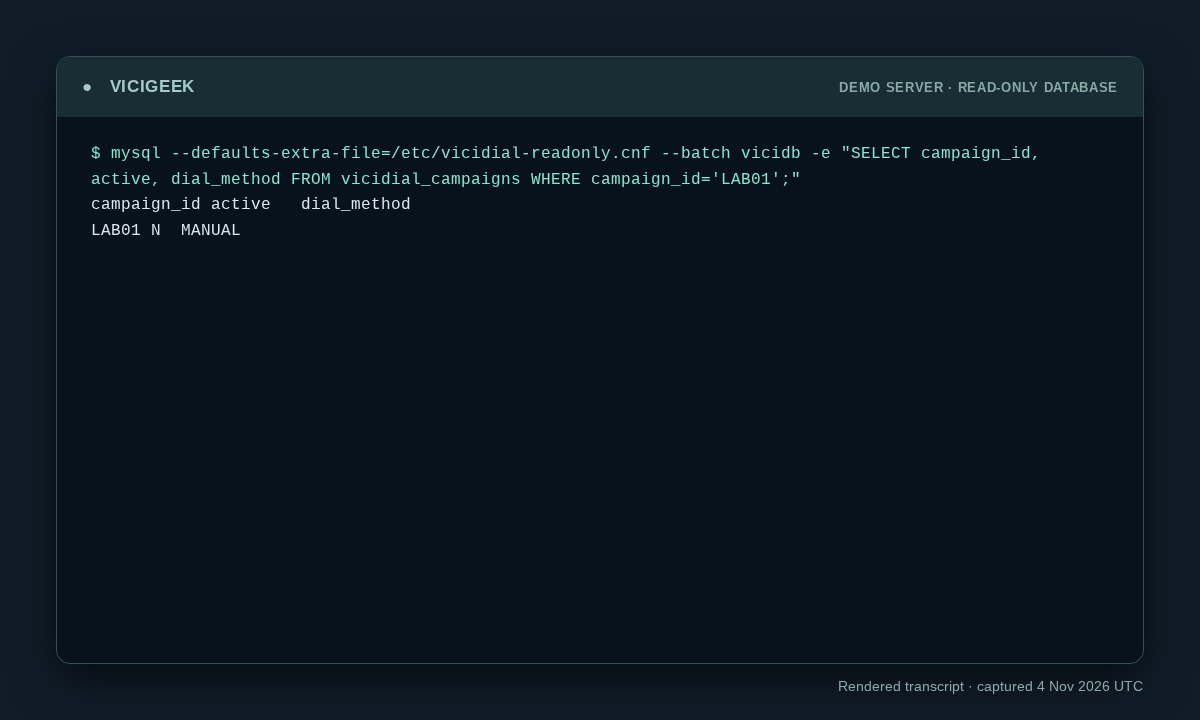
Capture details
Read-only observation, not a completed call or routing test. Display trims blank space; enlargement opens the complete original. SSH client post-quantum warning on stderr omitted; SQL stdout preserved. Aggregate counts or schema only; no customer rows.Recorded lab terminal: lab list
Open to enlarge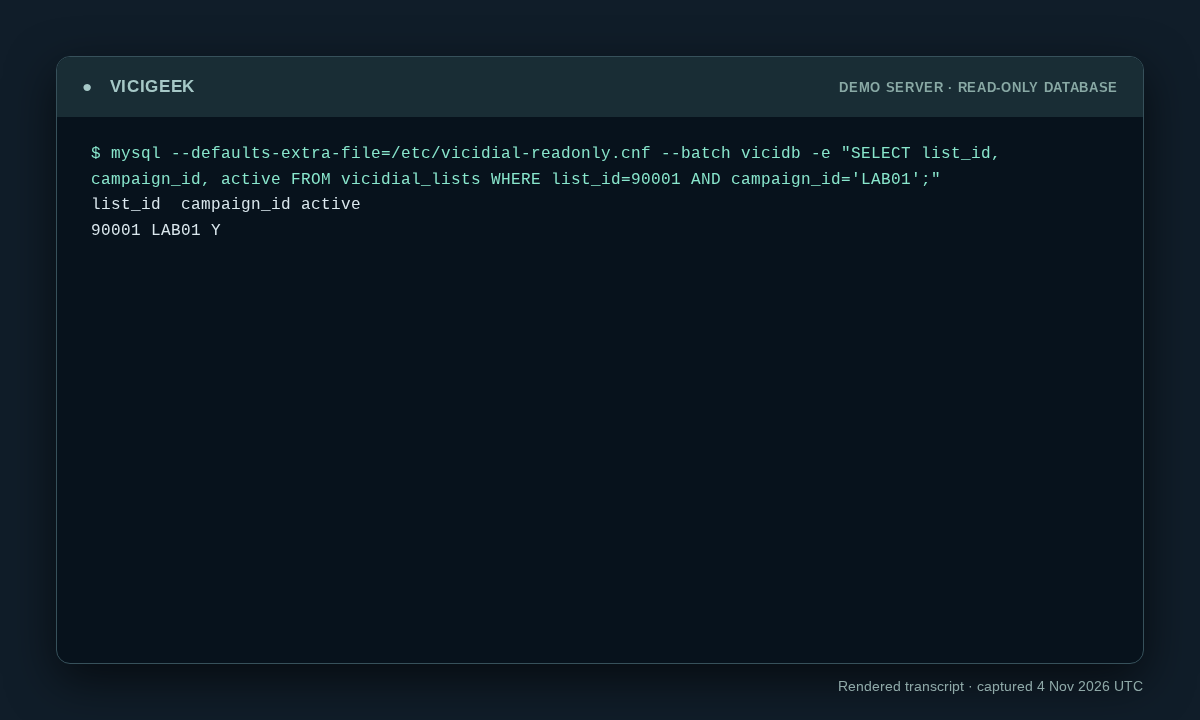
Capture details
Read-only observation, not a completed call or routing test. Display trims blank space; enlargement opens the complete original. SSH client post-quantum warning on stderr omitted; SQL stdout preserved. Aggregate counts or schema only; no customer rows.You should seeThe recorded lab command and output show exactly what the demo returned. Use the original workflow’s separate end-to-end acceptance checks before declaring success.
Checks and sources
What was checked
- These steps target VICIdial Admin 2.14-969a, SVN 4037 / database schema 1748. Substitute unused IDs for LAB01, LABTEAM, learner1, 8001, 90001, SALESDEMO and DEMOIVR if any already exist. Labels and options may differ on other builds. The configuration checks below do not establish that a call, audio, or carrier route has been tested.
- Admin form captures are visual orientation only; no live call, audio, or carrier drill was performed for this guide.
- Reviewed read-only SSH observations were added from the ViciBox 12 / SVN 4037 demo on November 4, 2026. Captures show point-in-time state, not successful calling, routing, audio, API writes or recovery.
Primary references
Sources
- VICIdial source and documentationVICIdial · accessed November 4, 2026
- VICIdial Non-Agent API referenceVICIdial · accessed November 4, 2026
- VICIdial statuses referenceVICIdial · accessed November 4, 2026