01 / 04
1. Prepare one review
Ask the campaign owner which QC queue and statuses are configured, which rubric applies, and who receives a correction. Confirm the installed version and review permission before relying on the historical manual. If the menu, fields or allowed results differ, use the local procedure and have its owner verify the mapping.
Select one synthetic interaction with an approved recording and known campaign, agent, lead identifier and time. Use the smallest scope needed. A recording link by itself does not prove that it belongs to the intended interaction.
- Record the test campaign, expected lead and agent, call time and time zone on your worksheet.
- Confirm that the test record qualifies for the QC queue and that your account may see and review it. If it does not appear, ask the QC owner to check queue configuration and permissions; do not alter a production record to force a match.
- Prepare a simple rubric: identity confirmed, recording matches the call, required review points, evidence notes and disposition or handoff owner.
Recorded read-only query showing QC features disabled and the synthetic campaign not enabled for QC
Open to enlarge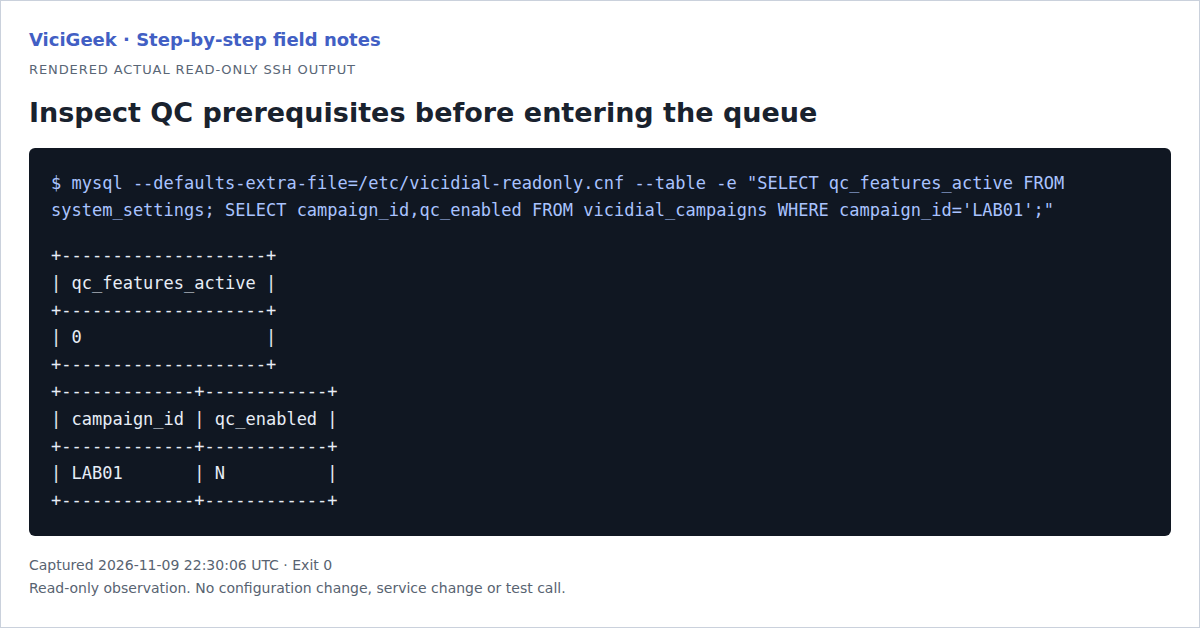
Capture details
QC is disabled in this demo snapshot, so a native scoring/FINISH outcome was not produced. The guide’s operational steps are current-source-reviewed and reader-run.You should seeYou have an identified test record, an approved rubric and a named owner before opening the review.
02 / 04
2. Locate the queued record and match its evidence
The historical manual shows Quality Control → Enter QC Queue. The inspected installed admin source includes a Quality Control Listings page and campaign queue with QC statuses; the record source includes ALL RECORDINGS FOR THIS LEAD and a QC log. Menu visibility depends on configuration and access. Viewing a record may itself be logged; follow local access policy.
- Open the installed QC queue, select the approved campaign and find the synthetic record using its known identifier and status.
- Open the record and compare campaign, lead, agent and time with the test case. If any identity differs, stop and ask the owner to resolve the mismatch.
- Open the permitted recording and listen only as authorized. Confirm it is the intended test interaction before scoring; if it is unavailable, silent or associated with a different call, record that limitation and investigate the association.
You should seeThe review identifies a specific record and recording, or stops with a documented evidence gap.
03 / 04
3. Record a review and choose its result
Apply the approved rubric to the identified test recording. Separate the observed evidence from interpretation: for example, “required test phrase absent at 00:20” is more useful than an unsupported conclusion about the agent. The original agent call disposition and the reviewer’s QC result are separate decisions.
The inspected record source places a result selector under FINISH QC on the SCORECARD, with FINISH and RELEASE controls; the older standalone QC Result submit markup is commented out. Codes are drawn from configured QC codes. The installed result meanings, callback behavior and notes visibility still need confirmation with the QC owner; do not assume a failure result creates the desired assignment.
- Record the rubric items, evidence and reviewer identity in the approved location. Avoid copying customer details or audio into a general worksheet.
- On the SCORECARD, for an authorized test, select the locally approved result under FINISH QC. Check the target record and selection, then use FINISH once; RELEASE is a separate control and should not be treated as completion. If those controls are absent, stop and ask the QC owner about the installed configuration.
- Read the confirmation and reopen the record or log using the installed procedure. Check the recorded result, reviewer and time against your notes. If the result is missing or ambiguous, stop and ask the QC owner before resubmitting.
You should seeA review is complete only when the saved result and supporting evidence can be checked on the intended test record.
04 / 04
4. Check the correction handoff
For a result requiring follow-up, use the installation’s approved callback or correction procedure. The older manual describes callback details and a QC log, but it does not establish how a current deployment routes or audits them. A reviewer should not call a customer or change historical dispositions as an improvised correction.
- Record the assigned owner, task and due time for the synthetic case. If the installed flow creates a callback, inspect its owner, date, time zone and status rather than assuming creation succeeded.
- Ask the owner to confirm the handoff through the authorized test process. If no callback or assignment appears, preserve the result and escalate to the QC owner instead of submitting the result repeatedly.
- Check the record’s available QC history for the review and any correction. Close the test according to the owner’s procedure and retain evidence only under the local retention policy.
You should seeThe test has either a verified owner and next action or a documented unresolved handoff with an escalation owner.
Checks and sources
What was checked
- The VICIdial QC manual identifies itself as v0.5 beta and shows a VICIdial 2.4-297 screen. Read-only inspection of installed admin.php and qc_modify_lead.php on November 9, 2026 found QC campaign queues, SCORECARD, FINISH QC, FINISH, RELEASE and lead recording and QC log sections. Available controls depend on configuration and permissions. No live QC result or callback was tested.
Primary references
Sources
- VICIdial Quality Control Manual v0.5 betaVICIdial Group / PoundTeam · accessed November 9, 2026