What the hopper actually does
The hopper is a staging queue of leads that can be presented for dialing. The full lead database can contain hundreds of thousands of records; the hopper holds a smaller working set selected under campaign rules. AST_VDhopper.pl prepares that working set. A separate dialing process consumes it and requests the call.
Hopper Level therefore describes a refill threshold, not the number of calls currently ringing and not a strict maximum row count. A campaign can have a large active list and an empty hopper when none of its leads pass the selection gates. Conversely, an old READY row can remain after the underlying lead or campaign changes.
You should seeRead the lead pool, the staged queue and live calls as three different measurements.
How the loader starts
The reviewed script reads /etc/astguiclient.conf for its database connection and paths, then loads server and system settings. It is a scheduled job, so not seeing a persistent AST_VDhopper.pl process between runs does not prove it is stopped.
This demo has one active root-cron entry running the hopper every two minutes. The commented entry above it would run every minute. The script header recommends one scheduled loader for the dialing system, running every minute during operating hours. The two-minute cadence below is an observation, not a configuration to copy blindly.
ADMIN_keepalive_ALL.pl has its own once-per-minute schedule. Its role includes maintaining long-running dialer and manager processes. The automatic dialer, fill helper, manager sender and manager listener were running during this inspection; keepalive is not a substitute for the hopper's cron entry.
- Before you use it
- Run on the identified dialer server with permission to read its current crontab. This command reads the schedule and does not execute the script.
crontab -l | grep -E '^([^#].*AST_VDhopper\.pl|#.*AST_VDhopper\.pl)'Captured demo response · Capture date is documented with the article evidence.. Any filtering, hidden values or test-only data are identified in the capture label. Select Replay transcript to read the recorded output.
- Success looks like
- Find one intended active entry and distinguish it from commented examples. Here */2 means every two minutes.
- Stop if
- If the schedule is absent or duplicated, reconcile ownership and the scheduler first. Do not start a second loader to compensate.
Recorded crontab excerpt showing a commented one-minute hopper job and an active two-minute job
Open to enlarge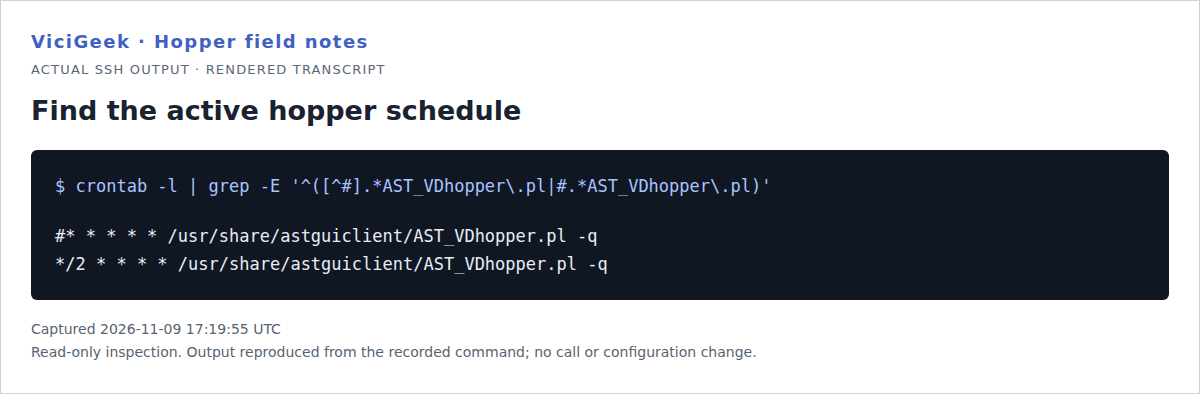
Capture details
Only the relevant crontab lines are selected by the displayed command. This establishes the configured schedule, not that a call completed.You should seeConfirm both the schedule and fresh run evidence. The demo's recent hopper runs were visible at 12:06, 12:08 and 12:10 server time.
The lead-selection gates
The standard loading loop selects active campaigns. Within each campaign, it builds a candidate set from list membership, allowed call times, status and additional configured restrictions. The checks work together: passing one check does not override another.
For standard source-S loading in this build, called_since_last_reset must equal N. This is separate from the lead's result status. A lead can still say NEW while its called flag is Y, and that combination is not a standard uncalled candidate. Callback, recycling, API and alternate-number paths have their own rules.
Native VICIdial list controls locating campaign assignment, Active and reset choices
Open to enlarge
Capture details
It locates the list's campaign, Active and reset controls. No values were submitted; this is not evidence of a saved list reset or today's campaign state.You should seeIdentify the first failing gate before considering a change.
Example: 108,288 leads, but zero standard candidates
The SOLAR demo campaign was active, used RATIO dialing, had Hopper Level 5,000 and had two active, unexpired lists. Its allowed dial statuses were N, NA, A, AA and NEW. Its hopper contained no READY rows.
The list total alone looked reassuring. The narrower query explains the result: only 17 leads matched those statuses, and none of those 17 had called_since_last_reset = N. The matching leads were 14 NA and three NEW records, all with a called flag of Y. Most other leads had statuses outside the configured dialing set.
- Before you use it
- This exact capture uses the existing SELECT-only client configuration and SOLAR's reviewed status set. For another campaign, use its actual statuses and approved connection configuration. The file path is specific to this demo, not a standard VICIdial credential file.
mysql --defaults-extra-file=/etc/vicidial-readonly.cnf --table -e "SELECT COUNT(*) AS total_leads, SUM(v.status IN ('N','NA','A','AA','NEW')) AS matching_status, SUM(v.status IN ('N','NA','A','AA','NEW') AND v.called_since_last_reset='N') AS matching_status_uncalled FROM vicidial_list v JOIN vicidial_lists l ON l.list_id=v.list_id WHERE l.campaign_id='SOLAR' AND l.active='Y' AND l.expiration_date>=CURDATE();"Captured demo response · Capture date is documented with the article evidence.. Any filtering, hidden values or test-only data are identified in the capture label. Select Replay transcript to read the recorded output.
- Success looks like
- Read the three counts from left to right: 108288 total, 17 matching statuses, zero matching statuses still uncalled. Zero here already explains standard-loader exhaustion before later gates.
- Stop if
- If candidates remain, continue with call times, filters, limits and DNC rules. Do not assume this query evaluates every gate or change statuses simply to make its final count positive.
Recorded SQL aggregate showing 108288 leads, 17 matching dial statuses and zero matching uncalled leads
Open to enlarge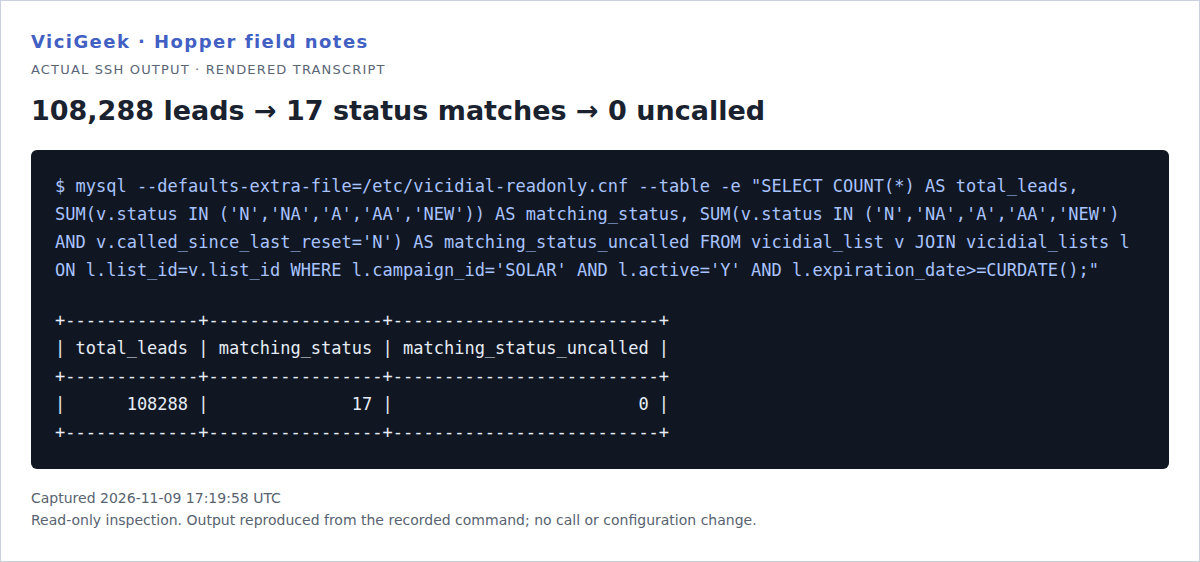
Capture details
Aggregates contain no phone numbers or individual lead records. This proves the observed status/reset funnel for the demo campaign, not future eligibility after a reset.You should seeThe next decision is a reviewed lead-status and retry/reset policy. Restarting the loader or raising its target does not address the observed cause.
Campaign settings and their functions
Open Campaigns → the intended campaign and locate its dialing and hopper settings. Field placement varies by build and detail view. The native screenshot below is a control-location illustration; inspect the current saved values on your own system before planning a change.
Native VICIdial campaign controls for hopper minimum, automatic level, multiplier, trim and reset
Open to enlarge
Capture details
Values were entered in browser state only and never submitted. The visible Force Reset choice is a field-location reference, not an instruction to use it.You should seeTreat sizing, selection and dialing pace as related but separate controls.
Example: calculate an automatic hopper target
In the reviewed build, calculated demand is rounded up from multiplier × qualifying agents × auto-dial level × (60 ÷ dial timeout). The effective loading target is the larger of that result and the configured minimum. Qualifying agents include fresh READY, QUEUE, INCALL and CLOSER sessions plus the recently paused sessions accepted by the script's timing checks.
The worksheet uses fictional inputs. Six qualifying agents, dial level 2, a 30-second timeout and multiplier 1 produce 24. With a minimum of 10, the effective target is 24. With a minimum of 100, the same calculation still has an effective target of 100. The stored calculated auto_hopper_level can therefore differ from the minimum actually used for loading.
- Before you use it
- Use this to understand the arithmetic. These are fictional inputs, not recommended production settings or a live performance test.
Qualifying agents: 6Auto-dial level: 2Dial timeout: 30 secondsHopper multiplier: 1Configured minimum: 10 Calculated demand = ceil(1 × 6 × 2 × (60 ÷ 30)) = 24Effective target = max(10, 24) = 24This sample is a template or reading aid, not a terminal command. There is no output to show.
- Success looks like
- Changing the minimum to 100 gives max(100, 24) = 100. Changing the multiplier changes demand, not lead eligibility.
- Stop if
- If observed behavior differs, first compare the installed build, agent freshness, dial timeout and saved campaign values. Do not tune pacing from this worksheet alone.
You should seeExplain both the calculated demand and the minimum floor when reviewing an automatic hopper.
The queue lifecycle: READY → QUEUE → INCALL
For automatic dialing, AST_VDauto_dial.pl claims READY rows in descending priority and then hopper_id order, assigning a server-specific owner while changing them to QUEUE. It reads a claimed lead and marks its hopper row INCALL. The call preparation updates reset/attempt counters and removes the consumed hopper row before creating the manager Originate request and the SENT live-call tracking row.
AST_manager_send.pl forwards queued manager actions to Asterisk. The eventual call and disposition workflow updates the lead's result. A row disappearing from vicidial_hopper therefore proves consumption of queue work, not that a person answered or that an agent received usable audio.
You should seeTrace a call beyond the hopper through its manager request, live-call record and final result when you need proof of dialing or completion.
Example: a READY row can outlive its original eligibility
The demo contained three READY rows at the snapshot below. KPISYN1 had one NEW lead staged and met its minimum of one. LAB01 was inactive but retained one NEW row. SIPPQA1 had a READY row whose lead now said SVYEXT even though that campaign's configured dial status was NEW.
Normal runs process active campaigns; they do not automatically discard all rows belonging to an inactive campaign. The usual maintenance also does not rebuild every existing row against the lead's latest result status. SIPPQA1's retained READY row counted toward its minimum even though the current standard candidate count was zero.
- Before you use it
- Use the approved SELECT-only configuration. This aggregate joins queue rows to their current lead and campaign without exposing individual lead IDs or phone numbers.
mysql --defaults-extra-file=/etc/vicidial-readonly.cnf --table -e "SELECT h.campaign_id, c.active, h.status AS hopper_status, v.status AS lead_status, COUNT(*) AS queued FROM vicidial_hopper h JOIN vicidial_campaigns c ON c.campaign_id=h.campaign_id JOIN vicidial_list v ON v.lead_id=h.lead_id GROUP BY h.campaign_id,c.active,h.status,v.status ORDER BY h.campaign_id;"Captured demo response · Capture date is documented with the article evidence.. Any filtering, hidden values or test-only data are identified in the capture label. Select Replay transcript to read the recorded output.
- Success looks like
- Compare active, hopper_status and lead_status together. Here LAB01 is inactive and SIPPQA1's queued lead is SVYEXT; a READY-only count would miss those distinctions.
- Stop if
- If a row looks stale, record its scope and review the relevant feature and operating plan before clearing or changing it. This inner-join example is not an orphan-row audit.
Recorded aggregate showing three READY rows, including inactive LAB01 and a SIPPQA1 lead with status SVYEXT
Open to enlarge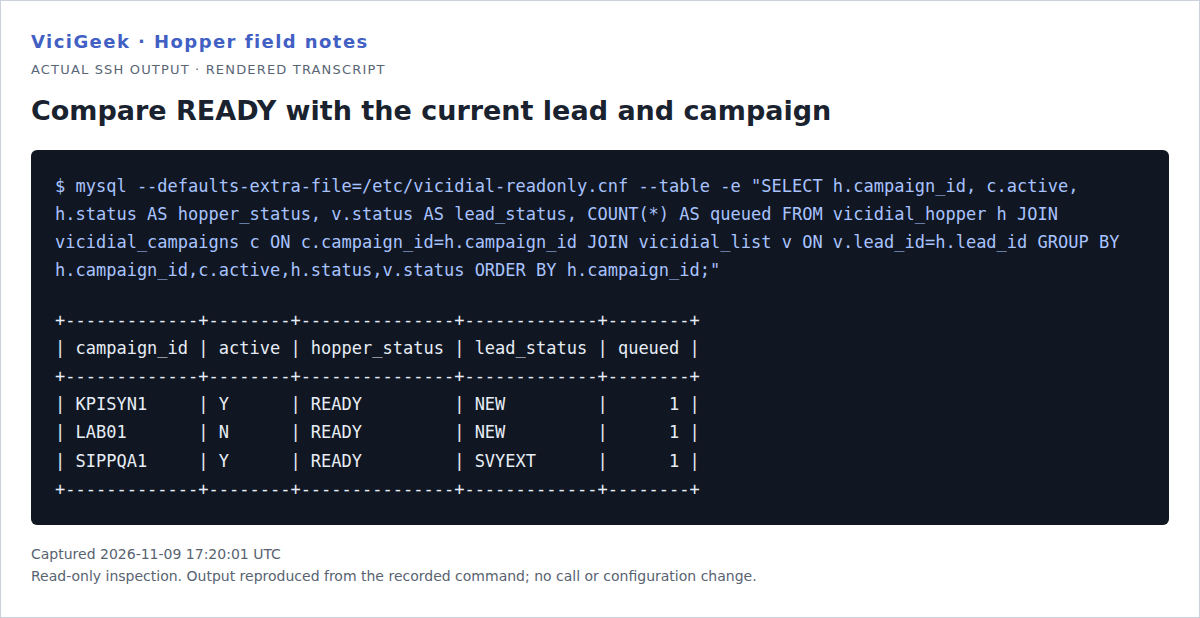
Capture details
These are aggregate queue observations from a demo, not evidence that any row was dialed. No queue entries were changed for this check.You should seeA hopper count is useful, but pair it with the current lead status and campaign state.
Source codes and dialing priority
The source character records how work entered the hopper. Standard inserts start with source S and priority 0 in this build. Other features can use different sources and priorities, so lead order alone does not explain every row's position.
The automatic consumer claims higher priority first, then hopper_id. In particular, callback and alternate-number work should be understood through their own rules rather than treated as ordinary source-S batches. API insertion is another path: the official API exposes separate hopper insertion and local-call-time-check options, so review those controls when diagnosing an integration.
You should seeUse campaign + status + source + priority to explain the queue, not lead_id order alone.
Manual dialing and the no-hopper option
A MANUAL campaign can use hopper leads. In the reviewed Agent UI backend, Dial Next claims a READY row as QUEUE for the requesting user. The automatic-dialer path instead claims work for a dialing server and creates the outgoing call request according to its pacing logic.
No Hopper Dialing is a separate manual workflow. When enabled, the normal loader branch is bypassed and the script removes applicable non-reserved hopper entries for that campaign. It should be evaluated as a deliberate workflow choice, not toggled to bypass an unexplained eligibility failure.
You should seeIdentify the actual dialing workflow before deciding which queue measurement matters.
Callbacks, recycling and cleanup
Before and around standard loading, the script performs maintenance. It can remove rows from inactive or expired lists, transition due callbacks, handle applicable ANYONE callback inserts, process automatic alternate-number work and reconsider certain leads held by rolling call-count limits.
Within active campaigns it prepares eligible recycle rules, removes DONE entries, removes work excluded by the relevant list/time conditions, applies optional trimming, and updates campaign statistics and diagnostic output. Callback recipients, inactive-list handling, DNC rules and limits can change the exact behavior. These side paths are why running the whole loader is not a read-only diagnostic.
The demo's diagnostic record for SOLAR reported zero leads to call and ERROR CANNOT ADD ANY LEADS TO HOPPER. AIWARM also reported zero, with no assigned lists. Those messages describe the candidate problem; they do not by themselves indicate a crashed process.
You should seeInterpret a maintenance message in the context of the relevant campaign and feature.
- Inspect the campaign's hopper debug record and the appropriate daily hopper log privately.
- Keep raw logs, customer details and individual callback records out of screenshots and support uploads.
- Correlate timestamps using the server's actual clock and timezone. This demo's server clock was UTC−5 during capture.
A compact read-only inspection sequence
Start with the saved campaign and list controls, then inspect aggregate database state. An approved read-only account helps keep an investigation observational. The demo's /etc/vicidial-readonly.cnf is an existing local client configuration, not a file every installation ships with.
- Identify the host, installed script build, actual database name and server timezone.
- Confirm one intended schedule and fresh completed-run evidence.
- Read campaign Active, dialing method, No Hopper Dialing, Dial Statuses and target settings.
- Check assigned lists, Active and expiration dates, then count status/reset candidates.
- Continue through local calling time, filters, DNC and attempt/recycling limits if candidates remain.
- Compare current hopper rows with campaign/lead state; then inspect the appropriate manual or automatic consumer.
- Before you use it
- Select your installation's actual database using the approved SELECT-only client. These portable inspection queries were not executed as this combined example; the earlier captured queries have their own exact receipts.
SELECT campaign_id, active, dial_method, no_hopper_dialing, hopper_level, use_auto_hopper, auto_hopper_level, local_call_time, dial_statusesFROM vicidial_campaignsORDER BY campaign_id; SELECT campaign_id, status, source, COUNT(*) AS queuedFROM vicidial_hopperGROUP BY campaign_id, status, sourceORDER BY campaign_id, status, source;This example has no recorded result here. Follow its preparation, expected result and stop conditions before using it.
- Success looks like
- Compare saved targets with READY versus held/reserved counts. Follow the matching campaign through its lead-selection gates rather than treating a total as proof of readiness.
- Stop if
- Stop on an unknown database, missing column or access error. Verify the installed schema and permissions rather than guessing another database or using a write-capable account.
You should seeKeep a dated record of the first failing gate and the next decision it requires.
Do not assume --test or --count-only is harmless
In the inspected build 250224-1641, --test assigns $T and $TEST, but neither flag is checked elsewhere in the script. The live hopper table remains selected and the mutation paths remain reachable. Treating this flag as a dry run would therefore be a mistake in this specific installed build.
The --count-only branch also occurs after an unconditional INSERT IGNORE into vicidial_campaign_stats_debug. It is not strictly read-only. Use SELECT counts for observation. The concurrency guard is separately opt-in through --run-check; the observed cron entry did not include it. This audit did not establish overlapping runs.
- Before you use it
- This grep reads the reviewed source file. It does not invoke AST_VDhopper.pl. Match the source build before applying the finding to another installation.
grep -n -E '\$T\b|\$TEST\b|\$run_check=|if \(\$run_check' /usr/share/astguiclient/AST_VDhopper.plCaptured demo response · Capture date is documented with the article evidence.. Any filtering, hidden values or test-only data are identified in the capture label. Select Replay transcript to read the recorded output.
- Success looks like
- The captured lines show the test-flag assignments and the opt-in concurrency guard. Full-source review found no later reads of $T or $TEST; the finding is scoped to this build.
- Stop if
- Do not execute --test, --count-only or --wipe-hopper-clean to confirm the warning. If your source differs, inspect its control flow and database writes first.
Recorded source-reference grep showing test flags assigned and the concurrency check gated by run_check
Open to enlarge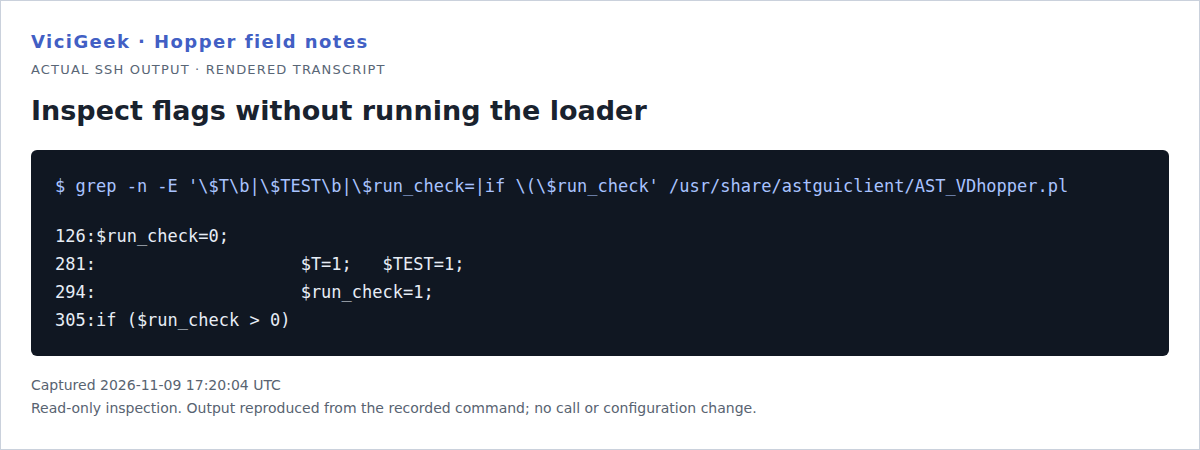
Capture details
The screenshot shows matching source lines; the unused-test-flag conclusion also relies on review of the complete installed file. No loader command was executed.You should seeA flag name is not a safety guarantee. Review the installed implementation and use genuinely read-only queries.
Choose the next check from the symptom
Resolve the observed gate before choosing a change. Clearing queue rows and resetting lead flags are different operations: one removes staged work, while the other can make previously attempted leads available again.
You should seeYou should be able to name the failed gate, show the evidence and state what must be reviewed before changing future dialing work.
Follow the focused empty-hopper diagnostic guide
Checks and sources
What was checked
- Source and runtime inspection: November 9, 2026. Installed AST_VDhopper.pl version 2.14, build 250224-1641; SHA-256 6d3879e1c3158160bfdf3ba61dc66e69bafb99d347362a0cbead7042b5a97b94. The published receipt records the independently verified installed-source hash; behavior described here belongs to that reviewed build.
- Four command transcripts were captured through an existing read-only inspection workflow. Their screenshots are browser-rendered transcripts of actual SSH output, not native terminal application screenshots. Commands and complete returned lines are selectable in the examples.
- The two November 4 native VICIdial screenshots show unsaved example controls. They locate the fields and do not establish today's saved settings. No form submission or server mutation was performed to make this article.
- Observed queue counts are dated snapshots. No end-to-end call, carrier acceptance, agent delivery or audio test was performed. The automatic-sizing calculation is an explicitly fictional worksheet.
Primary references
Sources
- ViciGeek installed hopper review: build, checksums and dated aggregate receiptsViciGeek Editorial Desk · first-hand source/runtime inspection · accessed November 9, 2026
- VICIdial Non-Agent API: hopper_list, hopper_bulk_insert and add_to_hopper controlsVICIdial Group · accessed November 9, 2026
- Asterisk AMI Originate actionAsterisk Project · accessed November 9, 2026