01 / 13
Start here: what reached Asterisk?
sngrep turns SIP messages into a call list and an arrow diagram. It helps answer: did an INVITE reach this server, which endpoint replied, and what response came first? It does not decide whether a campaign was eligible to dial or whether a person heard clear audio.
For VICIdial, inspect the correct leg. Asterisk can create different dialogs for the agent phone, conference and carrier. sngrep groups messages by Call-ID; a SIP dialog is identified by the Call-ID and both tags. Forked dialogs can share a Call-ID, and it is not automatically a VICIdial lead ID or the ID of every leg in the call.
02 / 13
1A. ViciBox/openSUSE: check the approved package
If sngrep is already installed, check its version and skip installation. On ViciBox/openSUSE, package availability depends on the repositories approved for that server. A missing candidate is not a reason to add an unknown repository.
- Run zypper search -s sngrep and inspect the package candidate, version and repository.
- Continue only when that candidate and the package change are approved for this server. Use the ViciBox/openSUSE block below; Debian/Ubuntu has its own block.
- Before you use it
- Inspect zypper search -s sngrep first. Run this installation block only on ViciBox/openSUSE with an approved candidate and change window; these commands were not run on the demo.
sudo zypper install sngrepsngrep --versionsngrep --helpThis example has no recorded result here. Follow its preparation, expected result and stop conditions before using it.
- Success looks like
- The installed binary reports its version and help. Confirm local options before using a command from this guide.
- Stop if
- If no trusted package is available, stop and obtain a reviewed installation plan; do not pipe an arbitrary downloaded script into a shell.
Sources for this section
- sngrep official project and capabilitiesIrontec · Checked November 8, 2026
- sngrep 1.8.3 command-line manualIrontec · Checked November 8, 2026
- sngrep binary installation guidanceIrontec · Checked November 8, 2026
03 / 13
1B. Debian/Ubuntu: use the distribution package
Choose this branch only on Debian/Ubuntu. The screenshots use an isolated extracted Ubuntu sngrep 1.8.3 binary; they do not establish that either installation block was run on your PBX.
- Before you use it
- Use the official repositories and the server’s normal package-change process. Skip this branch when using the ViciBox/openSUSE instructions.
sudo apt updatesudo apt install sngrepsngrep --versionsngrep --helpThis example has no recorded result here. Follow its preparation, expected result and stop conditions before using it.
- Success looks like
- The installed sngrep binary reports its version and options. Use the footer/help for that version’s controls.
- Stop if
- If the official candidate is unavailable or package verification fails, stop and obtain a reviewed installation plan.
Sources for this section
- sngrep official project and capabilitiesIrontec · Checked November 8, 2026
- sngrep 1.8.3 command-line manualIrontec · Checked November 8, 2026
- sngrep binary installation guidanceIrontec · Checked November 8, 2026
04 / 13
2. Open the safe practice capture first
Download the practice PCAP and open a terminal in the directory where you saved it. The file is deliberately fictional: three dialogs with 7, 3 and 2 messages. The application reads the file only; it does not send those messages or start a call.
For this offline file, -F ignores default configuration and uppercase -I selects the input file. Do not substitute a live interface command when you only want to learn the screen. You can verify the companion checksum before opening it.
- Before you use it
- Save both downloads in the same directory and run from there. Screenshots were made with the isolated sngrep binary documented in the capture provenance; this is the reader’s installed-binary command.
sha256sum -c vicigeek-sngrep-fictional.pcap.sha256sngrep -F -I ./vicigeek-sngrep-fictional.pcapThis example has no recorded result here. Follow its preparation, expected result and stop conditions before using it.
- Success looks like
- The checksum matches and the sngrep header shows Offline with 3 dialogs after loading.
- Stop if
- A missing file is a path problem, not a SIP failure. Do not use sudo just to bypass an unexplained file-permission problem.
The real sngrep call list
Open to enlarge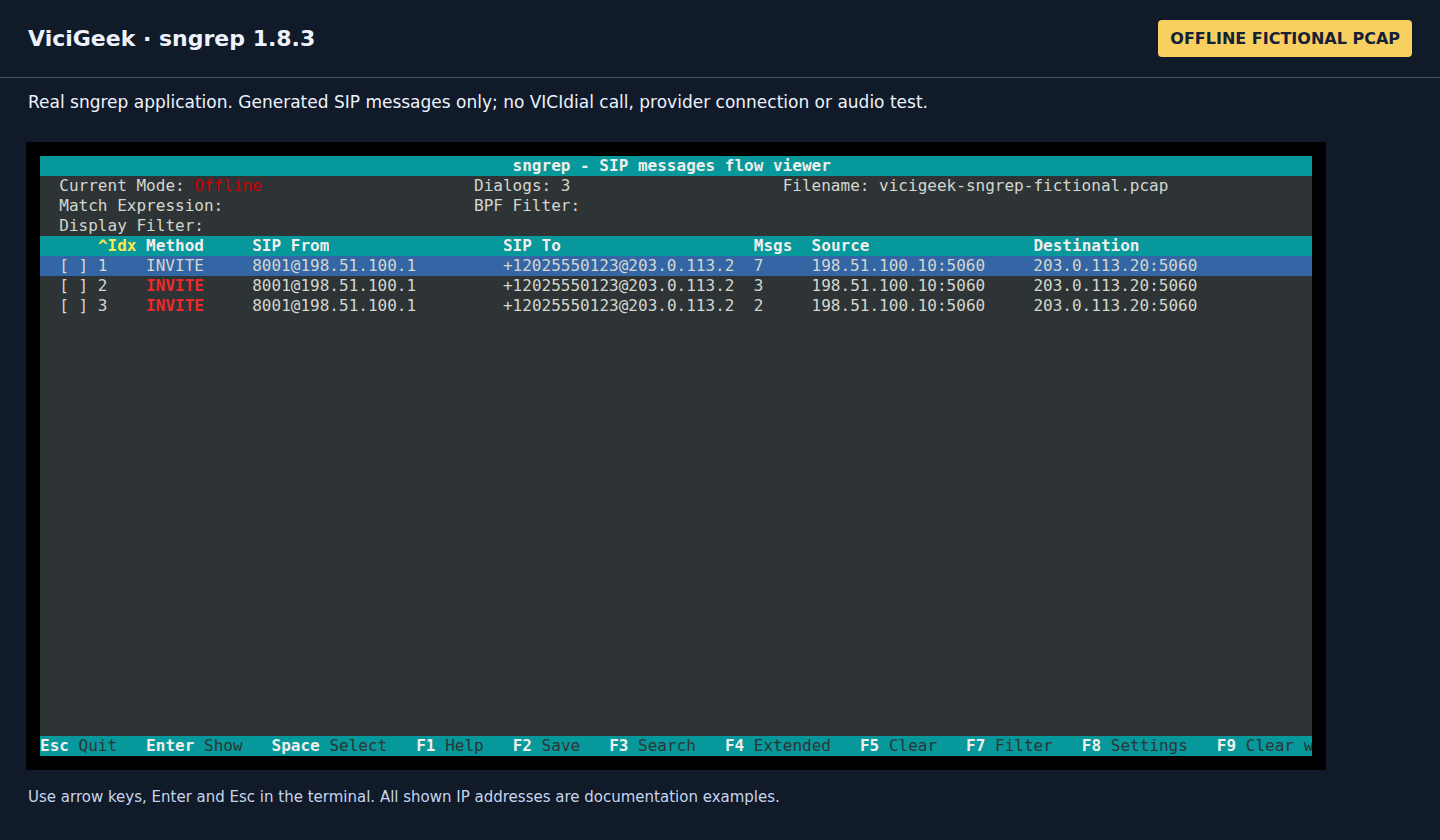
Capture details
Source and Destination here are packet endpoints, not a mapping of every VICIdial call leg. Actual sngrep 1.8.3 UI captured November 8, 2026 through a local terminal. Input is a generated fictional PCAP, not a VICIdial or provider call; no real network traffic or audio was captured. Enlarge and use Zoom to read the full headers.05 / 13
3. Open one dialog and follow the arrows
Use Up/Down to highlight a dialog, then Enter to open its flow. Inside the flow, Up/Down selects a message. Enter opens the selected message in the raw view; Esc returns one level. Use the footer in your version for other shortcuts.
In the first fixture dialog, read the sequence as INVITE → 100 Trying → 180 Ringing → 200 OK → ACK. Later BYE ends that dialog, and the final 200 OK acknowledges BYE. Check the CSeq method to distinguish the two 200 responses.
Read the SIP ladder
Open to enlarge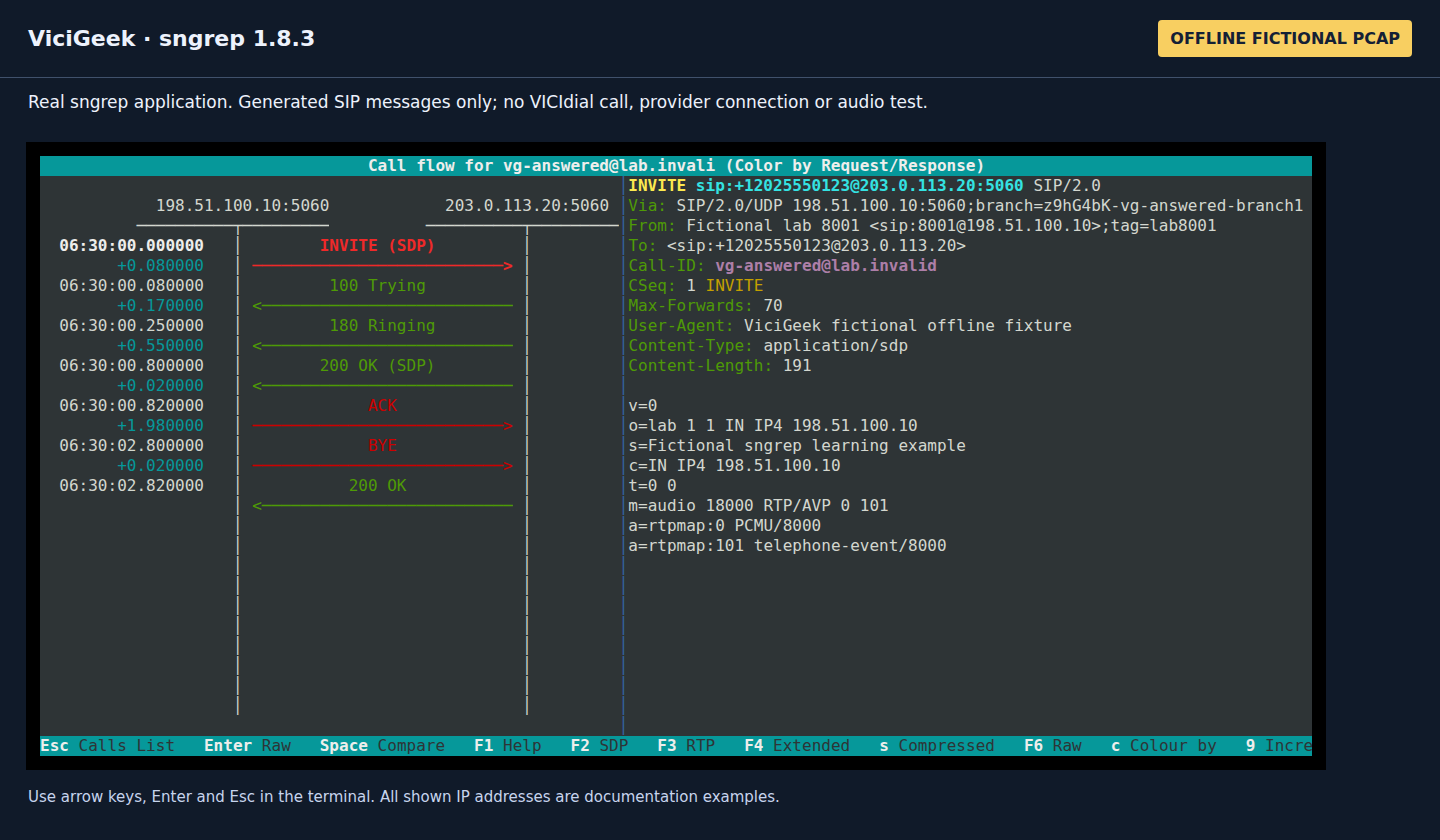
Capture details
The right panel shows the selected request and its SDP; this constructed answer sequence is not an actual completed call. Actual sngrep 1.8.3 UI captured November 8, 2026 through a local terminal. Input is a generated fictional PCAP, not a VICIdial or provider call; no real network traffic or audio was captured. Enlarge and use Zoom to read the full headers.06 / 13
4. Read the headers before changing a setting
Select the INVITE and press Enter. Compare its Request-URI user with the digits your VICIdial campaign constructs. Check the actual destination host, Call-ID and CSeq. The From identity is not necessarily the SIP digest username or the number stored on the lead.
In SDP, c= gives the advertised media address and m=audio gives the media port and payload types. A private or unexpected advertised address may support a NAT hypothesis, but the signaling view alone does not establish where RTP actually flowed.
- Request-URI
- The destination being requestedCompare route prefix removal, country code and the selected carrier’s accepted format.
- Call-ID + time
- Correlation for this SIP dialogKeep it with the server, timezone and provider call identifier; other Asterisk legs may have different Call-IDs.
- CSeq
- Transaction number and methodA 200 for BYE is different from a 200 for INVITE.
- SDP c= / m=audio
- Advertised media address / portAn offer or answer is not evidence of received or decoded speech.
Open the selected SIP message
Open to enlarge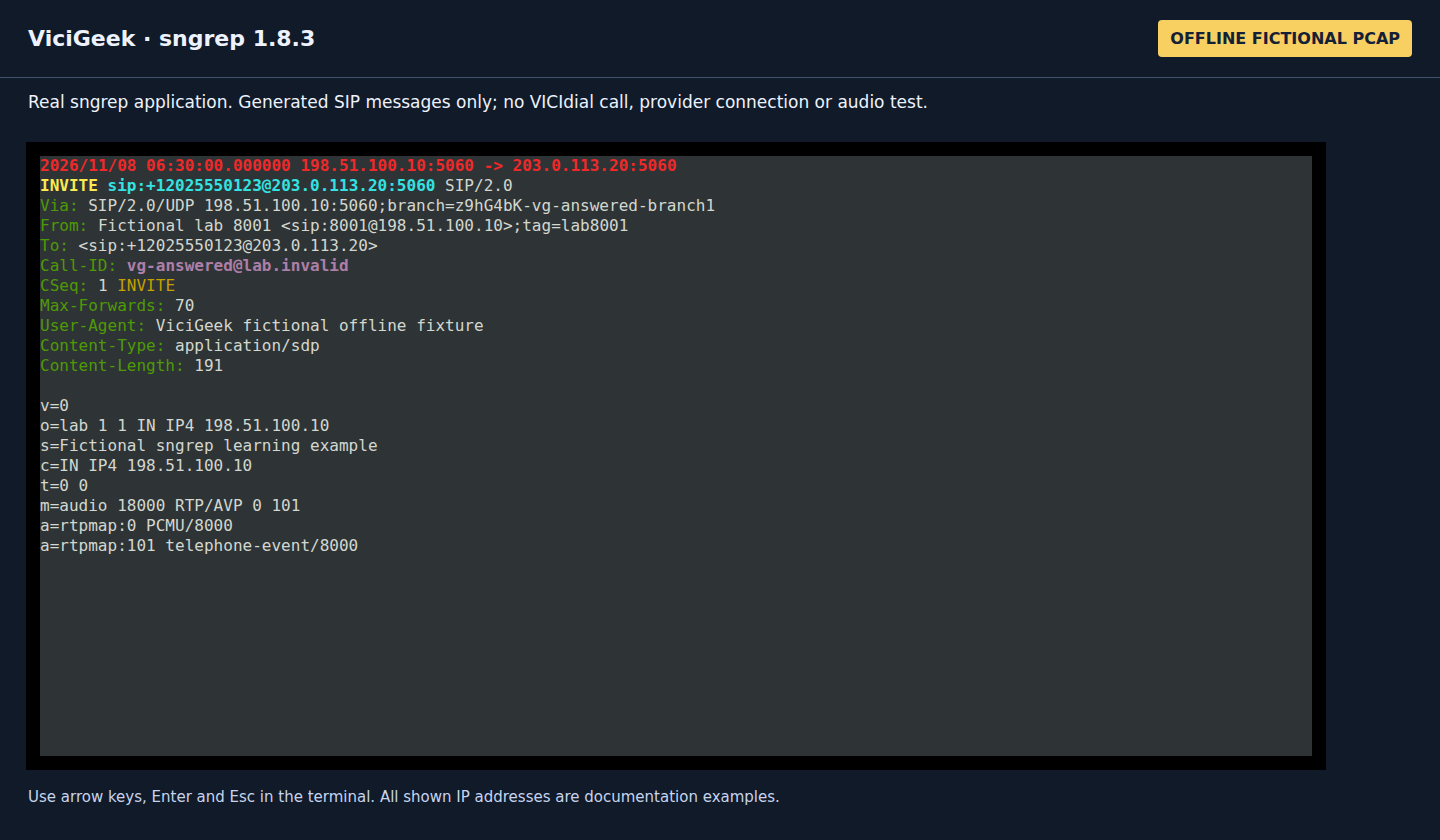
Capture details
There is no Authorization header or real caller data in the training file. Actual sngrep 1.8.3 UI captured November 8, 2026 through a local terminal. Input is a generated fictional PCAP, not a VICIdial or provider call; no real network traffic or audio was captured. Enlarge and use Zoom to read the full headers.07 / 13
5. Compare a rejected call instead of guessing
Return to the list and open the second fixture dialog. It shows INVITE → 403 Forbidden → ACK. That establishes a constructed rejection sequence from the displayed peer; it does not identify a real provider’s reason or justify a password change.
The screenshot colors requests red and responses green. A green 403 is still a rejection: interpret the status code and CSeq. For a real 403, read the full status/reason and correlate the provider/PBX record. Candidate checks include effective caller ID, source-IP allowlist, account permissions, destination restrictions and the chosen authentication mode. An initial 401/407 challenge can be normal; a repeated challenge after authentication needs a separate check.
A rejected SIP transaction
Open to enlarge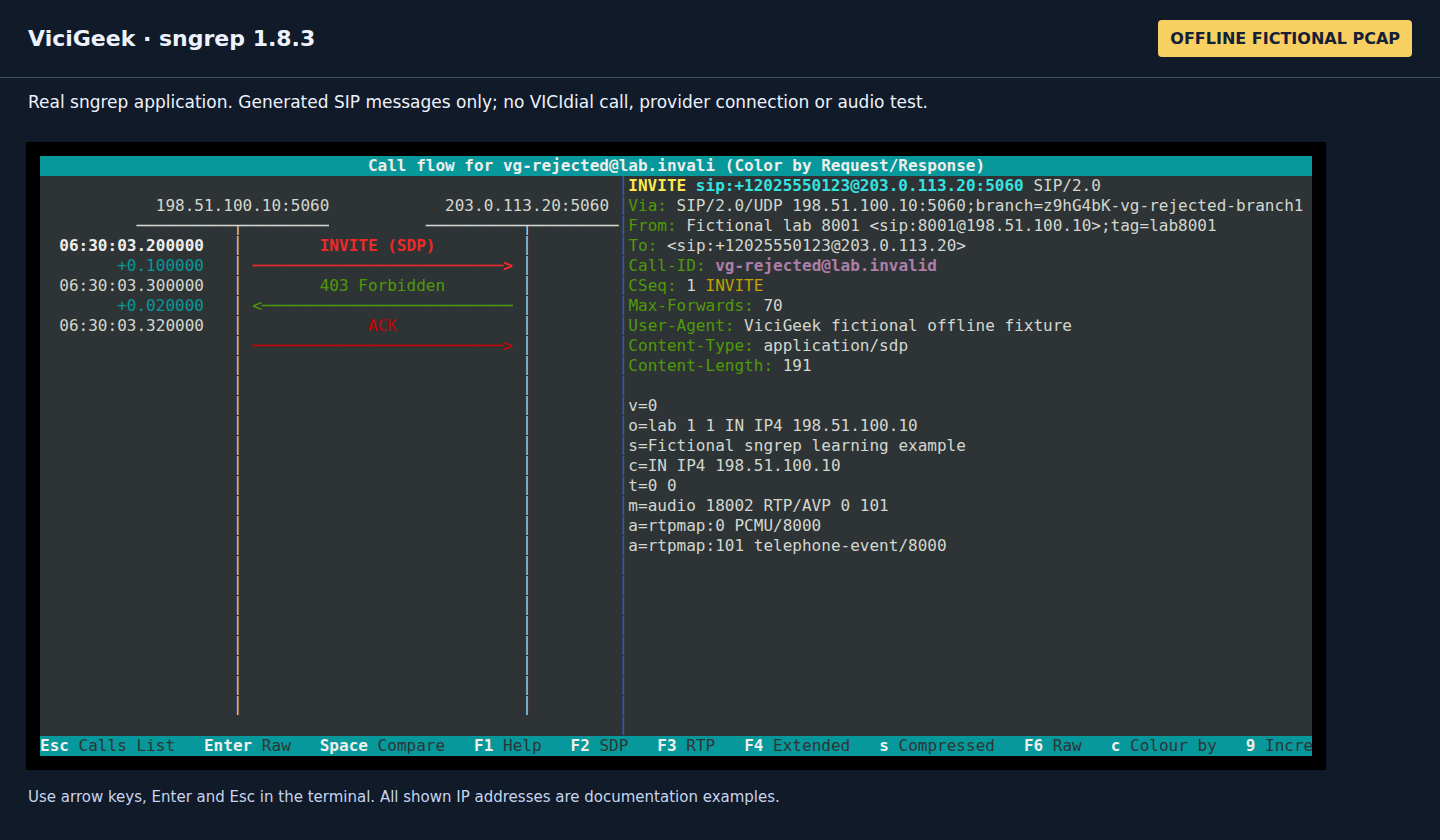
Capture details
It does not reproduce a Twilio, Telnyx, Vonage or VICIdial incident. Actual sngrep 1.8.3 UI captured November 8, 2026 through a local terminal. Input is a generated fictional PCAP, not a VICIdial or provider call; no real network traffic or audio was captured. Enlarge and use Zoom to read the full headers.08 / 13
6. For a real observation, find the actual interface and port
Use the server carrying the relevant SIP leg. On a multi-server VICIdial cluster, the web or database host may not carry that dialog. Start with the local interfaces and listening sockets, then confirm the configured remote peer and transport.
Port 5060 is common, not guaranteed. With both chan_sip and PJSIP enabled, inspect each driver’s actual listening socket. For PJSIP, pjsip show transports is useful; for chan_sip, sip show settings is the corresponding read-only check. Run the command that exists on your build.
- Before you use it
- Use an authorized read-only shell on the Asterisk host. Inspect the actual provider/phone configuration to identify the numeric peer and local SIP transport.
ip -br addrsudo ss -lntup # Replace this with the actual numeric SIP peer, not the fictional training IP.SNGREP_PEER='<ACTUAL_SIP_PEER_IP>'ip route get "$SNGREP_PEER"This example has no recorded result here. Follow its preparation, expected result and stop conditions before using it.
- Success looks like
- You can name the interface, peer and signaling port for the intended leg. A route lookup describes the host’s selected route, not successful delivery.
- Stop if
- If the peer resolves to several addresses, one host filter may miss failover traffic. Resolve that scope before starting; do not broaden to unrelated users by default.
09 / 13
7. Observe only that peer, for a short window
The following is an authorized-observation example, not a command run on this demo. Replace every placeholder. It uses a packet filter for one peer and signaling port, not a display search applied after collection. It does not start a call.
The GNU timeout wrapper bounds the observation; the extra kill deadline handles a program that does not finish after the interrupt. -l 100 limits tracked dialogs, not packets, seconds or audio length. This filter excludes RTP and other signaling ports.
- Before you use it
- Confirm GNU timeout and your local sngrep options. Use one already approved test window; do not create a call or monitor unrelated traffic to populate the screen.
SNGREP_IFACE='<ACTUAL_INTERFACE>'SNGREP_PEER='<ACTUAL_SIP_PEER_IP>'SNGREP_PORT='<ACTUAL_SIP_PORT>' sudo timeout --foreground --signal=INT --kill-after=5s 60s \ sngrep -F -d "$SNGREP_IFACE" -l 100 \ "host $SNGREP_PEER and (udp port $SNGREP_PORT or tcp port $SNGREP_PORT)"This example has no recorded result here. Follow its preparation, expected result and stop conditions before using it.
- Success looks like
- The screen contains only packets matching that peer/port scope. Stop when the needed observation is complete; a timeout exit 124 is an observation deadline, not a SIP response.
- Stop if
- If the view is empty, recheck interface, direction, peer/port, encryption and whether this leg was present. Do not immediately change NAT, authentication or campaign pacing.
Sources for this section
- sngrep 1.8.3 command-line manualIrontec · Checked November 8, 2026
10 / 13
8. Connect the observation to VICIdial
Agent ready but not dialing: follow the campaign/lead checks
11 / 13
9. Save only the selected dialog when you need evidence
In the call list, highlight the required dialog and press Space. Confirm the selection marker, then use F2 to open Save capture. The real dialog shows selected dialogs [1] when one is selected; all dialogs and filtered dialogs are different export scopes.
Choose a private, access-controlled directory and a filename for that incident. Keep .pcap (SIP) unless you have separately authorized media collection. A display filter is not a privacy guarantee for an export; review the selection and format before Save.
After saving, reopen only that approved file with sngrep -I and check its contents before sharing. Preserve the original privately and share only a reviewed/redacted derivative according to your team’s process. Quitting sngrep does not delete a saved PCAP.
Choose the export scope deliberately
Open to enlarge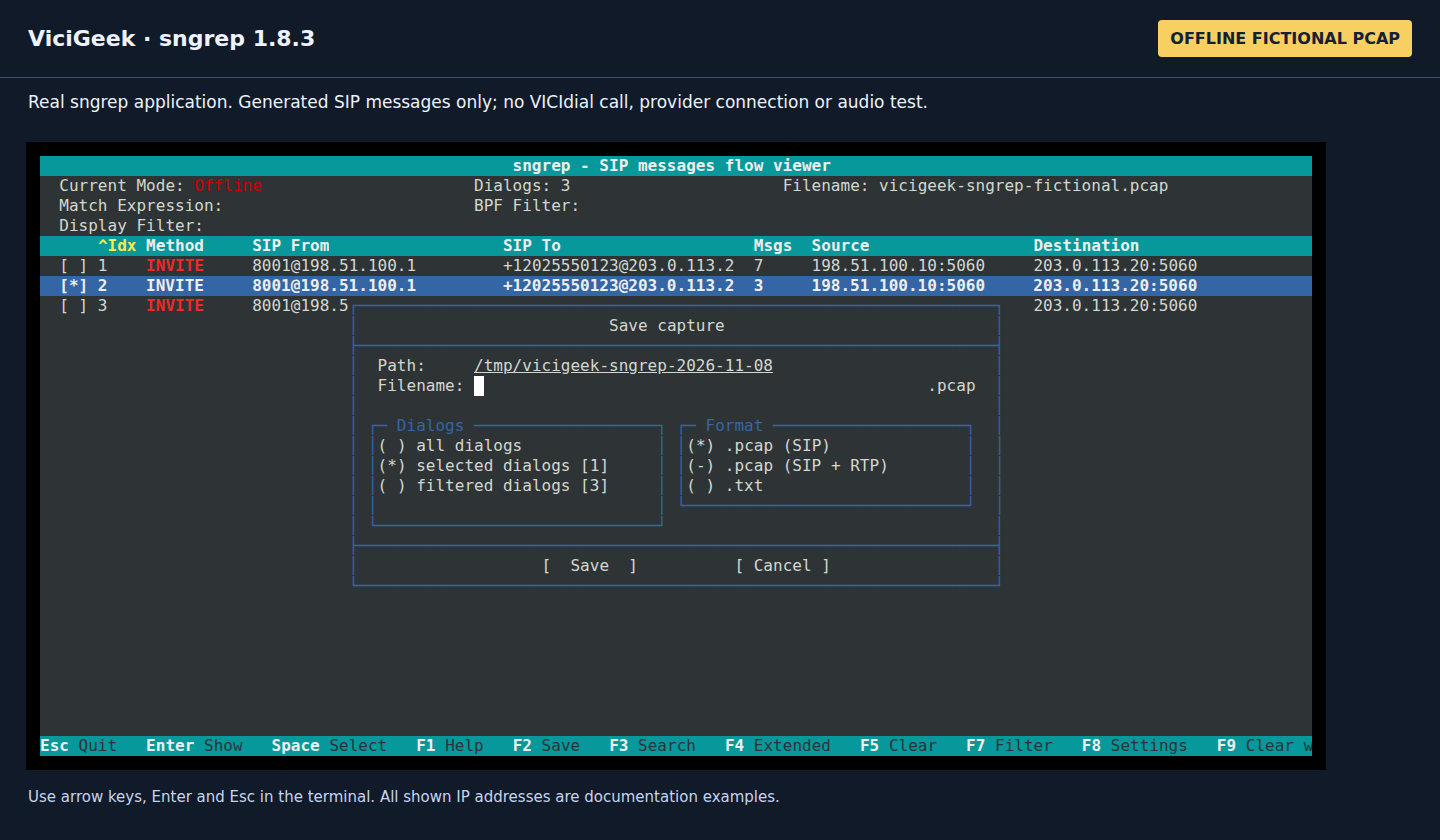
Capture details
This screenshot shows one fictional selection and a local workspace path; do not use that example path as storage for real customer data. Actual sngrep 1.8.3 UI captured November 8, 2026 through a local terminal. Input is a generated fictional PCAP, not a VICIdial or provider call; no real network traffic or audio was captured. Enlarge and use Zoom to read the full headers.You should seeThe exported incident file has the intended selection, private storage and review process; no screenshot alone establishes the contents of a saved file.
12 / 13
10. Know when sngrep cannot answer the question
SIP over TLS and browser WSS are encrypted. Capturing a TCP 5061 or WSS connection does not normally reveal a decoded SIP ladder. Optional TLS/private-key features depend on protocol, key exchange and build; do not assume they decrypt modern TLS or move private keys into a ticket. Use an approved endpoint/PBX logging workflow instead.
RTP is separate from SIP. -r asks sngrep to retain RTP payload, but a SIP-only packet filter still excludes those packets. The practice file has no RTP, and none of the screenshots establishes voice quality, one-way audio, jitter or a decoded recording.
Asterisk is a back-to-back user agent: correlate the relevant dialogs with timestamps, channel/bridge information and the provider’s record. One Call-ID is not a full end-to-end trace of every VICIdial participant.
Sources for this section
- sngrep official project and capabilitiesIrontec · Checked November 8, 2026
- sngrep 1.8.3 command-line manualIrontec · Checked November 8, 2026
- Asterisk: configuring res_pjsip through NATAsterisk · Checked November 8, 2026
- SIP responses, transactions and dialogs: RFC3261IETF · Checked November 8, 2026
13 / 13
Finish with a useful incident note
Record the server/build, time and timezone, chosen interface/peer/port, relevant Call-ID, constructed destination and first failing transaction. State what was observed and what remains untested. Keep phone numbers, raw authentication and full PCAPs out of a public post.
Return with Esc and confirm Quit from the call list when prompted; the example timeout also bounds a live observation. No Asterisk reload or restart is required just to close sngrep. Restore only a separately authorized setting you actually changed—this guide does not change carrier, campaign or transport configuration.
Checks and sources
What was checked
- The application screenshots are genuine sngrep 1.8.3 ncurses screens reading an offline, self-generated 12-packet file with three SIP dialogs. They establish interface navigation only, not a real call outcome.
- No login, package installation, packet capture, configuration change, carrier registration or call was performed on the pinned VICIdial demo for this guide. Copyable installation/live-observation commands are reader-run examples, not captured PBX output.
- The fixture contains a constructed answered-signaling sequence, a 403 rejection and unanswered INVITE retransmissions. It contains no RTP; neither its 200 OK nor its SDP establishes actual two-way audio.
Primary references
Sources
- sngrep official project and capabilitiesIrontec · accessed November 8, 2026
- sngrep 1.8.3 command-line manualIrontec · accessed November 8, 2026
- sngrep binary installation guidanceIrontec · accessed November 8, 2026
- Asterisk: configuring res_pjsip through NATAsterisk · accessed November 8, 2026
- SIP responses, transactions and dialogs: RFC3261IETF · accessed November 8, 2026