ViciBox 12 · Perl HTTPS dependencies
Perl SSL stops loading after the ViciBox 12 package update
Net::SSLeay fails with undefined symbol: MD2, version OPENSSL_3.0.0; vicibox-install may then report that Internet connectivity was not detected.
Source and affected scope
Problems with Perl SSL Module in Vicibox 12.0.2
- The reporter identified perl-Net-SSLeay 1.960.0-lp156.1.1 on ViciBox 12.0.2/Leap 15.6. The exact library/Perl combination matters.
- The isolated lab reproduced the affected signed RPM against its installed Perl/OpenSSL environment. Other releases and platforms are not covered by that result.
Before you start
- SSH access to the affected host; a root shell only for package inventory backups, locks or installation. Start with read-only probes.
- For any installed-package change: a maintenance window, a recorded restorable pre-change machine snapshot and a complete compatible signed recovery RPM. A config copy alone cannot undo a library replacement.
- For HTTPS verification: outbound access to the official VICIdial endpoint with normal CA validation. Do not disable certificate verification.
Diagnose the reported problem
Step 1Record the installed package and library context
Run these read-only commands on the machine reporting the Perl error. Record every release suffix; module version 1.94 alone is insufficient.
An unavailable command or package is a separate stop state. Confirm the host is ViciBox 12/Leap 15.6 before using its package guidance.
- Before you use it
- Run these read-only commands on the machine reporting the Perl error. Record every release suffix; module version 1.94 alone is insufficient.
Record the installed package and library context cat /etc/os-releaseuname -mperl -V:version -V:archnamerpm -q perl-Net-SSLeayopenssl versionenv -u PERL5LIB perl -MNet::SSLeay -e 'print "$INC{q(Net/SSLeay.pm)}\n"'Not executed · deliberately not run on the demoThis sample changes a system, contacts an outside service, needs a live call, or would print real data from a shared server, so it was not run on the demo. Run it only where you are authorized, and compare the result with the success and stop guidance.
- Success looks like
- You have the OS, architecture, Perl ABI, exact Net::SSLeay RPM and OpenSSL version. The working lab uses 1.940.0-lp156.64.4, which differs from the reporter’s 1.940.0-lp156.61.2.
- Stop if
- If this is another OS/ABI or a locally compiled module, stop the RPM repair branch and identify the loaded module path first.
- Expected observation
- You have the OS, architecture, Perl ABI, exact Net::SSLeay RPM and OpenSSL version. The working lab uses 1.940.0-lp156.64.4, which differs from the reporter’s 1.940.0-lp156.61.2.
- If this check fails
- If this is another OS/ABI or a locally compiled module, stop the RPM repair branch and identify the loaded module path first.
Step 2Test the Perl SSL module without invoking the installer
Use a single process with PERL5LIB removed for this probe; this leaves your shell and installed packages unchanged.
Capture exit status and error text. An undefined MD2 symbol at module load matches this report; a DNS, certificate or other error needs a different diagnosis.
- Before you use it
- Use a single process with PERL5LIB removed for this probe; this leaves your shell and installed packages unchanged.
Test the Perl SSL module without invoking the installer env -u PERL5LIB perl -MNet::SSLeay -e 'print "Module=$Net::SSLeay::VERSION\n";print Net::SSLeay::SSLeay_version(0), "\n";my $ctx = Net::SSLeay::CTX_new();die "SSL context allocation failed\n" unless $ctx;Net::SSLeay::CTX_free($ctx);print "SSL context created and released\n";'Not executed · deliberately not run on the demoThis sample changes a system, contacts an outside service, needs a live call, or would print real data from a shared server, so it was not run on the demo. Run it only where you are authorized, and compare the result with the success and stop guidance.
- Success looks like
- A healthy module prints its version/OpenSSL version and successfully creates/releases an SSL context. The affected lab payload failed before completing those checks.
- Stop if
- If the module fails, do not claim the server lacks Internet connectivity and do not launch vicibox-install to retest it.
- Expected observation
- A healthy module prints its version/OpenSSL version and successfully creates/releases an SSL context. The affected lab payload failed before completing those checks.
- If this check fails
- If the module fails, do not claim the server lacks Internet connectivity and do not launch vicibox-install to retest it.
Step 3Save private recovery evidence before a package change
Open a root shell for this step and keep the same shell for the following package steps. Record a verified restorable machine-snapshot identifier in the private file.
Also retain the original and candidate RPMs with verified signatures. Do not start a downgrade when your only recovery material is the installed-file inventory.
- Before you use it
- Open a root shell for this step and keep the same shell for the following package steps. Record a verified restorable machine-snapshot identifier in the private file.
Save private recovery evidence before a package change test "$(id -u)" -eq 0 || { printf 'Open an approved root maintenance shell.\n'; exit 1; }umask 077netssl_repair_dir=$(mktemp -d /root/vicigeek-netssl-repair.XXXXXXXX)rpm -q perl-Net-SSLeay > "$netssl_repair_dir/installed-package.txt"rpm -V perl-Net-SSLeay > "$netssl_repair_dir/rpm-verify-before.txt" 2>&1zypper locks > "$netssl_repair_dir/locks-before.txt"tar -cpf "$netssl_repair_dir/zypp-before.tar" -C / etc/zyppread -r -p 'Verified restorable machine snapshot/image ID: ' netssl_restore_idtest -n "$netssl_restore_id" || exit 1printf '%s\n' "$netssl_restore_id" > "$netssl_repair_dir/recovery-point.txt"printf 'Private record: %s\n' "$netssl_repair_dir"Not executed · deliberately not run on the demoThis sample changes a system, contacts an outside service, needs a live call, or would print real data from a shared server, so it was not run on the demo. Run it only where you are authorized, and compare the result with the success and stop guidance.
- Success looks like
- A private directory records packages, repository/lock configuration, integrity-check output and a specific recovery point.
- Stop if
- If no usable machine recovery point or trusted compatible recovery RPM exists, stop at diagnosis and provide the version/error record to the package maintainer.
- Expected observation
- A private directory records packages, repository/lock configuration, integrity-check output and a specific recovery point.
- If this check fails
- If no usable machine recovery point or trusted compatible recovery RPM exists, stop at diagnosis and provide the version/error record to the package maintainer.
Step 4Read the exact isolated test scope before replaying a probe
The downloadable Perl file is the exact credential-free test used on Solarefer. Save it as tls-head-probe.pl in your private working directory. It connects to 127.0.0.1:443, sends HEAD /vicidial/admin.php and verifies the certificate against dial.solarrefer.com. It does not log in or place a call.
For a different server, review and adapt the SNI, verified hostname and Host header to your own certificate name. Such an edited file is your reader-run test; it does not inherit the captured result below.
The affected-payload captures used a signed RPM extracted privately, never installed. ISOLATED_PERL5LIB identifies that extracted module directory for just one process. Do not set this globally, alter shared module paths or install the affected RPM to reproduce it.
- Expected observation
- You understand the exact host/path/authentication boundary and have the complete probe file, rather than an unexplained command with a missing dependency.
- If this check fails
- If the hostname does not match your certificate, correct the intended identity; do not disable peer or hostname verification.
Step 5Observe the installed working module
This is actual captured output from the pinned demo, with the process context and signed-RPM provenance in the downloadable results.
PERL5LIB was unset for this control. The TLS command uses the exact downloadable script in its working directory. HTTP 401 is the observed unauthenticated response; successful application login is a separate check.
- Before you use it
- Use the explicitly described process context above; this captured example is not a global package installation.
Observe the installed working module perl -e 'use Net::SSLeay; print Net::SSLeay::SSLeay_version(0);'Evidence · Solarefer ViciBox12: signed affected-RPM payload isolated by PERL5LIB; installed working control retained. DynaLoader NUL removed only; text/output unchanged.Captured demo response · 2026-11-06T23:21:55.513516+00:00. Any filtering, hidden values or test-only data are identified in the capture label. Select Replay transcript to read the recorded output.
Command output line: perl -e 'use Net::SSLeay; print Net::SSLeay::SSLeay_version(0);'OpenSSL 3.1.4 24 Oct 2023- Success looks like
- Compare the actual exit status and output with the precise module/TLS boundary shown.
- Stop if
- Stop on an unexpected module path, failed certificate validation or an unexplained package-version change.
- Expected observation
- The observed control exits 0; the TLS control reports TLSv1_3, verified certificate/hostname and HTTP 401.
- If this check fails
- Preserve the actual error and installed versions. A mismatch is a new observation; do not overwrite it with the example output.
Step 6Observe the exact reported loader failure in isolation
This is actual captured output from the pinned demo, with the process context and signed-RPM provenance in the downloadable results.
The shell variable ISOLATED_PERL5LIB was set to the privately extracted1.960.0-lp156.1.1 module path. This command selects it only for this process; the installed working1.94 remained unchanged.
- Before you use it
- Use the explicitly described process context above; this captured example is not a global package installation.
Observe the exact reported loader failure in isolation PERL5LIB="$ISOLATED_PERL5LIB" perl -e 'use Net::SSLeay; print Net::SSLeay::SSLeay_version(0);'Evidence · Solarefer ViciBox12: signed affected-RPM payload isolated by PERL5LIB; installed working control retained. DynaLoader NUL removed only; text/output unchanged.Captured demo response · 2026-11-06T23:21:55.650982+00:00. Any filtering, hidden values or test-only data are identified in the capture label. Select Replay transcript to read the recorded output.
Command output line: PERL5LIB="$ISOLATED_PERL5LIB" perl -e 'use Net::SSLeay; print Net::SSLeay::SSLeay_version(0);'Can't load '/tmp/vicigeek-net-ssleay-20261106.eSj2Jc/extracted-affected/usr/lib/perl5/vendor_perl/5.26.1/x86_64-linux-thread-multi/auto/Net/SSLeay/SSLeay.so' for module Net::SSLeay: /tmp/vicigeek-net-ssleay-20261106.eSj2Jc/extracted-affected/usr/lib/perl5/vendor_perl/5.26.1/x86_64-linux-thread-multi/auto/Net/SSLeay/SSLeay.so: undefined symbol: MD2, version OPENSSL_3.0.0 at /usr/lib/perl5/5.26.1/x86_64-linux-thread-multi/DynaLoader.pm line 193.at -e line 1.Compilation failed in require at -e line 1.BEGIN failed--compilation aborted at -e line 1.- Success looks like
- Compare the actual exit status and output with the precise module/TLS boundary shown.
- Stop if
- Stop on an unexpected module path, failed certificate validation or an unexplained package-version change.
- Expected observation
- The affected isolated module fails before a connection, while the installed module loads and its complete TLS control verifies the certificate and receives HTTP 401.
- If this check fails
- Preserve the actual error and installed versions. A mismatch is a new observation; do not overwrite it with the example output.
Step 7Verify the working module reaches the authenticated HTTPS boundary
This is actual captured output from the pinned demo, with the process context and signed-RPM provenance in the downloadable results.
PERL5LIB was unset for this control. The TLS command uses the exact downloadable script in its working directory. HTTP 401 is the observed unauthenticated response; successful application login is a separate check.
- Before you use it
- Use the explicitly described process context above; this captured example is not a global package installation.
Verify the working module reaches the authenticated HTTPS boundary perl ./tls-head-probe.plEvidence · Solarefer ViciBox12: signed affected-RPM payload isolated by PERL5LIB; installed working control retained. DynaLoader NUL removed only; text/output unchanged.Captured demo response · 2026-11-06T23:21:55.767279+00:00. Any filtering, hidden values or test-only data are identified in the capture label. Select Replay transcript to read the recorded output.
Command output line: perl ./tls-head-probe.plTLS_PROTOCOL=TLSv1_3CERTIFICATE_AND_HOSTNAME=verifiedHTTP_STATUS=401- Success looks like
- Compare the actual exit status and output with the precise module/TLS boundary shown.
- Stop if
- Stop on an unexpected module path, failed certificate validation or an unexplained package-version change.
- Expected observation
- The observed control exits 0; the TLS control reports TLSv1_3, verified certificate/hostname and HTTP 401.
- If this check fails
- Preserve the actual error and installed versions. A mismatch is a new observation; do not overwrite it with the example output.
Correct the confirmed cause
Use this branch only when your diagnostic observations match the affected scope above. The lab result states which outcomes were actually tested.
Step 8If the installed module works, contain the reported update regression
This is the forum’s lock-before-update workaround. Use it only after the module probe passes and the proposed transaction contains the affected replacement.
Record whether an equivalent lock already exists. Add only this package lock; then review your intended update transaction again. The lock does not fix other outdated software.
Treat this as temporary containment. The lock also blocks future security fixes for Net::SSLeay. Record the current working release, the incident owner and a review date.
When a trusted replacement fixes the regression, test that signed replacement in isolation, review its targeted transaction, then remove only the lock created for this incident and repeat the module/TLS probes. Preserve any pre-existing broader lock.
- Before you use it
- This is the forum’s lock-before-update workaround. Use it only after the module probe passes and the proposed transaction contains the affected replacement.
If the installed module works, contain the reported update regression zypper lockszypper addlock perl-Net-SSLeayzypper locksNot executed · deliberately not run on the demoThis sample changes a system, contacts an outside service, needs a live call, or would print real data from a shared server, so it was not run on the demo. Run it only where you are authorized, and compare the result with the success and stop guidance.
- Success looks like
- The package remains at the verified working release; the lock is visible in zypper locks.
- Stop if
- If the probe already fails, a lock merely preserves the failing package. Use the recovery-RPM branch instead. If an existing lock is broader, do not remove it.
- Expected observation
- The package remains at the verified working release; the lock is visible in zypper locks.
- If this check fails
- If the probe already fails, a lock merely preserves the failing package. Use the recovery-RPM branch instead. If an existing lock is broader, do not remove it.
Step 9If already broken, verify a compatible signed recovery package
Obtain the exact compatible known-working RPM from your preserved package cache or a trusted official repository/archive. The forum does not supply a recovery-download URL; do not substitute an RPM from another OS or ABI.
Enter its local absolute path. Confirm the expected package name, architecture, release and trusted signature. Copy the verified file into the private record.
If this package is locked, identify that specific lock and remove it only for the approved targeted change; retain all other locks.
- Before you use it
- Obtain the exact compatible known-working RPM from your preserved package cache or a trusted official repository/archive. The forum does not supply a recovery-download URL; do not substitute an RPM from another OS or ABI.
If already broken, verify a compatible signed recovery package read -r -p 'Absolute path to verified compatible working RPM: ' netssl_recovery_rpmtest -f "$netssl_recovery_rpm" || exit 1rpm -qp --qf '%{NAME} %{VERSION}-%{RELEASE} %{ARCH}\n' "$netssl_recovery_rpm"rpm --checksig "$netssl_recovery_rpm" || exit 1printf 'Review the identity and signature above before proceeding.\n'cp -p -- "$netssl_recovery_rpm" "$netssl_repair_dir/"sha256sum -- "$netssl_recovery_rpm" > "$netssl_repair_dir/recovery-rpm.sha256"Not executed · deliberately not run on the demoThis sample changes a system, contacts an outside service, needs a live call, or would print real data from a shared server, so it was not run on the demo. Run it only where you are authorized, and compare the result with the success and stop guidance.
- Success looks like
- The RPM is the intended perl-Net-SSLeay release for this OS/Perl ABI, and rpm --checksig reports valid signatures under an already trusted key.
- Stop if
- NOKEY, a bad signature, an incompatible architecture or an unverified package source is a stop. Do not import an arbitrary key merely to make the check pass.
- Expected observation
- The RPM is the intended perl-Net-SSLeay release for this OS/Perl ABI, and rpm --checksig reports valid signatures under an already trusted key.
- If this check fails
- NOKEY, a bad signature, an incompatible architecture or an unverified package source is a stop. Do not import an arbitrary key merely to make the check pass.
Step 10Preview the targeted repair before approving installation
Run the preview after validating the package and recovery point. Save its complete proposal.
Continue only when the plan is confined to the intended compatible package and understood dependencies. Stop if it proposes removing VICIdial components or changing Perl/OpenSSL families.
- Before you use it
- Run the preview after validating the package and recovery point. Save its complete proposal.
Preview the targeted repair before approving installation zypper install --dry-run --oldpackage "$netssl_recovery_rpm"Not executed · deliberately not run on the demoThis sample changes a system, contacts an outside service, needs a live call, or would print real data from a shared server, so it was not run on the demo. Run it only where you are authorized, and compare the result with the success and stop guidance.
- Success looks like
- The dry run proposes the selected known-working package without unrelated removals or an ABI transition.
- Stop if
- If dependency resolution is unclear or the only available package is unsuitable, stop. Never use --nodeps or force an RPM over incompatible libraries.
- Expected observation
- The dry run proposes the selected known-working package without unrelated removals or an ABI transition.
- If this check fails
- If dependency resolution is unclear or the only available package is unsuitable, stop. Never use --nodeps or force an RPM over incompatible libraries.
Step 11Install only the reviewed repair, then repeat both probes
This changes the installed host. Execute only in the approved maintenance window after the preview and recovery checks.
After installation, run the module/context probe again, then the HTTPS request below. Do not rerun the ViciBox installer on a configured system.
If a lock was deliberately removed for this package, re-establish it only while the failing update remains unresolved; record the lock for later review.
- Before you use it
- This changes the installed host. Execute only in the approved maintenance window after the preview and recovery checks.
Install only the reviewed repair, then repeat both probes zypper install --oldpackage "$netssl_recovery_rpm" || exit 1rpm -q perl-Net-SSLeayenv -u PERL5LIB perl -MNet::SSLeay -e 'print "Module=$Net::SSLeay::VERSION\n";print Net::SSLeay::SSLeay_version(0), "\n";my $ctx = Net::SSLeay::CTX_new();die "SSL context allocation failed\n" unless $ctx;Net::SSLeay::CTX_free($ctx);print "SSL context created and released\n";' env -u PERL5LIB perl -MLWP::Simple -MSocket=AF_INET,AF_INET6,inet_pton -e 'my $body = get("https://www.vicidial.org/yourip.php");die "HTTPS request failed\n" unless defined $body;$body =~ s/^\s+|\s+$//g;die "Unexpected endpoint response\n" unless inet_pton(AF_INET,$body) || inet_pton(AF_INET6,$body);print "Valid IP response over HTTPS; address omitted\n";'Not executed · deliberately not run on the demoThis sample changes a system, contacts an outside service, needs a live call, or would print real data from a shared server, so it was not run on the demo. Run it only where you are authorized, and compare the result with the success and stop guidance.
- Success looks like
- The intended RPM is installed; module/context checks pass and the HTTPS endpoint returns a valid IP response without printing that address.
- Stop if
- If module loading still fails, preserve the error and package transaction. Restore the recorded pre-change machine state if required; do not stack unreviewed package changes.
- Expected observation
- The intended RPM is installed; module/context checks pass and the HTTPS endpoint returns a valid IP response without printing that address.
- If this check fails
- If module loading still fails, preserve the error and package transaction. Restore the recorded pre-change machine state if required; do not stack unreviewed package changes.
Verify the outcome
- Record the installed RPM and module/OpenSSL versions before and after; a module version alone does not identify the package release.
- The module/context probe must pass. For the installer’s connectivity dependency, separately verify a CA-validated HTTPS response; a module-load success alone does not prove network access.
- For the isolated lab result, compare the installed package hashes/integrity record before and after. Leaving the process-only test environment restores use of the untouched installed module; that is not an installed-package rollback.
- A running production installer, saved configuration or completed installation is outside the captured result.
Recover or roll back
- For a process-only PERL5LIB test, stop that test process and run the control command without its override. Do not edit global Perl search paths.
- For an added package lock, use zypper locks to identify the specific lock you created; zypper removelock perl-Net-SSLeay is appropriate only when that exact package lock was absent before and is the one this procedure added. Retain unrelated pre-existing locks.
- A failed installed-package transaction requires the recorded machine recovery point or a separately reviewed reverse transaction using retained signed RPMs. Restoring /etc/zypp alone does not restore package binaries.
- Keep private error/transaction evidence. Do not reinstall the known-failing RPM merely to show that rollback was attempted.
- Review and remove a temporary incident lock after a trusted fixed replacement passes the same module and strict-TLS checks; do not leave a security-sensitive package frozen indefinitely.
Screenshot evidence
Actual isolated failure
Open to enlarge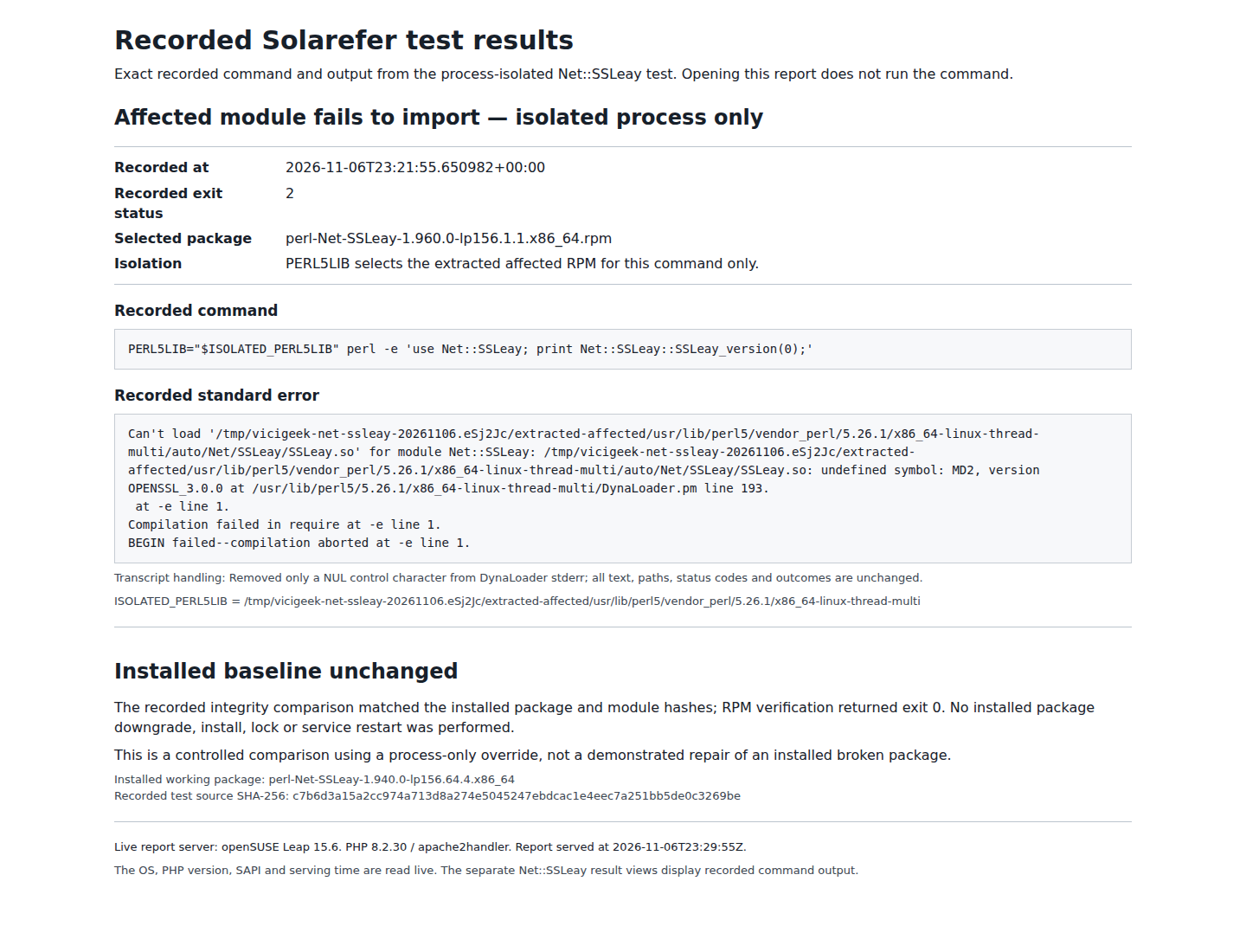
Capture details
The signed affected RPM was extracted and selected only for one process; this is not a native VICIdial application screen. This November 6 test predates the separate PHP maintenance; any PHP 8.2.30 context shown is historical.Working installed control
Open to enlarge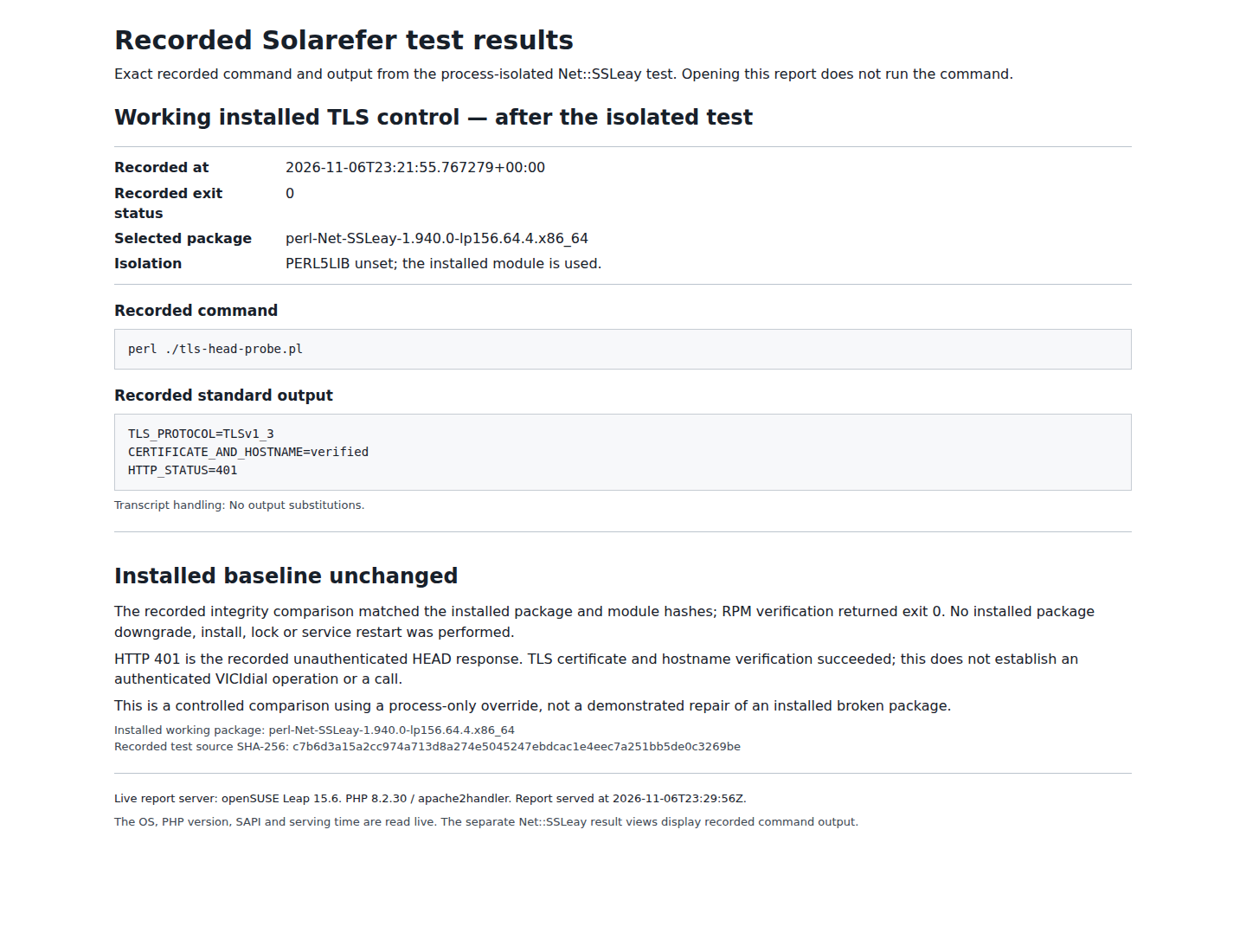
Capture details
Both controls pass, and package integrity remains unchanged. The screenshot displays exact recorded output. This November 6 test predates the separate PHP maintenance; any PHP 8.2.30 context shown is historical.- Reporter identifies the working/failing packages · VICIdial Group forum; checked November 6, 2026
- Maintainer acknowledgement · VICIdial Group forum; checked November 6, 2026
- Official affected-package directory · openSUSE Build Service; checked November 6, 2026
- Zypper15.6 command reference · openSUSE; checked November 6, 2026
Actions to avoid
Do not rerun vicibox-install on a configured server, compile over the packaged module, or assume a package lock repairs an already broken installation.